
PowerPoint Presentation Examples: Thesis, Meeting, and Lesson Outlines
A useful presentation example shows more than a pretty template: it shows the slide order, the time per slide, and what the speaker says on each one.

What a good PowerPoint presentation example shows
A good PowerPoint presentation example shows three things at once: a slide order that follows the purpose of the event, a time budget per slide that adds up to the slot you have, and speaker notes that say what to explain on each slide. Design is the last layer. Two decks built on the same template can land very differently when their order and content differ.
This article walks through three real examples built with the Soluslide outline builder on 19 November 2026: a 10-minute thesis defense, a 10-minute team meeting, and a 15-minute science lesson. Each one is shown as an unedited screenshot and then taken apart: why the first slide looks the way it does, which slides get the most time, and how it ends.
You will notice square brackets such as [your figure] in the screenshots. Those mark places for your own data, such as research results or support metrics. No example, from a template site or from AI, knows your numbers. Decks often fail exactly where those gaps are filled with generic sentences instead of evidence. Once you have read the three examples, you will have a pattern you can reuse for a work presentation, a group presentation, or anything in between.
Example 1: a 10-minute thesis defense
The first example is a thesis defense on how social media influences university students' purchase intention. We entered this topic, event type, and length into the outline builder:
Topic: Thesis defense on how social media influences university students' purchase intention
Event: Thesis defense
Length: 10 minutes
The result has eight slides: Social Media Influence on Student Purchase Intent (2 min), Problem Formulation (1 min), Research Objectives (1 min), Methodology Overview (2 min), Key Findings (1 min), Discussion of Findings (1 min), Conclusions and Recommendations (1 min), and Examiner Questions and Closing (1 min). That adds up to exactly 10 minutes.
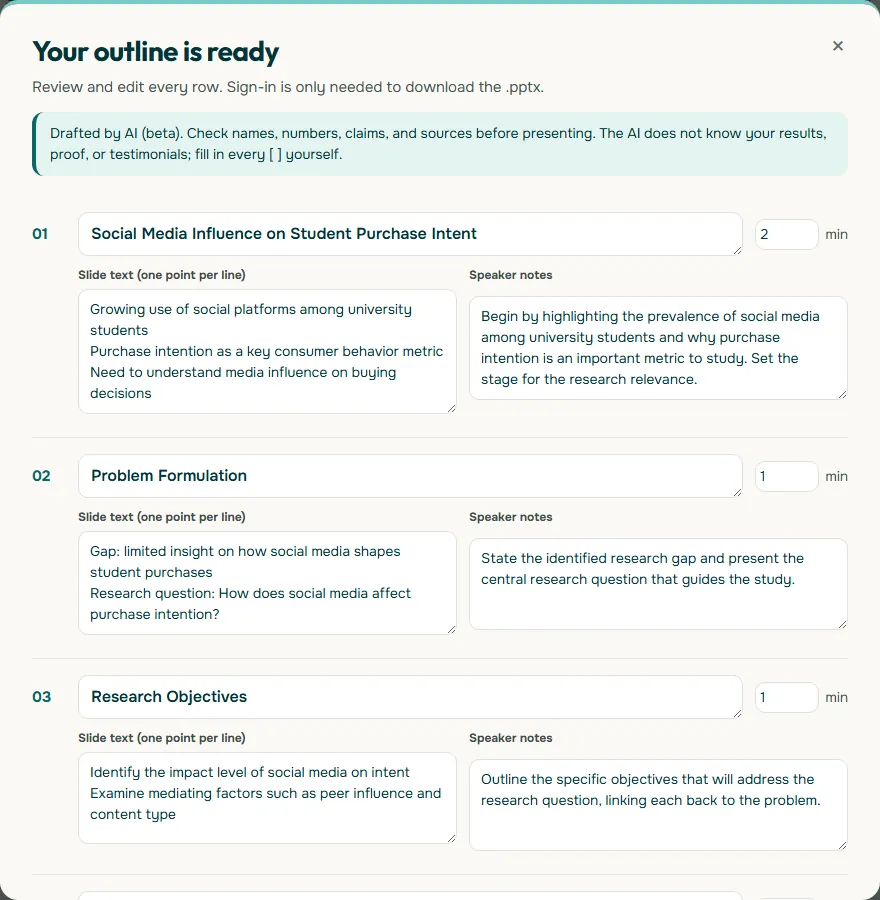
Look at the Key Findings slide in the full outline: it reads Main result: [your primary effect size or direction]. The examiners will ask about your actual result, so this slide must carry your number from the results chapter, not a summary of the literature. The same goes for the sample size and the institution in the methodology slide. For a complete walkthrough of defense slides, see thesis defense presentation, or start from the thesis defense template.
Why the thesis defense example is ordered this way
The eight slides follow the logic of a research report: problem, objectives, method, findings, meaning, conclusion. Examiners have usually read the thesis already, so the slides do not need to repeat every chapter. Their job is to show the through line in ten minutes.
The time budget is worth copying. The opening and the methodology slides get 2 minutes each, more than any other slide. The opening has to establish why the question matters, and the methodology is where examiners probe hardest: is the design right, is the sample adequate, does the analysis answer the question? The findings slide gets only 1 minute because what matters is one or two headline results, not every table of statistical output.
- Skip the agenda slide. In ten minutes, an agenda costs time you need for the method.
- One slide, one question. If a slide tries to answer two things, split it or cut it.
- Keep backup slides. Put full test tables after the closing slide and open them only if asked.
If your defense slot is 15 or 20 minutes, resist adding slides first. Give the methodology and discussion more time, because that is where the deepest questions come. A practical rule for pacing is covered in how many slides per minute.
Example 2: a 10-minute team meeting
The second example is a quarterly team meeting reviewing Q3 customer support performance, built as a meeting with a 10-minute length. It produced six slides: Purpose and Decision Needed: Q3 Support Review (2 min), Current Status and Data (2 min), Key Issues Identified (2 min), Options and Recommendation (2 min), Owners and Deadlines (1 min), and Follow-up and Next Steps (1 min).
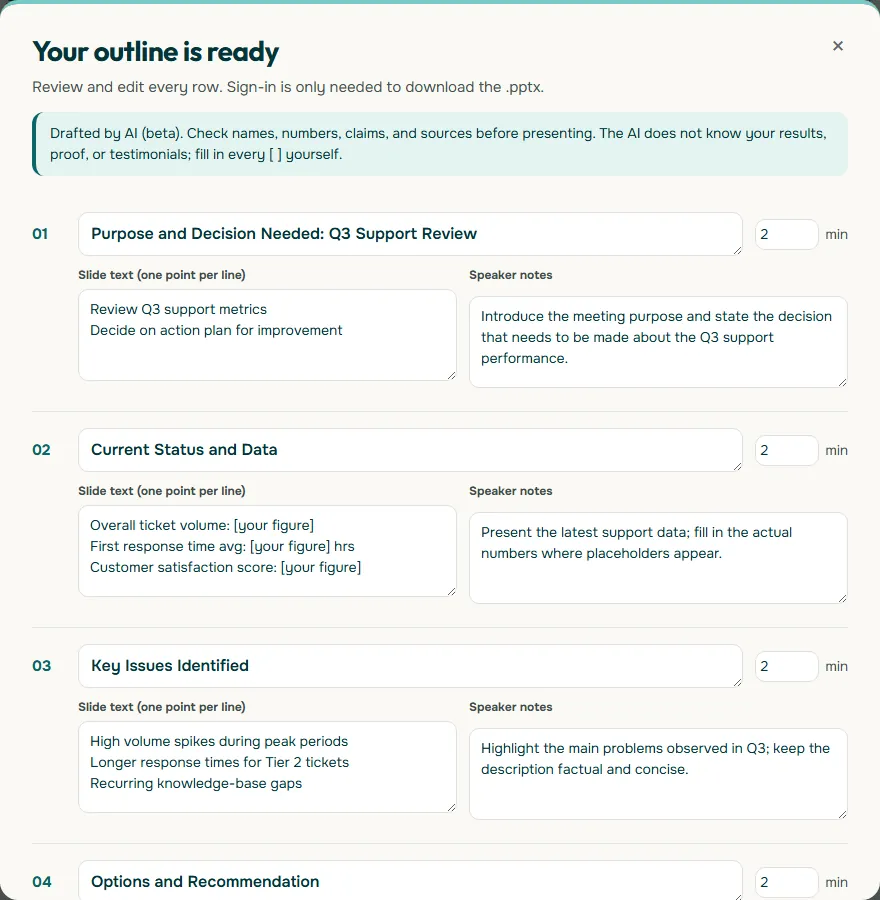
The difference from the thesis shows on slide one. A meeting does not open with background; it opens with the decision the room has to make. A manager wants to know from the first minute what will be asked of them. Slide two goes straight to the numbers, with placeholders for ticket volume, average first response time in hours, and the customer satisfaction score, all to be filled from your support dashboard.
The first four slides get 2 minutes each and the last two get 1 minute each. That is sensible: status, issues, and options need explanation, while owners and next steps only need to be stated clearly. For more on decision-focused decks, read business presentation and meeting presentation.
What makes a meeting deck work
A good meeting deck ends with a decision and named owners, not with applause. This example has two slides for exactly that: Owners and Deadlines, and Follow-up and Next Steps. Without them, meetings often close with "we will follow up" and nobody knows who or when.
The Options and Recommendation slide is also worth copying. It lists Option A (increase staffing during peaks), Option B (implement triage automation), and then your recommendation. This format makes the choice easy because the comparison is already on screen. When you present a single proposal, people tend to hunt for its weaknesses. When you present two or three options with a recommendation, the conversation moves to which option is best.
Keep the data visuals plain. The UK government Analysis Function guidance on charts advises avoiding shaded backgrounds, unnecessary borders, patterns, shadows, and 3D shapes. A two-colour bar chart without effects reads faster than a busy 3D chart. Practical steps are in how to make a graph in PowerPoint, and slide arrangements are in PowerPoint layout.
Example 3: a 15-minute lesson
The third example is a grade 7 science lesson on the water cycle, built as a teaching session with a 15-minute length. The outline has seven slides: Learning Objectives for the Water Cycle (2 min), Trigger Question to Spark Curiosity (2 min), Evaporation and Condensation Explained (3 min), Precipitation and Collection Overview (3 min), Student Activity: Build a Mini Water Cycle (2 min), Quick Quiz: Check Understanding (2 min), and Reflection and Recap of Key Ideas (1 min).
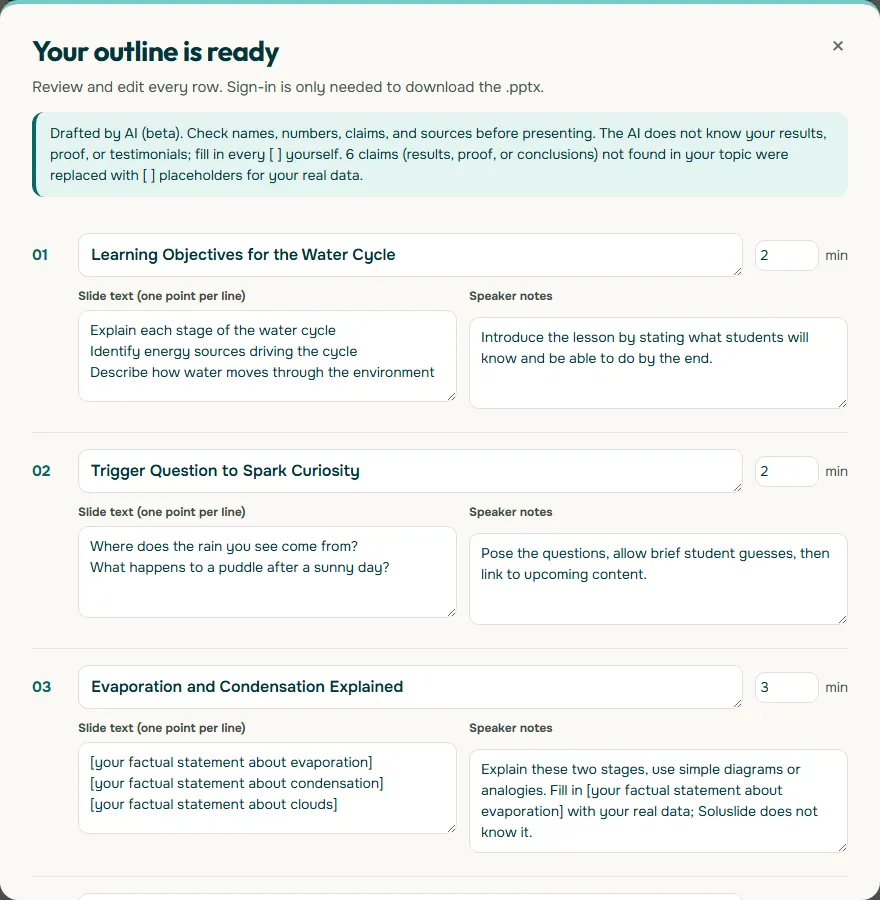
This structure is different again. A lesson does not end with a decision; it ends with evidence that students understood, which is why it has both a quick quiz and a recap. The trigger question near the start is typical of teaching: asking "what happens to a puddle after a sunny day?" gets students thinking before the teacher explains.
Notice the placeholders on the content slides, such as [your factual statement about evaporation]. The builder leaves science facts for the teacher to supply from the curriculum text, which is safer than trusting generated definitions. The activity slide, by contrast, is concrete: a clear cup, warm water, plastic wrap, and a lamp. More templates for teachers are in teaching presentation template.
The pattern behind all three examples
Line the three examples up and a reusable pattern appears. The table and diagram below take their numbers straight from the screenshots above.
Scroll the table sideways to see every column.
| Example | Length | Slides | Opens with | Closes with |
|---|---|---|---|---|
| Thesis defense | 10 minutes | 8 | Why the research question matters | Examiner questions and closing |
| Team meeting | 10 minutes | 6 | The decision needed | Follow-up and next steps |
| Lesson | 15 minutes | 7 | Learning objectives | Reflection and recap |
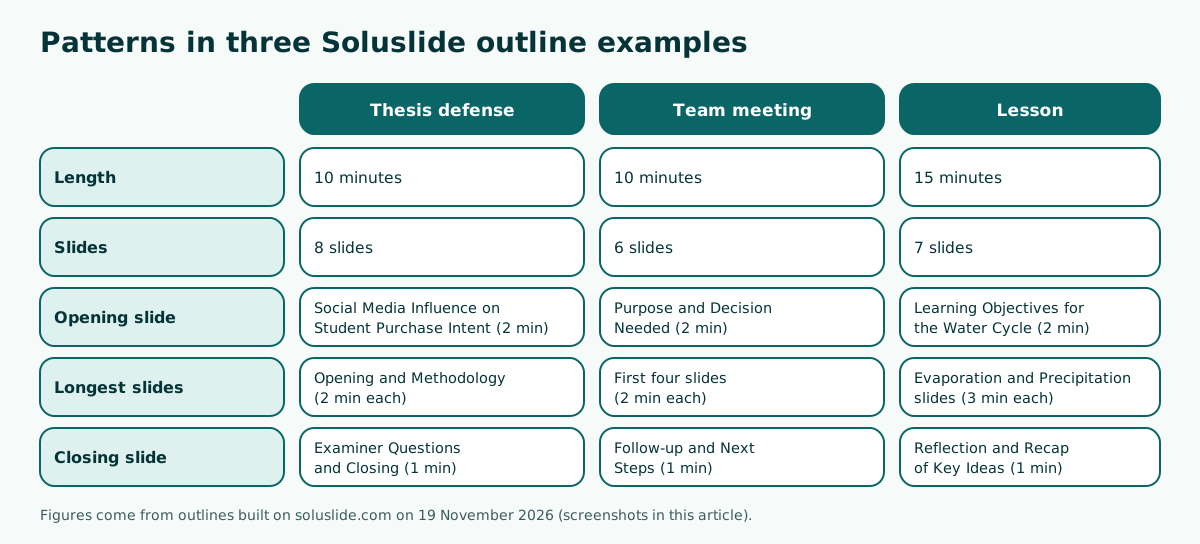
The pattern is simple. First, the opening slide answers the audience's first question: examiners want the problem, managers want the decision, students need the goal. Second, the most time goes to the part that gets challenged most. Third, the closing slide always asks for something: questions, a decision, or an answer from students. For more on order, see presentation structure, and for endings, how to end a presentation.
How to adapt an example to your own talk
An example only helps once it fits your situation. Use these steps so the borrowed structure does not feel foreign in front of your audience.
- Write your goal in one sentence. For instance, "the examiners accept my method" or "my manager approves option B". Cut any slide that does not serve it.
- Work out your real speaking time. Subtract the chair's introduction and technical set-up from the official slot. A 10-minute defense often leaves 8 or 9 minutes of talking.
- Replace every placeholder with real data. Numbers, names, quotes, and results must come from your own documents.
- Turn slide titles into messages. "Key Findings" becomes "Instagram had the strongest effect on purchase intent", if that is what you actually found.
- Write speaker notes. One to three sentences per slide is enough to keep you on track when nervous.
- Rehearse with a timer. If you run over, cut content rather than speaking faster.
Step four has the biggest effect. Message titles let the audience get the point even at a glance. If you are building from an existing document such as a thesis chapter or a quarterly report, start with presentation from a document.
Design comes after the content
Once order, timing, and content are settled, move on to design. This order of work matters: a template chosen too early tends to force your content into its boxes rather than the other way round.
- Text contrast. WCAG 2.2 success criterion 1.4.3 sets a minimum contrast ratio of 4.5:1 for normal text and 3:1 for large text. Light grey text on white often fails on a meeting-room projector.
- One idea per slide. The lesson example splits the water cycle stages across two slides instead of cramming them into one.
- Charts without effects. Avoid 3D shapes and shadows, as the Analysis Function guidance recommends.
- Consistent type sizes. Use two sizes, one for titles and one for body text, so the deck feels like one family.
To choose safe colours and type, see PowerPoint color palette and best fonts for presentations. If you want a particular look, there are ideas in aesthetic presentation and PowerPoint themes. One rule holds across every style: the look can change, but contrast and readability cannot be sacrificed.
Using speaker notes when you present
All three examples include speaker notes for every slide. Those notes stay off the audience's screen when you use presenter view. In Google Slides, according to Google Docs Editors Help, you open the arrow next to Slideshow, choose Presenter view, and then click Speaker notes to see them while you present.
Treat the notes as prompts, not a script to read word for word. The meeting example's first note, "Introduce the meeting purpose and state the decision that needs to be made about the Q3 support performance", is enough to remind you what to say without pulling your eyes to the screen. Add one or two key figures to the notes if you are worried about misquoting a number under pressure.
Rehearse aloud at least twice while looking at presenter view. The first run checks the flow; the second checks the time. More on notes and delivery habits is in speaker notes in PowerPoint and how to give a good presentation.
Build your own version of these examples
The quickest way to use this article is to type your own topic and event, then compare the result with the three examples above. In the Soluslide outline builder you can enter a topic, pick an event type (thesis defense, proposal seminar, meeting, small-business pitch, or teaching), set a length, and edit each slide's title, text, notes, and minutes before signing in. Signing in is only needed to download an editable .pptx file for PowerPoint.
Whatever tool you use, keep the three questions from these examples in mind: what does the audience want to know in the first minute, which part will be challenged most, and what are you asking for on the last slide? Answer those, and the example you borrowed becomes a presentation that is genuinely yours. For building the file from scratch, see how to make a PowerPoint presentation.
Frequently asked questions
What is a good example of a PowerPoint presentation?
A good example shows a slide order that follows the purpose of the event, minutes per slide, and speaker notes. The 10-minute thesis defense in this article, with eight slides from the research question to examiner questions, is one such example.
How many slides should a 10-minute presentation have?
In the examples here, a 10-minute thesis defense uses 8 slides and a 10-minute team meeting uses 6. The right number follows the content and the time budget rather than a fixed rule.
What goes on the first slide of a thesis defense?
A short statement of why the research question matters, supported by evidence from your introduction chapter, followed by the problem formulation on the next slide.
How should a meeting presentation be structured?
Start with the decision needed, then current status and data, key issues, options with a recommendation, owners and deadlines, and finally next steps.
How is a lesson presentation different from a regular presentation?
A lesson opens with learning objectives and a trigger question and ends with a check for understanding, such as a quick quiz and a recap, rather than a decision.
Can I copy someone else's presentation example?
You can reuse the structure and timing, but the content, data, and slide titles should be your own. Results and figures must come from your own documents.
What text contrast is safe for slides?
WCAG 2.2 success criterion 1.4.3 sets a minimum contrast ratio of 4.5:1 for normal text and 3:1 for large text.
How do I see speaker notes while presenting in Google Slides?
Open the arrow next to Slideshow, choose Presenter view, and click Speaker notes. The notes appear on your screen but not on the audience's.
Sources
Factual claims in this article refer to the sources below. Sample outlines and prompts are illustrations to adapt.
Related reading
Try shaping your own outline. You can review and edit it before signing in.
Build a free outline