
Thesis Defense Presentation: A Structure Built for Your Examiners
Your committee has already read the thesis. The presentation is your chance to show them, in a few focused minutes, that you understand what you did, why it matters, and where it stops.
What a thesis defense presentation must do
A strong thesis defense presentation does four jobs in a short time: it states the research question, shows how you answered it, presents what you found, and makes a clear case for your contribution, while being honest about the limits. Everything else is optional. If a slide does not serve one of those jobs, it is a candidate for the appendix.
The core structure most committees can follow without effort looks like this:
- Title and one-sentence claim: what you studied and what you concluded.
- Problem and gap: why the question matters and what was missing before your work.
- Research question or hypotheses: stated exactly as in the thesis.
- Method: design, data, and the key decisions you made.
- Findings: the results that answer the question, shown visually.
- Contribution: what is new because of your work.
- Limitations and future work: where the conclusions stop.
- Closing: the claim restated, then questions.
The rest of this guide explains how long each part should take, how to word the slides, and how to prepare for the part many candidates find hardest: the questions that follow. If you want the shorter version focused on slide design, see the overview on our thesis defense presentation page.
Start with your program's rules and time limit
Before you open a slide editor, find out three things from your department or supervisor: how long your presentation may run, how long the whole session lasts, and who will be in the room. These numbers vary a lot between institutions and degree levels, so do not rely on a friend's experience at another school.
Two real examples show the range. A faculty member at the University of Guelph advises students in his department to plan a presentation of about 20 to 25 minutes, with 30 minutes as the maximum. At Princeton's Woodrow Wilson School, an undergraduate correspondent described a 20-minute defense session: ten minutes of his own presentation and ten minutes of questions from his two readers. Some Indonesian programs set a ten-minute limit for the presentation part of an online thesis exam. Same word, "defense", very different time budgets.
Your audience has already read the thesis
The same Guelph guidance makes a point that changes how you should build the deck: the presentation is primarily for the examination committee, and the committee will all have read your thesis. They do not need or want an exhaustive description. That means you can skip the long literature tour and the chapter-by-chapter summary. Your job is to make the argument visible, not to retell the document.
Plan for being cut off
Some examination chairs will stop a candidate who runs over. Build the talk so that the last minutes are expendable, and mark two or three slides you can skip if time gets tight. A defense that ends on time with the contribution clearly stated is far better than one that rushes the findings because the background ran long.
A slide structure and timing plan that follows the examiner's logic
Examiners read a thesis with a set of questions in mind: Is the problem real? Is the method appropriate? Do the results support the conclusions? Is there an original contribution? Your slide order should answer those questions in the same sequence, so nobody has to reconstruct your logic from memory.
The plan below assumes a 20-minute presentation. Treat it as a starting proportion, then scale it to your own limit. For a ten-minute slot, halve the slide counts and merge the problem and gap into one slide.
Scroll the table sideways to see every column.
| Part | Slides | Minutes | What the examiner should take away |
|---|---|---|---|
| Title and core claim | 1 | 1 | The topic and your answer in one sentence |
| Problem and research gap | 2 | 2 | Why this question was worth asking |
| Research questions or hypotheses | 1 | 1 | Exactly what the thesis set out to answer |
| Method and data | 2 to 3 | 4 | The design is suitable and the key choices are justified |
| Findings | 3 to 4 | 7 | The results that answer each question |
| Contribution | 1 | 2 | What is new because of this work |
| Limitations and future work | 1 | 2 | You know where your conclusions stop |
| Closing | 1 | 1 | The core claim restated, ready for questions |
| Backup slides (appendix) | 3 to 8 | 0 | Detail you show only when asked |
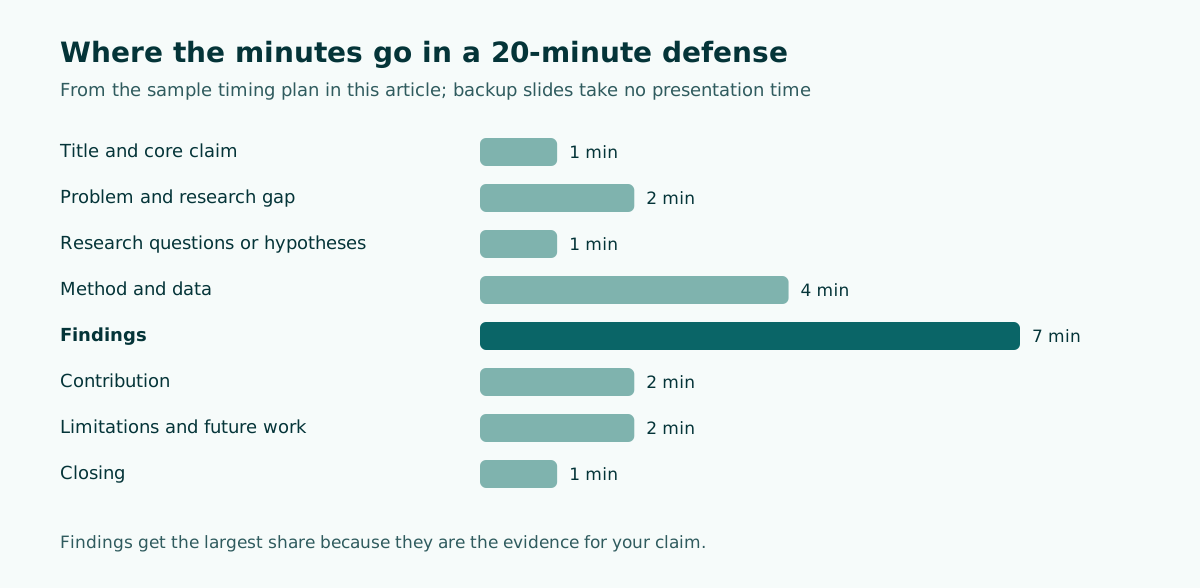
Notice where the minutes go. Findings receive the largest share because they are the evidence for your claim. Background receives very little because the committee has read it. Method gets enough time to show that your choices were deliberate, which is where many follow-up questions come from.
Practical slide rules for a committee
- Turn on slide numbers. The Guelph guidance recommends this because examiners can jot them down and later say "please go back to slide 23". In PowerPoint you can type the slide number and press Enter to jump straight to it.
- Define every acronym the first time it appears on a slide. An external examiner may not share your field's shorthand.
- One message per slide. Put that message in the slide title as a full sentence, and let the chart or table below prove it.
- Keep text readable from the back of the room. Our guide on readable presentation contrast covers font size and color choices for projected slides.
Worked example: a 20-minute defense outline
Here is a complete outline for a hypothetical master's thesis on whether weekly low-stakes quizzes improve exam scores in an introductory statistics course. Each line is a slide title written as a statement, followed by its time and the speaker's purpose.
1. Weekly low-stakes quizzes raised final exam scores in intro statistics (1 min)
   Purpose: state the claim before anything else.
2. Students forget early material before the final exam (1 min)
   Purpose: the practical problem.
3. Few studies test quizzing in large first-year statistics courses (1 min)
   Purpose: the gap this thesis fills.
4. Two research questions (1 min)
   RQ1: Do weekly quizzes change final exam scores?
   RQ2: Does the effect differ for students with low prior grades?
5. Quasi-experimental design across four course sections (2 min)
6. Data: exam scores, quiz logs, prior grades; analysis plan (2 min)
7. Quiz sections scored higher on the final exam (2 min)
8. The gain held after controlling for prior grades (2 min)
9. Students with low prior grades gained the most (2 min)
10. Quiz completion predicted the size of the gain (1 min)
11. Contribution: evidence from a large, mandatory course context (2 min)
12. Limits: no random assignment, one semester, one institution (2 min)
13. Quizzing is a low-cost lever; the next step is a randomized trial (1 min)

Appendix: A1 full regression table, A2 quiz sample items,
A3 attrition by section, A4 alternative model specifications
Rewriting topic titles into claim titles
The single change that most improves a defense deck is replacing topic labels with sentences that state the point. Compare:
- Topic title: "Results" becomes claim title: "Quiz sections scored higher on the final exam".
- Topic title: "Methodology" becomes claim title: "Quasi-experimental design across four course sections".
- Topic title: "Limitations" becomes claim title: "Limits: no random assignment, one semester, one institution".
Read only the claim titles in order and you should hear the whole argument of the thesis. If a title could appear in anyone's thesis, it is still a topic label. If you are drafting from your thesis file rather than from scratch, our guide to building a presentation from a document explains how to pull claims out of long chapters without copying paragraphs onto slides.
How to present method, findings, and contribution
Method: show the decisions, not the procedure
Examiners rarely need every step of your procedure on screen; it is in the thesis. What they want to see is that each major choice was deliberate. For each decision (sample, instrument, analysis, setting), give the choice and the reason in one line, such as "Purposive sample of 12 teachers, because the question concerns experienced practitioners". A simple diagram of the research design often replaces three slides of bullet points.
Findings: one result per slide, tied to a question
Label each findings slide with the research question it answers. A small tag such as "RQ1" in the title keeps the committee oriented. Show the result as a chart or a compact table, and say aloud what the reader should notice before they start searching the figure for it. If a result was surprising or did not support your hypothesis, present it plainly; examiners notice when a weak result is buried, and they will ask about it anyway.
Do not add new data that is not in the thesis. The committee evaluates the document they read, and fresh analyses raise questions you have not had time to defend.
Contribution: say it directly
The Guelph guidance is blunt on this point: do not be modest, and be clear on your contributions. Imagine an examiner asking why you should receive the degree. A good contribution slide answers in two or three numbered statements, each beginning with a verb: "Provides", "Shows", "Develops", "Extends". Separate what is genuinely new (a dataset, a model, a finding in a new context, a method adaptation) from what confirms earlier work. Both have value, but examiners respect a candidate who can tell the difference.
Handling limitations without undermining your work
Many candidates either skip the limitations slide or turn it into an apology. Neither helps. The committee has already identified the weaknesses while reading; naming them first shows that you understand the boundaries of your evidence.
A useful pattern is limitation, consequence, response:
- Limitation: "Data come from one university."
- Consequence: "Results may not transfer to institutions with smaller classes."
- Response: "The effect was consistent across all four sections; a multi-site replication is the next step."
Keep it to three limitations at most on the slide, chosen because they matter to the conclusions, not because they are easy to admit. Keep further caveats in your notes or a backup slide. Then connect the limitations to future work, so the slide ends forward-looking instead of defensive.
If reviewers have already sent comments on your draft, use them. The Princeton undergraduate quoted earlier planned to address his readers' main criticism, the lack of individual-level data, directly in his defense, and to frame it as a direction for future research. That is a sound model: anticipate the known critique and answer it before anyone has to ask.
Preparing for examiner questions
For many committees, the questions matter more than the talk. Preparation here is concrete work, not just "staying calm".
Build a question bank
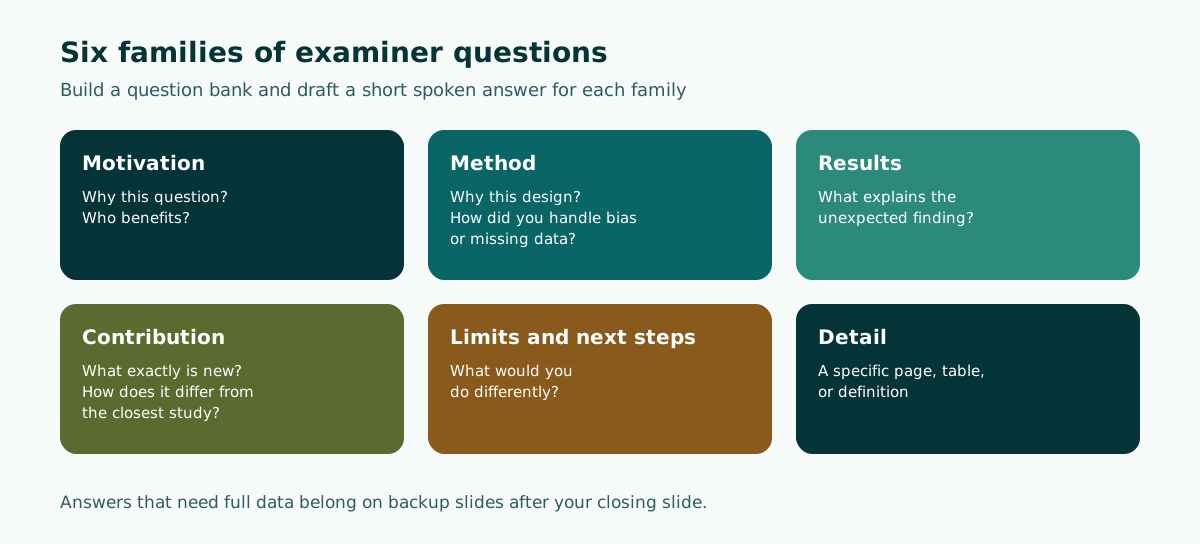
Write down the questions you would ask if you were the examiner, then draft a short spoken answer for each. Most fall into a few families:
- Motivation: Why this question? Why now? Who benefits from the answer?
- Method: Why this design instead of an obvious alternative? How did you handle bias, validity, or missing data?
- Results: What explains the unexpected finding? How large is the effect in practical terms?
- Contribution: What exactly is new? How does it differ from the closest earlier study?
- Limits and next steps: What would you do differently? What should the next study test?
- Detail: Questions about a specific page, table, or definition in the thesis.
Prepare backup slides
The Guelph guidance suggests thinking of expected questions and preparing extra slides to answer them. Put these after your closing slide: full statistical tables, instrument items, coding schemes, alternative analyses. Number them clearly so you can jump to the right one.
Bring your own copy of the thesis
Questions often take the form "On page 25, what did you mean by...?" or point to a specific table. Bring a copy of the exact version the committee received, not a later revision, so the page numbers match theirs.
Answer what is asked
Examiners get frustrated when candidates misunderstand the question, answer around it, or talk too long and eat into the session. Listen to the full question, pause, and answer directly in the first sentence. If you did not understand, ask for it to be repeated. If you do not know, say what you do know and how you would find out. Resist looking to your supervisor for rescue; it is your thesis.
Rehearsal and timing
Rehearse aloud with a timer, and then rehearse in front of people. A dry run with faculty and graduate students from your research group is the best single preparation step, because it shows you which slides confuse listeners and which questions come up naturally. Listen to the feedback, but accept that tastes differ and you cannot please everyone.
After each run, ask the questions the UNC Writing Center suggests for speakers: Where might listeners lose the thread of my argument? Where did I have trouble speaking clearly? Did I stay within my time limit? The same handout recommends telling listeners your thesis right away, repeating crucial points, and using especially strong transitions so they can see how new information relates to what they have heard. Those habits matter more when your audience is evaluating you.
Tools that help with practice
- Speaker Coach in PowerPoint: according to Microsoft Support, it evaluates pacing, pitch, filler words, informal speech, euphemisms, and culturally sensitive terms, and detects when you are being overly wordy or simply reading slide text. After each rehearsal you get a report with statistics and suggestions.
- Presenter view: lets you see your speaker notes on your laptop while the audience sees only the slides on the projector. Put timing cues in the notes, such as "minute 8: should be on findings".
- Black screen: Presenter view also lets you black out the slide show. This is useful during a long question when you want the committee's attention on the discussion instead of an old slide.
Timing checkpoints
Write three checkpoints in your notes: where you should be at one quarter, half, and three quarters of your time. If you are behind at the halfway checkpoint, skip the slides you marked as optional rather than speeding up your speech.
For writing timing cues that are easy to glance at under pressure, see our guide to speaker notes in PowerPoint. For the last lines before questions, read how to end a presentation. Broader delivery advice is in how to give a good presentation and presentation structure.
Building the deck efficiently
A defense deck is mostly an editing task: your thesis already contains every argument, so the work is choosing what goes on screen, in what order, and for how long. A practical sequence:
- Write the one-sentence claim and the research questions first.
- Draft all slide titles as statements, using the timing table above, before designing any slide.
- Add one visual per findings slide, taken or redrawn from the thesis.
- Write speaker notes with timing cues.
- Move every detail you cut into the appendix as a backup slide.
- Run a timed dry run and adjust.
If you prefer to start from a timed outline rather than a blank file, Soluslide's outline builder can generate slide titles, notes, and minutes per slide from your topic, your chosen duration, or an uploaded thesis document. You can edit the outline before signing in, and a beta account lets you export it as an editable .pptx built with standard text boxes and shapes, so you can apply your university's template afterward. The guide to editable PPTX from AI tools explains why that editability matters when your supervisor asks for changes the night before. Preparing for an oral examination with a different format? See the viva presentation outline, or learn how to write clearer instructions in our article on prompts for AI presentations.
The two screenshots below show that step with the worked example topic from this article. The only inputs are a topic, an event type, and a duration.
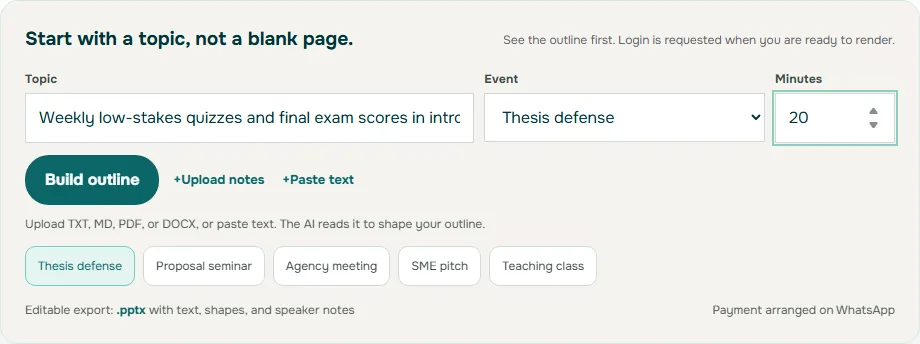
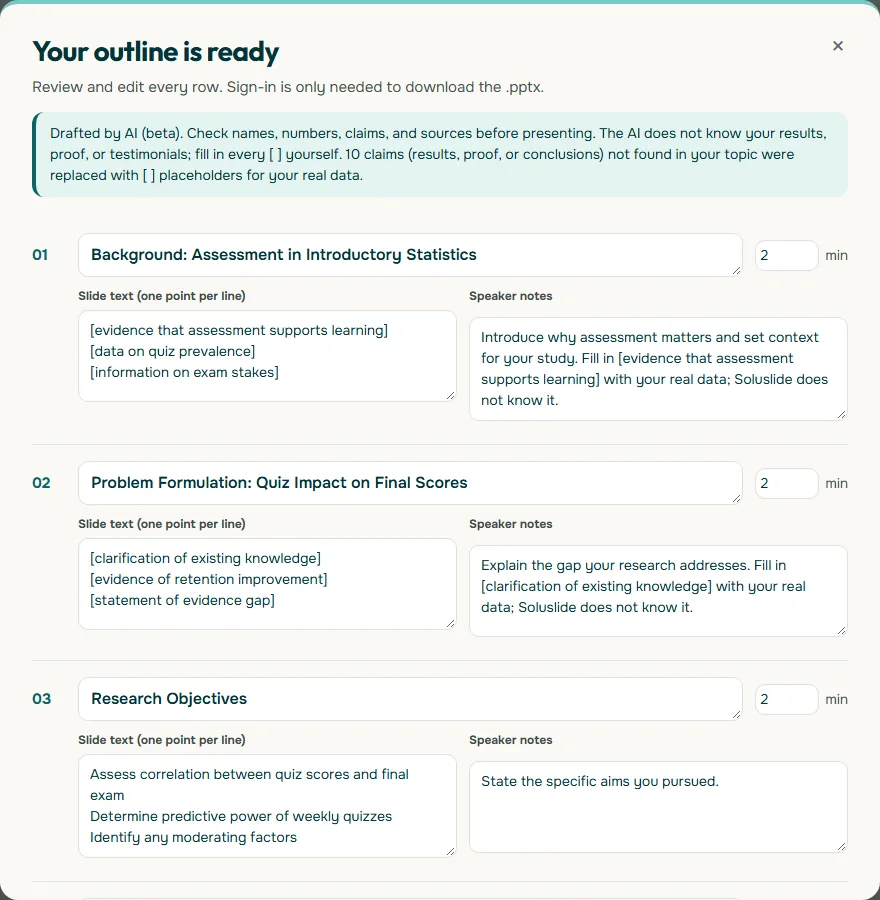
Whatever tool you use, the test is the same: read the slide titles in order, aloud, in under a minute. If that alone makes your argument clear, the committee will follow you, and you can spend your energy on the questions.
Frequently asked questions
How long should a thesis defense presentation be?
It depends entirely on your program, so check the written rules first. Published examples range from about ten minutes for some undergraduate and Indonesian thesis exams to 20 to 25 minutes, with 30 as a maximum, in one University of Guelph department.
How many slides do I need for a 20-minute defense?
Around 12 to 15 main slides works for most 20-minute talks, plus backup slides after the closing. Give the largest share of time to findings and keep background short, because the committee has read the thesis.
What should the first slide of a thesis defense say?
Your topic and your main conclusion in one sentence. Stating the claim at the start lets examiners judge every later slide against it.
Should I include a limitations slide?
Yes. Name up to three limitations that matter to your conclusions, explain their consequence, and connect them to future work. Raising them yourself shows you understand the boundaries of your evidence.
How do I prepare for examiner questions?
Write a question bank covering motivation, method, results, contribution, and limits, draft short answers, and prepare numbered backup slides for likely detail questions. Bring a copy of the exact thesis version the committee received.
Can I present new results that are not in my thesis?
It is safer not to. The committee is evaluating the document they read, and new analyses invite questions you have not had time to prepare for.
What are backup slides in a thesis defense?
Backup slides sit after your closing slide and hold detail such as full statistical tables, instrument items, or alternative analyses. You do not present them; you jump to them only when an examiner asks.
Sources
Factual claims in this article refer to the sources below. Sample outlines and prompts are illustrations to adapt.
- University of Guelph (Bill Gardner): Tips for your thesis defence
- Princeton Correspondents on Undergraduate Research: Post-Thesis Life, An Insight into the Thesis Defense Process
- STIE Bisma Lepisi: Panduan Pelaksanaan Ujian Skripsi Online
- UNC Writing Center: Speeches
- Microsoft Support: Rehearse your slide show with Speaker Coach
- Microsoft Support: Start the presentation and see your notes in Presenter view
Related reading
Try shaping your own outline. You can review and edit it before signing in.
Build a free outline