AI PPT prompts: a practical brief for better slide outlines
A request such as "make a presentation about X" usually returns generic slides: an introduction, history, benefits, and conclusion. The issue is a thin brief, not a lack of creativity. This guide shows the elements to include in an AI PPT prompt, examples for four presentation situations, and a review loop before the outline becomes an editable PowerPoint file.
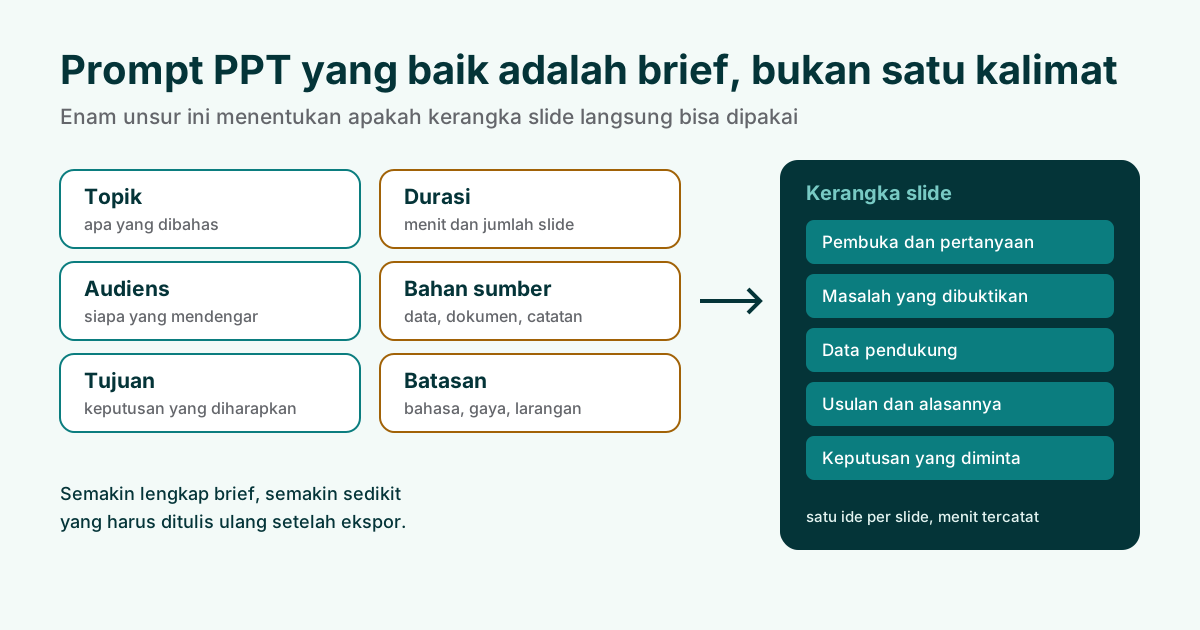
Why short prompts produce generic slides
Language models assemble an outline from familiar patterns. If the only instruction is "make a presentation about coffee", an encyclopedic sequence is a reasonable guess: definition, history, varieties, benefits, and conclusion. That sequence is not wrong, but it rarely matches a real room. A cafe owner hearing a pitch does not need a history lesson. A thesis examiner needs the research question, method, evidence, contribution, and limits in an order that supports questions.
Start with the situation behind the topic. Who is listening? What should they understand or decide? What source material may be used? How much time is available? These details give each part of the outline a job. They also make a review possible. A short title can be judged against the decision it supports, instead of being accepted because it sounds polished.
Keep the source boundary explicit. Ask the model to use the supplied notes and to mark missing information rather than inventing it. If a number, quote, or product promise is not in the source, leave a placeholder for a human to fill. This simple rule prevents an empty slide from becoming a reason to create a claim. Accuracy remains the presenter's responsibility after the first outline.
Six elements to include in an AI PPT prompt
A practical prompt can fit in a few sentences when each sentence answers a different planning question. Name the topic and the specific moment that makes it relevant. Describe the audience in terms of knowledge, concern, and role. State the purpose as a decision or change you want after the presentation. Add the duration and any required number of sections. List the source documents or facts that may be used. Finally, set boundaries: what the draft must not invent, which terms must stay unchanged, and what kind of output you want.
| Element | Planning job | Useful question |
|---|---|---|
| Topic and situation | Frames the moment | Why is this being presented now? |
| Audience | Sets context and language | What do listeners already know? |
| Purpose | Defines the next decision | What should happen after the talk? |
| Duration | Controls depth | How many minutes can each idea take? |
| Sources | Grounds evidence | Which notes or files are allowed? |
| Boundaries | Limits invention | What must be checked by a person? |
Ask for an outline before asking for design. Request a slide title, its job, two or three supporting points, and an estimated speaking time. That format is quick to scan and easy to edit. It also keeps decoration from hiding a weak argument. Once the sequence works, a separate instruction can define tone, visual hierarchy, and the editable elements required in the exported file.
Prompt examples for four presentation situations
Examples are useful because they show how the six elements work together. Replace the details with your own material and keep the constraints visible. The first example is a thesis defense. It asks for a calm sequence that lets an examiner find the question, method, evidence, contribution, and limitations without reading a paragraph on each slide.
Thesis defense
Create a 12-minute thesis defense outline for examiners who know the field but have not read the full paper. The purpose is to explain the research question, method, strongest evidence, contribution, and limitations before questions. Use only the attached thesis notes and mark any missing value as [CHECK SOURCE]. Plan 10 to 12 slides, give each slide one job, estimate minutes, and keep the conclusion focused on what the evidence supports.
For an internal meeting, the decision is usually more important than the background. Ask the outline to make the current situation, options, recommendation, owner, and next step easy to find. Include the meeting duration and the evidence that participants can verify before the call.
Team meeting
Build an eight-minute decision deck for a product team choosing between two onboarding changes. The audience includes design, engineering, and support leads. Use the attached support themes and experiment notes only. Compare the options, state trade-offs, recommend one path, name the owner, and end with a decision request. Use eight slides maximum, with no unsourced percentages and a clear note for open questions.
A small business pitch needs a specific listener and a specific next action. The owner of a cafe may care about a test, a cost, and a measurable result, not a general description of a market. Tell the model what the owner can approve and which proof is available.
Small business pitch
Draft a 10-minute pitch to the owner of a neighborhood cafe for a four-week menu photo and ordering test. The goal is approval for a small pilot, not a long-term contract. Use the attached menu, customer questions, and cost sheet. Show the current friction, the proposed test, what will be measured, the schedule, and the decision needed today. Keep the claims tied to the supplied notes and label every assumption.
Teaching decks have a different rhythm. Students need a clear learning goal, a short explanation, an example, a check for understanding, and a task to try. Ask for pauses and questions rather than filling every slide with text.
Teaching session
Create a 25-minute lesson outline for first-year students learning how to read a simple bar chart. Use the attached lesson notes and examples. Start with one learning goal, explain the axes, model one example, include two questions for a short pause, and finish with a five-minute practice task. Keep language plain, show where a student may make a mistake, and do not add data that is not in the notes.
Set duration and slide count
Duration is a planning constraint, not a promise that every minute needs a new slide. Put the total time in the prompt and ask for an estimate beside each section. A 15-minute talk might reserve a minute for the opening, several minutes for evidence, a few minutes for the recommendation, and time for a question. The exact split depends on the room, but the estimate reveals when the outline is overfilled.
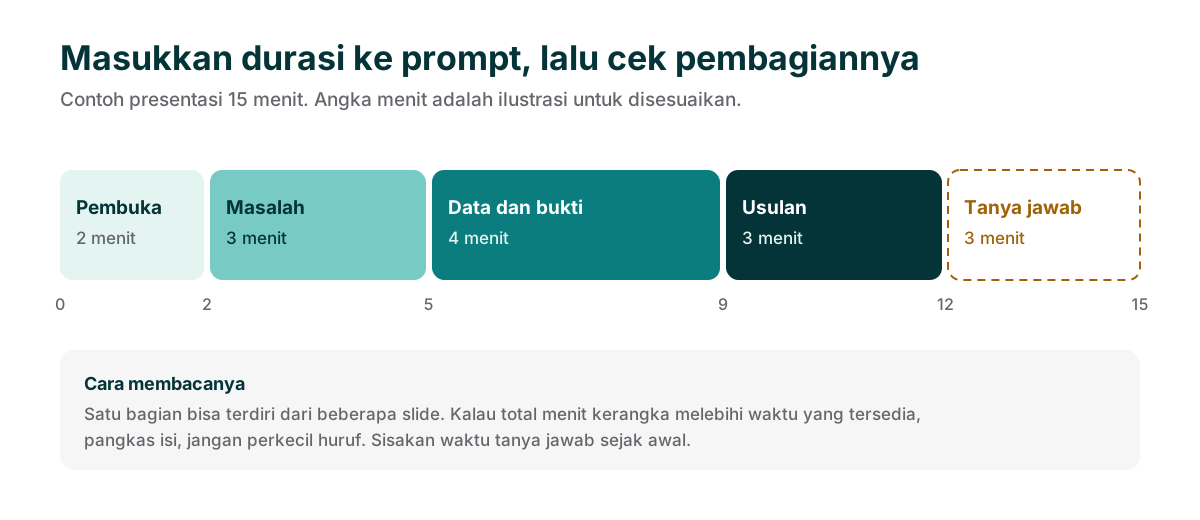
Use slide count as a ceiling when the deck must move quickly. Ask for fewer ideas per slide rather than shrinking the type. If a section needs too many slides, decide whether the supporting detail belongs in notes or in a source document. A readable outline makes that cut before it becomes a design problem.
Use a follow-up prompt to revise the outline
The first outline is a draft to inspect, not a final answer. A revision prompt should point to a concrete problem. Ask the model to move context earlier, combine two repeated slides, state a decision, or add a missing source check. Paste the current outline and name the change you want. Avoid asking for a completely new deck when only one transition is weak, because a full rewrite can hide useful work.
Try a readability pass after the story is stable. Ask for one message per slide, short titles that state the point, and a note where a claim needs evidence. Then compare the revised outline with the source. A model can follow a formatting request while still misreading a number or changing a proper name. Human review is a required stage, not a final polish.
Check the outline before PPTX export
Reviewing the outline is faster than reviewing a finished file. Read the titles from top to bottom and ask whether the sequence answers one question at a time. Check names, figures, quotations, dates, and links against the source. Confirm that the speaking time adds up. Look for a clear handoff between sections and a final slide that states the next action or question.
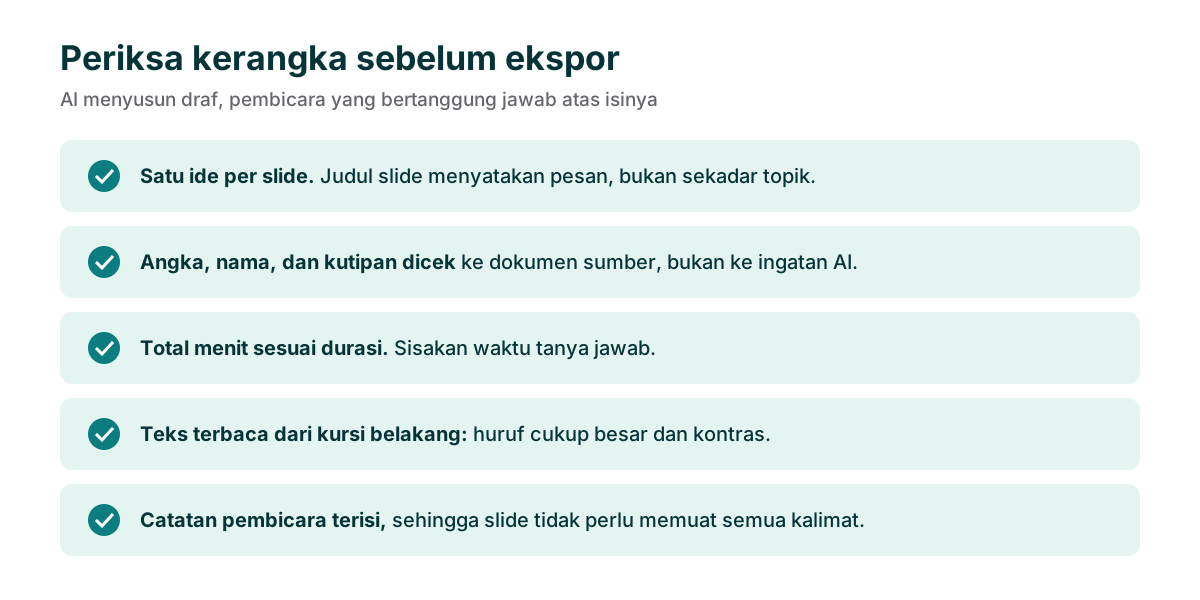
When the outline passes, export and test the file as a handoff. Open the PPTX, edit one title, move one shape, and check the slide order. If your team uses Google Slides, test an import copy and inspect text wrapping and fonts. The goal is not to promise identical behavior in every application. The goal is to keep important work inspectable after the first render.
Keep human responsibility visible
An AI assistant can make a first structure quickly, but it cannot attend the room or accept responsibility for a claim. Keep a note of which sources were used and which decisions remain open. Do not ask for statistics merely to make a slide look complete. If a source is missing, say so. If a term has a precise meaning in your field, preserve it and check it after generation.
Use a repeatable loop: brief, outline, edit, readability check, export, and human review. Keep beta limits visible when sharing a deck and tell reviewers whether the file is a draft. Soluslide helps turn a prompt and source material into an editable starting point. The presenter still owns the story, the evidence, and the decision requested in the room.
Frequently asked questions
What is an AI PPT prompt?
An AI PPT prompt is a written brief that tells an assistant how to plan a presentation. It can include the topic, audience, purpose, duration, source material, and boundaries.
How long should a presentation prompt be?
There is no fixed length. Five to eight specific sentences often cover the audience, purpose, timing, sources, and boundaries better than a long but vague paragraph.
Why does an AI deck feel generic?
A topic without an audience, decision, or time limit encourages the model to use a common introduction, history, benefits, and conclusion pattern.
Should I ask AI to add statistics?
Provide statistics from your own sources and ask the model to leave unknown values blank. Unsourced numbers can be wrong and hard to defend.
Can I edit an exported PPTX?
Soluslide exports standard text boxes and shapes for editing in PowerPoint. Open the file and test an import into your team's presentation tool before relying on it.
Is Soluslide a finished public SaaS?
Soluslide is in beta. You can review an outline before login, while editable export requires a beta account and checkout is WhatsApp-first.
Sources
Use these primary sources to check the technical principles referenced in this guide. The workflows and wording examples are practical guidance, not research statistics.
- Google Search Central: SEO Starter Guide
- Microsoft Support: Add text to a PowerPoint slide
- Google Slides Help: Work with Microsoft Office files
- W3C WAI: Contrast Minimum