
How to End a Presentation: Conclusion Structure, Closing Lines, and Q&A
The last thing your audience hears is often what they remember. This guide covers the structure of a presentation conclusion, closing lines for four common settings, how to handle Q&A, and a final slide that works harder than a thank-you.
How to end a presentation: the five-step answer
To end a presentation, signal that you are wrapping up, restate your two or three main points in fresh words, give one specific call to action, take questions, and finish with a prepared final line and a thank-you. In a short talk, the ending itself takes one or two minutes, not counting Q&A.
- Signal the end. "Let me wrap up" brings drifting attention back.
- Summarize. Two or three main points, restated rather than repeated.
- Call to action. One request that says who does what, and by when.
- Take questions. Listen, restate, answer briefly, link back.
- Final line. One prepared sentence on why it matters, then thank the audience.
The speech guide from the Writing Center at the University of North Carolina at Chapel Hill names the two core moves of an effective conclusion. First, restate your main points, but don't repeat them. Second, speeches often close with an appeal to the audience to take action based on their new understanding, and if you do this, the action you recommend should be specific and realistic.
Many talks end with "That's all from me, thank you. Any questions?" over a slide that says Thank You. The thanks are polite, but on their own they send people away without a summary or any idea of what you want from them. This guide covers each part of a strong presentation ending, example closing lines for four settings, Q&A, and the final slide. If you are still working on the first minute, start with how to start a presentation, because the best endings echo the opening.
How to conclude a presentation: five parts of a strong conclusion
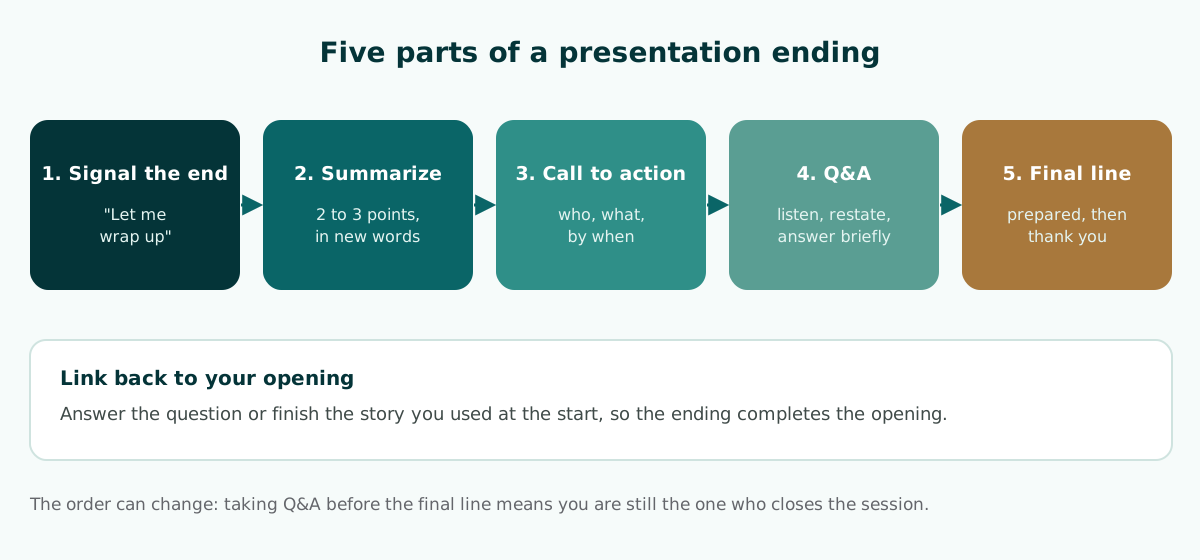
This structure works for most events. You can move the parts around; many presenters take questions before the final line so that they, not the last question, close the session.
1. Signal the end
A sentence such as "Let me wrap up" or "To conclude" tells a tired audience to refocus. It also lets a moderator or an examiner start preparing questions.
2. Summarize your main points
Restate the two or three points that matter most, in new words. The UNC guide gives examples that link back to the opening, such as "I asked earlier why we should care about the rain forest. Now I hope it's clear that..." The ending then answers the question your introduction raised.
3. Give a call to action
What do you want from this audience? Budget approval, feedback on your method, a product trial, or homework. One specific request is stronger than three vague ones.
4. Take questions
Open the floor clearly, answer briefly, and connect each answer to your main message. This part is covered in detail below.
5. Deliver your final line
Close with one sentence that sums up why the topic matters, then thank the audience. Prepare this sentence in advance rather than improvising it.
The conclusion is the last part of a larger plan. To see how it connects to the opening and the body, read the guide to presentation structure and outlines.
Presentation ending examples for four settings
The examples below are fictional and continue the four openings from the guide on starting a presentation. Each one signals the end, summarizes, asks for something, and closes.
Thesis defense or viva
To conclude, this study found two things. First, streets with continuous tree cover stayed noticeably cooler at surface level than comparable streets without it. Second, the effect was strongest on the hottest afternoons, when it matters most. For future work, I recommend repeating the measurements in a second city. Thank you, members of the committee. I welcome your questions and suggestions.
For the full slide sequence of a defense, see the thesis defense presentation guide or this viva presentation outline.
Team or client meeting
Let me sum up. The pilot improved response times, but costs rose. We've proposed two changes to control that: routing simple requests to self-service and sharing one support queue across regions. What I'm asking for today is approval to roll out both changes in two regions next quarter, with a cost review at the end of it.
Meetings that end in a clear decision are covered in meeting presentations built around decisions.
Small-business pitch
So, bakeries throw bread away because they can't see tomorrow's orders, and our app lets customers pre-order the night before. We're looking for ten bakeries to join a free trial next month. If you run one, or know someone who does, come and find me after this session.
For the rest of the deck, see the practical pitch deck guide for small businesses.
Classroom lesson
Today we followed a plastic bottle from the bin to where it ends up. Your task this week is simple: count how many plastic bottles your household uses in three days, and we'll compare the numbers on Monday.
Lessons that end with a clear task are outlined in the teaching presentation template.
How to write a specific, realistic call to action
The call to action is the part of a conclusion most likely to be vague. "Let's all support small businesses" or "I hope this was useful" does not tell anyone what to do after they leave the room. The UNC guide stresses that the recommended action should be specific and realistic, and gives an example: the audience may not be able to affect foreign policy directly, but they can vote or work for candidates whose views they support.
Use the table below to turn a vague request into one people can act on.
Scroll the table sideways to see every column.
| Setting | Vague | Specific |
|---|---|---|
| Thesis defense | I hope this research is useful | I would welcome your feedback on my sampling method in particular |
| Team meeting | We need your support | Please approve a two-region rollout next quarter |
| Small-business pitch | Feel free to try our product | Sign up for the free trial with the link on this slide before the end of the month |
| Classroom lesson | Don't forget to study | Finish the three questions on the last page before our next class |
| Internal training | Apply what you learned today | Use the new report template for next week's report |
A good call to action usually has three elements: who acts, what they do, and by when. If one is missing, people tend to postpone. At a defense, the call to action can be a targeted request for feedback, because giving feedback is exactly what the committee is there to do.
Worked example: replacing "Thank you, any questions?"
Here is a common ending for a ten-minute update on a customer survey, followed by a rewrite that uses the five parts. It continues the survey example from the companion article on openings.
BEFORE
So... yeah, that's the last slide. That's all from me.
Thank you. Any questions?

AFTER
[Signal] Let me wrap up.
[Summary] Our survey showed that waiting, not price, was the top
complaint, and that two causes explain most of the delay.
[Call to action] I'm asking you to approve one change today: a
callback option in the support queue, tested for the next two months.
[Q&A] I'm happy to take questions now.
[Final line, after Q&A] If we fix waiting, we keep the customers
we already have. Thank you.
What changed in the rewrite:
- The end is announced, so the audience refocuses instead of being caught off guard.
- The summary restates the finding in new words and links back to the opening hook about waiting.
- The call to action names the decision, the change, and the time frame.
- The final line comes after Q&A, so the session ends on your message rather than on the last question.
The survey details are fictional; in a real talk, every number in the summary must match the data shown earlier in the deck.
How to handle Q&A without losing your ending
Q&A is the least predictable part of a conclusion. You can take questions at any time or ask the audience to hold them until the end. Microsoft Support recommends the second option for many presentations: questions are an excellent sign that people are engaged, but if you save them for the end you get through your material uninterrupted, and early questions are often answered by the slides that follow.
If you choose this approach, mention it in your opening. When you open the floor, use a simple pattern for each question.
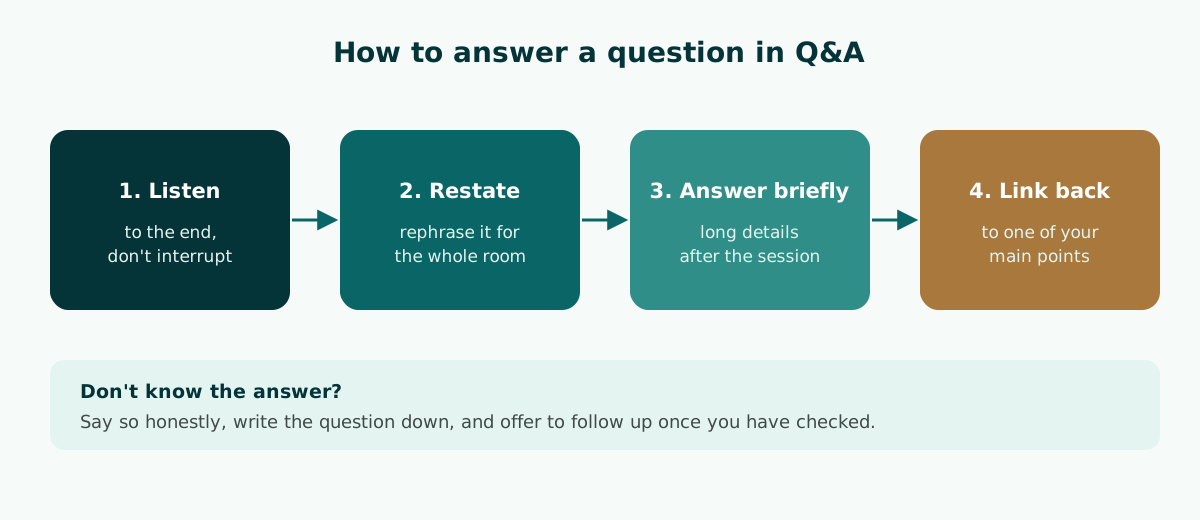
- Listen to the end. Don't interrupt, even if you can guess where the question is going.
- Restate or summarize the question. It confirms you understood and helps people at the back who did not hear it.
- Answer briefly. If the answer is long, offer to continue after the session.
- Link back. Finish by connecting the answer to one of your summary points.
If you don't know the answer, say so and offer to follow up once you have checked. At a defense, writing the examiner's question down is better than guessing. It also helps to keep a few backup slides with supporting data after your final slide. Your speaker notes in PowerPoint are a good place to list where each backup slide sits.
If you present from Google Slides, Google's help page explains how to present with speaker notes in Presenter view, and notes that you can even accept audience questions while you present.
What to put on your final slide
The final slide is often on screen longer than any other, because it stays up during Q&A. It is a waste if it only says Thank You. Use it to help the audience remember your message and the next step.
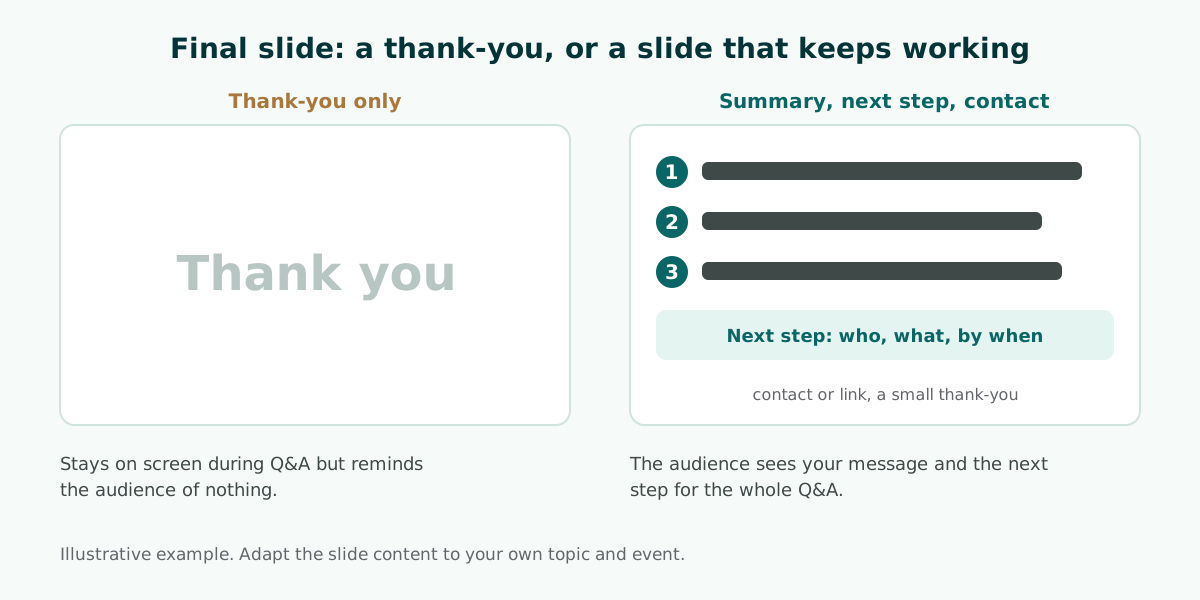
What to include on the last slide:
- Two or three summary points in short sentences.
- One call to action or next step, the same one you say aloud.
- Relevant contact details or a link, such as an email address or a sign-up page.
- A thank-you if you like, in smaller type.
The design rules are the same as for other slides. Microsoft Support recommends simple text with bullets or short sentences, avoiding font sizes smaller than 18 pt, and high contrast between background and text. The guide to readable presentation contrast shows how to check contrast, and these slide design principles cover layout and hierarchy.
Timing your ending and common mistakes
The ending is often what gets squeezed. Presenters who run long in the body end up rushing the conclusion or running over time. Microsoft advises that if you plan a certain amount of time for your presentation, you should not go over it, and if there is no time limit, take less time rather than more so that people stay engaged.
In practice, note in your speaker notes the minute at which you must start the ending. If you are running late, cut an extra example from the body, not the conclusion. A complete ending matters more than one more content slide.
Scroll the table sideways to see every column.
| Mistake | Effect | Fix |
|---|---|---|
| Stopping abruptly after the last content slide | The audience doesn't realize you have finished | Signal the end and summarize |
| Adding new information in the conclusion | Confusion and extra time | Move it to the body or a backup slide |
| Repeating every point word for word | Feels tedious | Restate two or three points in new words |
| A vague call to action | Nothing happens afterwards | Say who, what, and by when |
| Ending with an apology | A weak last impression | Close with your prepared final line |
| Running over time | Q&A gets cut and organizers are frustrated | Mark the minute to start the ending in your notes |
The first mistake happens most often under pressure, so memorize your wrap-up sentence just as you memorize your first line. For delivery habits that carry through the whole talk, see how to give a good presentation.
How to rehearse your conclusion
Many people rehearse from the beginning to the middle and stop before the ending because it seems easy. As a result, the conclusion is the least practiced part of the talk. Rehearse it on its own, several times, until you can deliver it within the time you planned.
The UNC guide suggests reading your draft to a friend or in front of a mirror, then asking which pieces of information were clearest, where listeners might lose the thread, and whether you stayed within your time limit. Ask the friend to repeat your main message after hearing your ending. If they can't, your summary needs work.
In PowerPoint, Speaker Coach can help with private practice. According to Microsoft Support, it evaluates your pacing and filler words, detects when you are simply reading slide text, and gives you a report after each rehearsal. An ending read off the slide usually sounds flat, so the report is a useful check.
Prepare answers to the questions you are most likely to get. For a defense, build the list from your methods and limitations sections. For a meeting, expect questions about cost, timing, and risk. Students preparing for graded presentations will find more preparation tips in AI presentation tools for students.
Plan the ending from your outline
A strong ending grows out of a clear outline. If you know your three main messages and your one request from the start, the conclusion only has to gather them. Write the main messages and the call to action into your outline before you build the content slides, then check that every section supports one of them.
If you draft the outline with AI, say in your prompt that you need a closing slide with a summary, a call to action, and contact details, not just a thank-you. Sample prompts and how to review the result are in this guide to AI presentation prompts. If your talk is based on a report, turning a document into a presentation helps you pick the findings worth repeating at the end. Either way, rewrite the output in your own voice.
Soluslide, a beta tool that builds a timed slide outline from a topic or a document, can help at this stage. The outline lists slide titles, points, speaker notes, and minutes per slide, so you can see whether the ending gets enough time. You can review and edit it before logging in, and exporting an editable .pptx file requires a beta account. You can draft a free outline or see the full list of features.
Frequently asked questions
How do you end a presentation?
Signal that you are wrapping up, restate your two or three main points in new words, give one specific call to action, take questions, and finish with a prepared final line and a thank-you.
What do you say at the end of a presentation?
For example: "Let me wrap up. Two things to remember: first... second... What I'm asking for today is... Thank you, I'm happy to take your questions." Adapt the content to your event.
How do you write a presentation conclusion?
Restate your main points without repeating them word for word, link back to the question or story from your opening, and add a call to action that is specific and realistic, as the UNC Writing Center advises.
Is it okay to end a presentation with "Thank you"?
Thanking the audience is polite, but it should come after a summary and a call to action. On its own, it leaves people without your main message or a next step.
Should Q&A come before or after the conclusion?
Many presenters summarize and give the call to action, take questions, and then deliver a short final line so the session ends on their message. Microsoft Support suggests asking the audience to hold questions until the end so you get through your material uninterrupted.
What should be on the last slide of a presentation?
Two or three summary points, one call to action, and relevant contact details. A thank-you can stay in smaller type, because this slide is on screen during Q&A.
How long should a presentation conclusion be?
Keep it short: in a brief talk, one or two minutes before Q&A is usually enough. Mark in your notes when you must start it so it is not squeezed.
What should you do if you can't answer a question?
Say so honestly, write the question down, and offer to follow up once you have checked. Guessing is riskier, especially at a thesis defense.
Sources
Factual claims in this article refer to the sources below. Sample outlines and prompts are illustrations to adapt.
Related reading
Try shaping your own outline. You can review and edit it before signing in.
Build a free outline