
How to Start a Presentation: Structure, Hooks, and Opening Lines
The first minute or two decides whether your audience follows the rest of the talk. This guide covers the structure of a presentation introduction, hook ideas, example opening lines for four common settings, and how to build first slides that support them.
How to start a presentation: the four-step answer
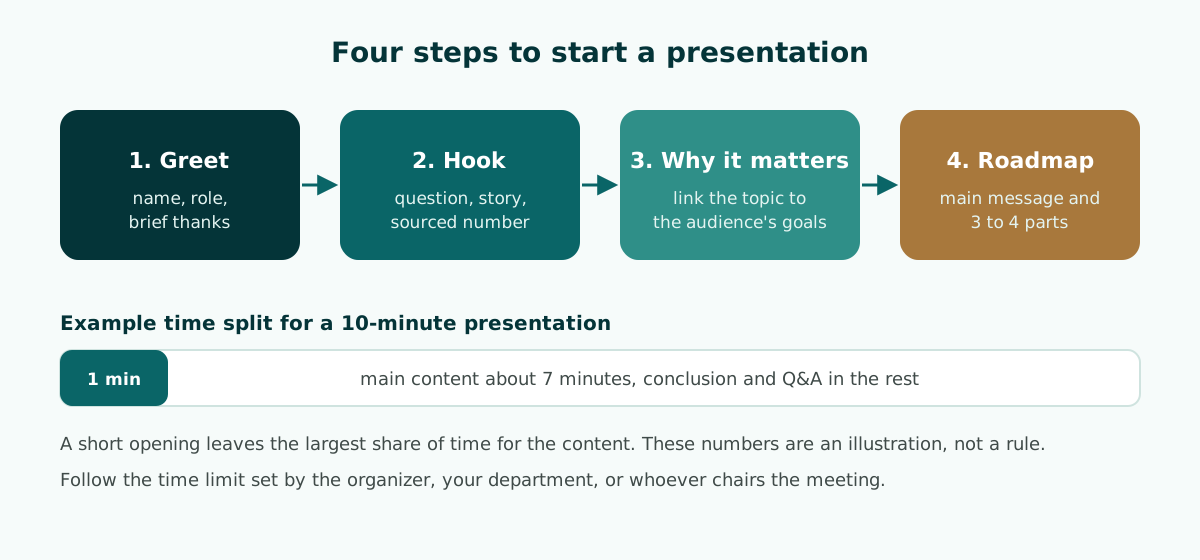
To start a presentation, do four things in order: greet the audience and say who you are, hook their attention, explain why the topic matters to them, and preview your main message and the parts you will cover. In a short talk, all four fit into one or two minutes, and then you move straight into the content.
- Greet. Your name, your role, and a brief thank-you.
- Hook. One question, story, or sourced number tied to the topic.
- Why it matters. One or two sentences that link the topic to the audience's goals.
- Roadmap. Your main message and the three or four sections that support it.
The speech guide from the Writing Center at the University of North Carolina at Chapel Hill describes the same pattern. An effective introduction gets attention first (the guide calls this "the hook"), then establishes context or motive by explaining why the topic is important, and then gets to the point: tell listeners your thesis right away and explain how you will support it.
That last step is where many openings go wrong. Long thank-you lists, a slow warm-up, or a joke unrelated to the topic all delay the moment the audience learns why they should listen. Below you will find each step, example opening lines for four settings, and advice on first slides. When your opening is ready, the companion guide on how to end a presentation covers the final minutes of the same talk.
The four parts of a strong presentation introduction
This structure works for almost any presentation. How long each part takes depends on your total time and on how formal the event is.
1. Greet and introduce yourself
Greet the audience the way the event expects, give your name and role, and thank the host briefly. At formal events, acknowledge the people who need acknowledging, such as the examining committee or the person chairing the meeting.
2. Hook their attention
The UNC guide lists the methods speakers commonly use: beginning with an anecdote, presenting shocking statistics, asking the audience direct questions, or enlisting audience participation. Pick one, and make sure it connects directly to your topic.
3. Explain why it matters
Connect the topic to what this particular audience cares about. A thesis committee wants to know what problem you studied, a manager wants to know what decision you need, and an investor wants to know which customer problem you solve. One or two sentences are enough.
4. Give a roadmap
State your main message and the two to four parts you will cover. An audience that knows where the talk is heading finds it easier to follow, and you get a clear handrail for moving between sections. If you plan to take questions at the end, say so here.
The order is flexible. In a short pitch you might ask the question first and introduce yourself afterwards. What should never disappear is the reason to listen and the roadmap. To see how the opening fits into the full arc of a talk, read the guide to presentation structure and outlines.
Presentation hook ideas for the first minute
The hook is usually the hardest part to write. The table below summarizes the common options, where each one fits, and what can go wrong.
Scroll the table sideways to see every column.
| Hook | Short example | Works well for | Watch out for |
|---|---|---|---|
| Direct question | "Who here has waited more than a week for a reply from customer support?" | Classes, seminars, pitches | Silence in a quiet room; have your own answer ready |
| Short anecdote | A real moment that started your research or your business | Pitches, seminars, lessons | Running long; keep it to three or four sentences |
| Strong number | One figure from a credible source that frames the problem | Meetings, defenses, briefings | A number without a source damages credibility |
| Picture a situation | "Picture a bakery owner throwing away unsold bread every evening." | Small-business pitches, lessons | A scene too far from the audience's own experience |
| Audience participation | A show of hands, a quick poll, or a guess | Classes, training sessions | Feels out of place at a defense or a formal meeting |
For formal settings such as a thesis defense or a meeting with senior management, the safest hooks are usually a strong number or a concise description of the problem. Rhetorical questions and participation work better in classrooms, workshops, and public talks.
If you use a number, make sure you can name its source when asked. Examiners and managers often ask where the first figure on screen came from. One number with a clear source beats three numbers you cannot defend.
Also avoid openers that have been worn smooth, such as "In today's fast-paced world" or "As we all know". They carry no new information and make the audience wait for the real content.
How to introduce a presentation: example opening lines
Adapt the examples below to your own talk. Each one still contains a greeting, a hook, a reason the topic matters, and a roadmap; only the tone changes.
Thesis defense or viva
Good morning, members of the committee. I'm Maya Chen, and my thesis looks at heat in mid-sized cities. On a summer afternoon, a parking lot and a tree-lined street two blocks away can feel like different climates. My research measures how much street trees change surface temperature in one city center, and what that means for planning. I'll cover the problem, my method, the results, and then my conclusions and recommendations.
For the full slide sequence of a defense, see the thesis defense presentation guide or the viva presentation outline.
Team or client meeting
Thanks for making the time. I need one decision from this group today: whether we extend the new customer support process to every region next quarter. The short version is that response times improved in the pilot, but costs went up, and I'll propose two ways to manage that. I'll start with the results, then the cost issue, then the decision.
A meeting opening that names the decision up front is covered in more depth in meeting presentations built around decisions.
Small-business pitch
Picture a bakery owner throwing away unsold bread every evening because she can't predict tomorrow's orders. I'm Sam, and I built a simple pre-order app for neighborhood bakeries. In the next five minutes I'll show you the problem, how the app works, and the support we're looking for.
For the rest of the deck, see the practical pitch deck guide for small businesses.
Classroom lesson
Good morning, everyone. Hands up if you drank from a plastic bottle today. Keep your hand up if you know where that bottle goes after you throw it away. Today we'll follow its journey, and at the end we'll pick three things our school can change.
A lesson deck that opens with a question and closes with a task is outlined in the teaching presentation template. These examples are fictional. Replace the names, numbers, and context with your own, and if you open with a figure, put its source on the slide or in your speaker notes.
Worked example: rewriting a weak opening
Here is a typical opening for a ten-minute update on a customer survey, followed by a rewrite that uses the four steps.
BEFORE
Good afternoon, everyone. Thank you to the organizers, to my manager,
to the IT team, and to everyone joining online. Sorry, I only finished
these slides last night. So, today I'm going to talk about our customer
survey. Let's see... first, some background.

AFTER
Good afternoon. I'm Priya from the customer insights team.
[Hook] Last quarter, the most common complaint in our survey wasn't
price. It was waiting.
[Why it matters] If we fix that one issue, we protect the customers
we already have.
[Roadmap] I'll show what respondents told us, the two causes behind the
delays, and one change I'd like us to approve today.
What changed in the rewrite:
- The apology is gone. It lowered expectations before any content appeared.
- The thanks shrank to a greeting. The organizers can be thanked at the end if needed.
- The hook is a finding from the survey itself, so it leads straight into the topic instead of away from it.
- The roadmap names three parts and the decision, which tells the audience why they should stay engaged.
The rewrite takes roughly the same time to say, but the audience now knows the problem, the stakes, and the route before the first content slide. Notice that the survey finding is fictional here; in a real talk it must come from your data.
What to put on your first slides
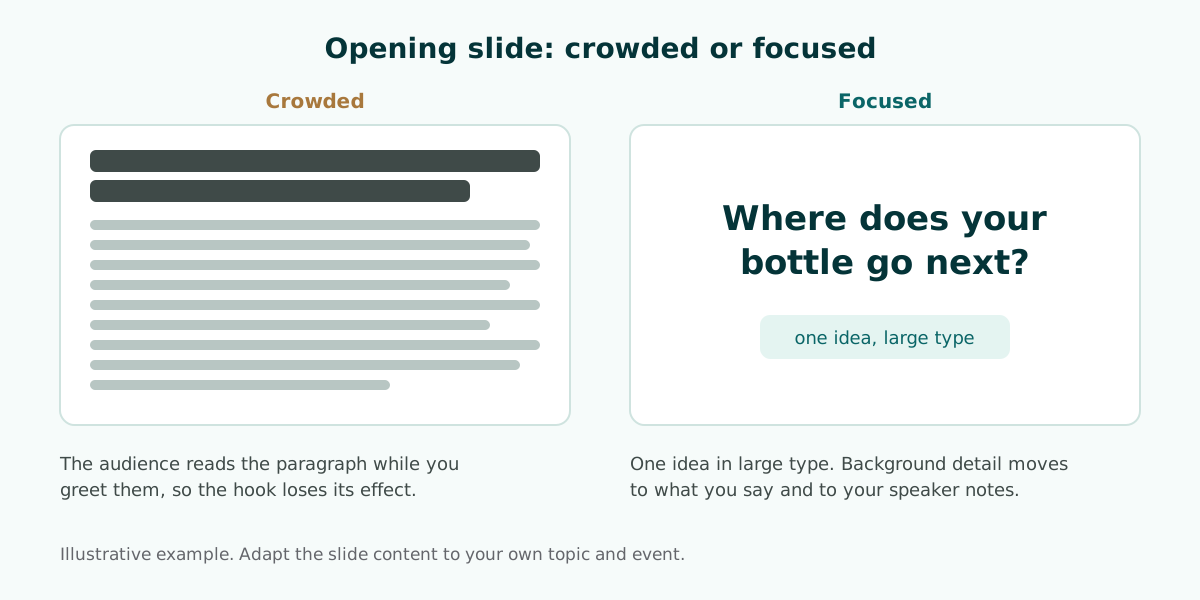
The first slide usually shows the title, your name, and perhaps a logo. Keep it, especially at academic events, but a title slide is not where you win attention. Consider adding one opening slide after it that carries your hook: a single question, a single number, or a single image of the problem.
Microsoft Support advises keeping slide text simple, with bullets or short sentences, because you want the audience to listen to you present your information rather than read the screen. That advice matters most on the opening slide. If it is full of text, people read while you greet them, and the hook loses its effect.
Practical rules for opening slides:
- One idea per slide. Put the hook and the roadmap on separate slides.
- Large type. Microsoft suggests avoiding font sizes smaller than 18 pt, and going larger for a big room.
- High contrast between text and background. The guide to readable presentation contrast shows how to check it.
- A roadmap slide with three or four parts, matching exactly what you say.
For layout and type choices beyond the first slides, see these slide design principles. Keep the words you plan to say, including how to address the committee or the chair, in your notes; speaker notes in PowerPoint explains how to set them up and read them in Presenter View.
How long should a presentation introduction be?
There is no single number that fits every event. A more useful guide is proportion: keep the introduction short enough that the main content gets the largest share of your time. The UNC guide notes that moving from the introduction into the body quickly helps keep the audience interested, and that you should not spend as much time building up to your thesis as you would in a research paper.
As an illustration, in a ten-minute talk an opening of about one minute leaves room for a greeting, one hook, one sentence on why it matters, and a roadmap. If your department sets a fixed time for a defense, scale the opening to fit.
Scroll the table sideways to see every column.
| Total time | Opening length | What fits |
|---|---|---|
| 3 to 5 minutes (short pitch) | About 20 to 30 seconds | One hook and one sentence with the main message |
| 10 minutes (seminar, meeting) | About 1 minute | Greeting, hook, why it matters, roadmap |
| 15 to 20 minutes (defense) | About 1 to 2 minutes | Formal greeting, short problem statement, aim, roadmap |
| 45 minutes or more (class, workshop) | About 3 to 5 minutes | Opening activity, learning goals, session plan |
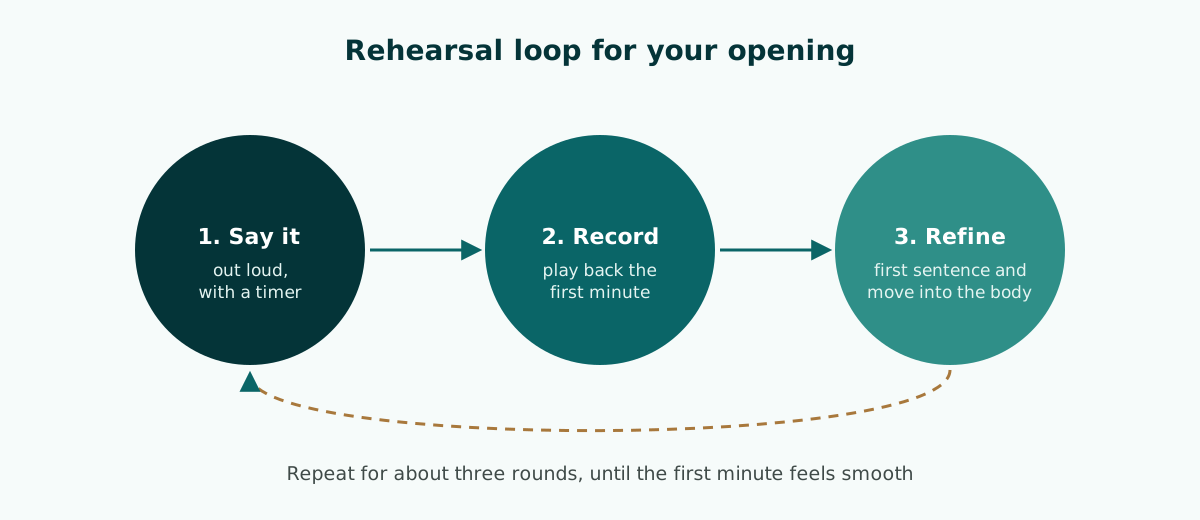
The honest way to know how long your opening runs is to rehearse it with a timer. Microsoft also advises that if you plan a certain amount of time for a presentation, you should not go over, and if there is no time limit, take less time rather than more. A timed outline, like the ones described in AI presentation tools for students, shows how many minutes each part gets before you start rehearsing.
Opening mistakes to avoid
The same mistakes show up in student presentations, office meetings, and business pitches. Spotting them early lets you fix them before you stand up.
- Apologizing at the start. "Sorry, I didn't have much time to prepare" lowers the audience's confidence before the content begins.
- A long list of thanks. Naming every person and team eats the time your content needs.
- Saving the main point for the end. The UNC guide warns that if you keep the audience guessing about your thesis until the end, they will most likely become bored or confused.
- Reading the slides. Microsoft advises against reading the presentation; practice so you can speak from bullet points, with the slide text as a cue for you rather than the full message.
- A hook that does not connect. A joke or video unrelated to the topic leaves people puzzled.
- Fixing equipment in front of the audience. Microsoft suggests showing up early, checking that your equipment works, and verifying that the projector's resolution matches the computer you built the slides on.
The last mistake can ruin a well-prepared opening. Test the laptop, projector, and file before the session starts, and keep a copy of the file on a second device. For delivery habits beyond the first minute, see how to give a good presentation.
How to rehearse your opening until it flows
The opening is the part most worth memorizing, because nerves usually peak in the first minute. You do not need to learn it word for word, but do memorize the order of the four steps and the exact first sentence you will say.
The UNC guide suggests reading your draft to a friend or in front of a mirror, then asking yourself which pieces of information were clearest, where you connected with the audience, and whether you stayed within your time limit. Record a rehearsal on your phone and listen back to the first minute.
If you use PowerPoint, Speaker Coach can help with private practice. According to Microsoft Support, it evaluates your pacing and your use of filler words, detects when you are simply reading the text on a slide, and gives you a report after each rehearsal. That is useful for finding out whether nerves make your opening too fast.
Rehearse the transition from the opening into your first section as well. A plain bridge such as "Let me start with the problem" is enough.
Write your opening last, from the outline
An opening is easiest to write once the body is settled. If you do not yet know the three main sections, the roadmap in your introduction will be vague. That is why many presenters draft the outline first and write the opening last.
You can build the outline by hand or with a tool. If you use AI, write a prompt that names the event type, the time limit, and the audience, as shown in this guide to AI presentation prompts. If your material is a report or a thesis chapter, turning a document into a presentation helps you choose what belongs on slides.
Plan both ends of the talk together. Your opening question or story is the natural thing to return to at the close, so sketch the ending as soon as the opening is drafted; the guide on how to end a presentation shows how to link back.
Soluslide, a beta tool that builds a timed slide outline from a topic or a document, can help at this stage. The outline lists slide titles, points, speaker notes, and minutes per slide, and you can review and edit it before logging in. Exporting an editable .pptx file requires a beta account. After that, rewrite the opening lines in your own voice for your audience. You can draft a free outline or see the full list of features.
Frequently asked questions
How do you start a presentation?
Greet the audience and introduce yourself, hook their attention with one question, story, or sourced number, explain why the topic matters to them, and preview your main message and the parts you will cover.
What is a good hook for a presentation?
One that connects directly to your topic. The UNC Writing Center lists anecdotes, shocking statistics, direct questions to the audience, and audience participation as common methods; pick the one that suits the setting.
What should a presentation introduction include?
A greeting and short self-introduction, a hook, the reason the topic matters to this audience, and a roadmap with your main message and the two to four sections ahead.
How do you introduce yourself at the start of a presentation?
Give your name and the role that makes you relevant to the topic in one sentence, for example "I'm Priya from the customer insights team." Save longer background for later if it matters.
How long should a presentation introduction be?
There is no fixed rule. Keep it short enough that the content gets most of the time; as an illustration, about one minute in a ten-minute talk.
What should you not say at the start of a presentation?
Avoid apologies, long lists of thanks, and empty phrases such as "As we all know". They delay the reason to listen and can lower the audience's confidence in you.
What should be on the first slide of a presentation?
A title slide with the title, your name, and the event. After it, an opening slide can carry one question, one sourced number, or one image of the problem in large type.
Should you write the introduction first or last?
It is often easier to write it last. Once the outline is settled, you can state the main message and the roadmap precisely.
Sources
Factual claims in this article refer to the sources below. Sample outlines and prompts are illustrations to adapt.
Related reading
Try shaping your own outline. You can review and edit it before signing in.
Build a free outline