
Presentation Structure: How to Outline an Intro, Body, and Conclusion
Presentations that are easy to follow almost always have a clear structure: the audience knows where the talk is going, what the point is, and what is being asked of them at the end. This guide covers the introduction, body, and conclusion, five patterns for organizing the body, outline examples by event, and how to split the time.

What is presentation structure?
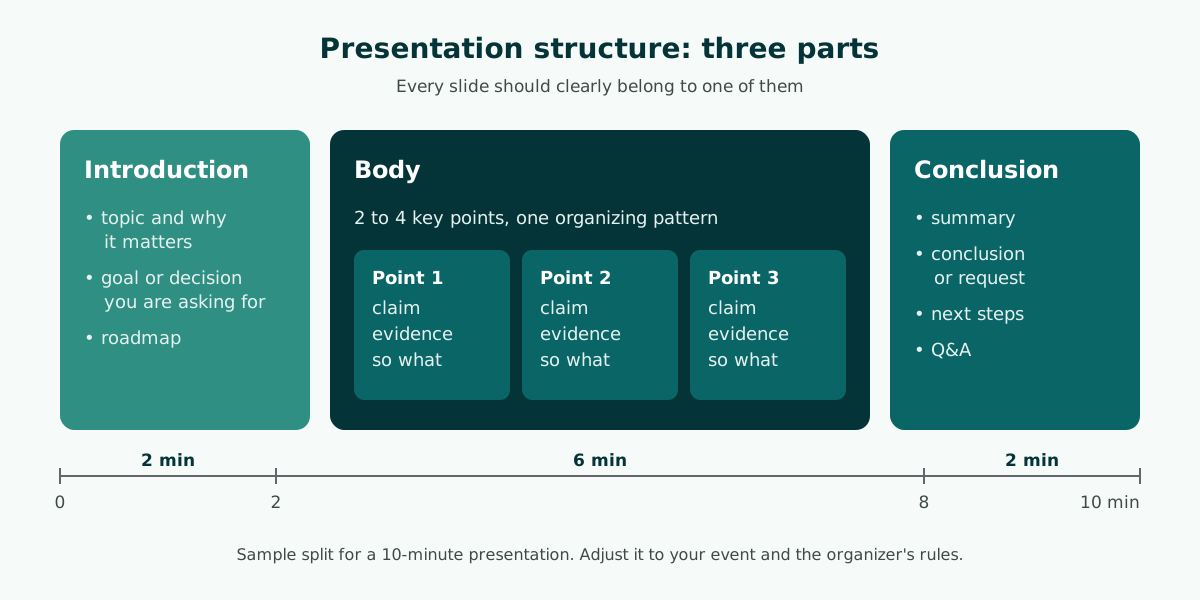
Presentation structure is the order of parts that takes your audience from "why should I listen?" to "what should I remember or do?" Nearly every effective presentation uses three parts: an introduction, a body, and a conclusion, followed by questions when the event allows them.
- Introduction sets out the topic, the goal, and a roadmap of what is coming. It is short.
- Body delivers two to four key points, each with evidence or an example. It is the longest part.
- Conclusion summarizes the points, states the conclusion or the decision you need, and opens the floor to questions.
This structure does not fix the number of slides. A five-minute update might have a one-slide introduction, while a thesis defense might have a body of a dozen slides or more. What matters is that every slide clearly belongs to one of the three parts. When you write those parts down as an ordered list with titles and minutes, you have a presentation outline, which is the practical tool this guide builds toward. Learning how to structure a presentation is mostly learning how to write that list well.
The introduction: topic, purpose, and roadmap
The introduction has one job: to let the audience know what they will get and why it matters to them. An introduction that runs too long, with layered greetings and a full career history, uses up attention before the content even starts.
A concise presentation introduction usually contains:
- A short greeting and who you are. Your name and role in one or two sentences.
- The topic and the reason. What you will cover and why it is relevant to this audience today.
- The goal. What you want after the talk: understanding, agreement, or a decision.
- A roadmap. The two to four points you will walk through, so people can follow the flow.
The roadmap is often skipped, yet it helps the audience most. The UNC Writing Center recommends building previews and summaries into a speech, and gives the example "I'm here today to talk to you about three issues that threaten our educational system: First, ... Second, ... Third." A simple line such as "I will cover three things: where we are now, our options, and my recommendation" tells people when one part ends and the next begins. Attention-grabbing openers, such as a question, a statistic, or a short story, are covered in the guide on how to start a presentation.
For a meeting where you need a decision, state the decision in the introduction, not only at the end. UNC's advice to tell listeners your thesis right away applies here: the chair can then listen to the body with the right question in mind.
How to structure the body: five organizing patterns
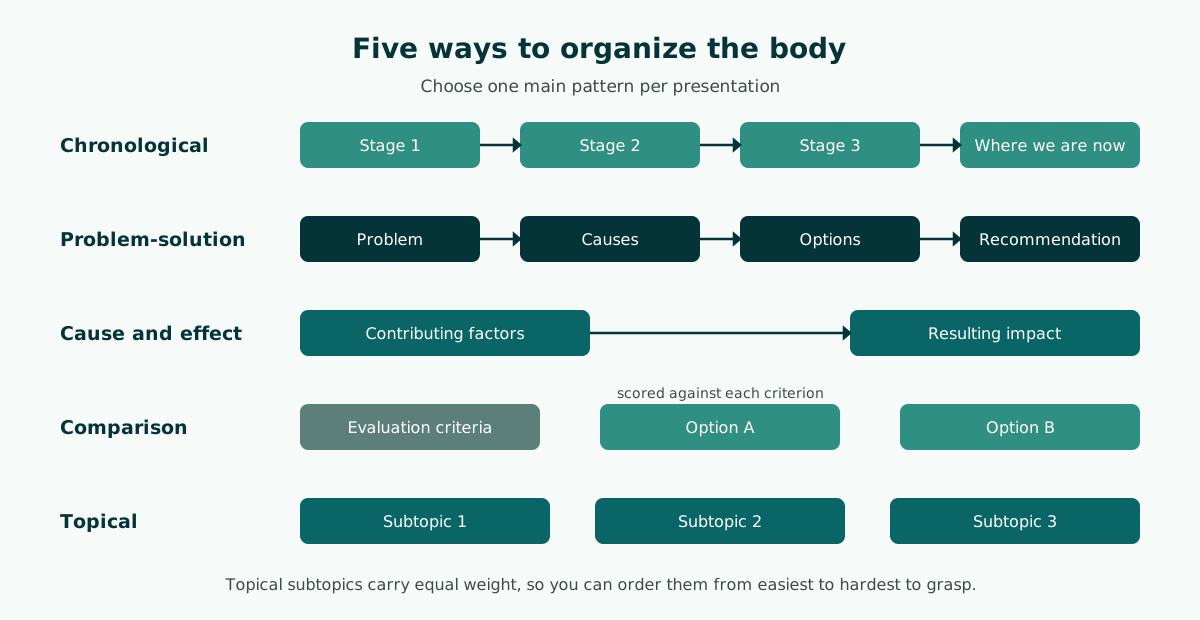
The body is where most of the time goes, and it is where presentations most often lose their way. The easiest way to keep the body in order is to choose one organizing pattern from the start. The table below summarizes the five patterns used most often.
Scroll the table sideways to see every column.
| Pattern | Order | Best for |
|---|---|---|
| Chronological | From first to last by time or stage | Project updates, activity reports, history |
| Problem-solution | Problem, causes, options, recommendation | Proposals, pitches, case studies |
| Cause and effect | Contributing factors, then the resulting impact | Analysis, explaining a trend |
| Comparison | Criteria first, then option A and B scored against each | Choosing a vendor, method, or product |
| Topical | Several equal subtopics covered one by one | Lessons, product introductions |
Whatever the pattern, limit the number of key points. The more points you add, the harder they are to remember. If your material has seven points, group them into three or four larger parts.
Each key point works best in three layers: the claim, the evidence or example, and what it means for the audience. For example, "Printing costs have risen" (claim), "the last three months of invoices" (evidence, filled in with your own data), and "next quarter's budget needs an increase" (so what). This layering gives every slide a reason to exist.
The conclusion: summary, request, and questions
The conclusion is the part the audience remembers best, yet it is often the most rushed because time runs out. Give it a fixed share of the time from the start so it never gets cut.
A complete presentation conclusion contains:
- A summary. Restate your key points on one slide, in the same order as your roadmap.
- The conclusion or the request. What the audience should remember, decide, or do next.
- Next steps. Who does what and by when, especially for meetings and pitches.
- Questions and thanks.
The UNC Writing Center recommends restating your main points in the conclusion without simply repeating them word for word. Microsoft Support suggests asking the audience to hold questions until the end, because you get through your material uninterrupted and early questions are often answered by later slides. In a thesis defense the examiners usually set that rule, so follow the format of the event.
One habit helps a lot: keep backup slides after the conclusion for detailed data you might be asked about. They stay hidden unless someone asks, so the body stays lean. Closing lines for different events are collected in the guide on how to end a presentation, and handling the question session calmly is covered in how to give a good presentation.
How to write a presentation outline
A presentation outline is the structure written down: an ordered list of slide titles grouped into introduction, body, and conclusion, with a few points and a number of minutes for each slide. Writing it before you open your slide software forces you to settle the flow first and design later.
- Write your key message in one sentence. Everything in the outline must support it.
- Note the audience, the goal, and the time limit. These decide how deep each point can go.
- Pick one organizing pattern for the body from the table above.
- List two to four key points and give each a slide title that states the point, not just the topic.
- Add the introduction and conclusion slides, including the roadmap and the request.
- Assign minutes to every slide and check that the total fits your slot with a small buffer.
- Run the title test. Read only the slide titles from first to last. If they tell the story in order, the structure is sound.
The outline then becomes your working document. Slide text comes from the points, speaker notes come from the evidence and examples, and the minutes become your target when you rehearse with a timer. The full process from outline to finished file is in the guide on how to make a PowerPoint presentation. If your material already exists as a report or paper, the guide to building a presentation from a document shows how to pick the parts that belong on slides.
Presentation outline example: a 10-minute meeting
The example below is a 10-minute team meeting outline about a four-day work week pilot, using the problem-solution pattern. Each line shows the slide title and its minutes, so the total can be checked at a glance. Square brackets mark data you must fill in yourself.
INTRODUCTION (2 min)
1. Purpose and decision needed ...................... 2 min

BODY (6 min)
2. Current status and pilot data: [pilot duration] .. 2 min
3. Key issues identified: [scheduling gaps] ........ 2 min
4. Options and recommendation ...................... 2 min

CONCLUSION (2 min)
5. Summary, decision, and next steps ............... 2 min
                                         Total: 10 min
Notice three things. The decision needed is named on the very first slide. The body follows one pattern: current status, issues, then options and a recommendation. The conclusion adds no new material; it summarizes and asks for the decision.
A blank presentation outline template
To build your own outline, copy this template and replace each bracket. It works for most talks between 5 and 20 minutes.
Key message: [one sentence the audience should remember]
Audience: [who]   Goal: [inform / agree / decide]   Time: [x min]

I.   INTRODUCTION ([x] min)
     A. Hook and why this matters to you
     B. Goal or decision needed
     C. Roadmap: [point 1], [point 2], [point 3]
II.  BODY ([x] min), pattern: [chronological / problem-solution / ...]
     A. [Point 1 as a sentence]: evidence, so what
     B. [Point 2 as a sentence]: evidence, so what
     C. [Point 3 as a sentence]: evidence, so what
III. CONCLUSION ([x] min)
     A. Summary in roadmap order
     B. Request or conclusion
     C. Next steps, then questions
Structure of a presentation by event type
The three parts stay the same, but what goes inside them changes with the event. The table below gives a common slide sequence for each. Treat the slide names as a starting point and follow your university, company, or organizer guidelines where they exist.
Scroll the table sideways to see every column.
| Event | Introduction | Body | Conclusion |
|---|---|---|---|
| Thesis defense | Title, background | Research questions, objectives, method, results, discussion | Conclusions, recommendations, thanks |
| Research proposal | Title, background | Research questions, objectives, literature review, method, timeline | Summary of the plan, request for feedback |
| Team or client meeting | Purpose, decision needed | Current status, issues, options, recommendation | Owners, deadlines, follow-up |
| Small-business pitch | Customer problem | Solution, product, market, proof, business model | The ask (funding or partnership), contact |
| Classroom lesson | Learning objectives, warm-up question | Concept, examples, practice | Reflection, summary, assignment |
Each event has its own guide: the thesis defense presentation page, the viva presentation page, the meeting presentation guide, the pitch deck guide, and the teaching presentation template.
Dividing time between the parts, for short and long talks
A good structure can still fall apart on timing. Microsoft Support advises not going over the time you planned, and if there is no time limit, taking less time rather than more so people stay engaged.
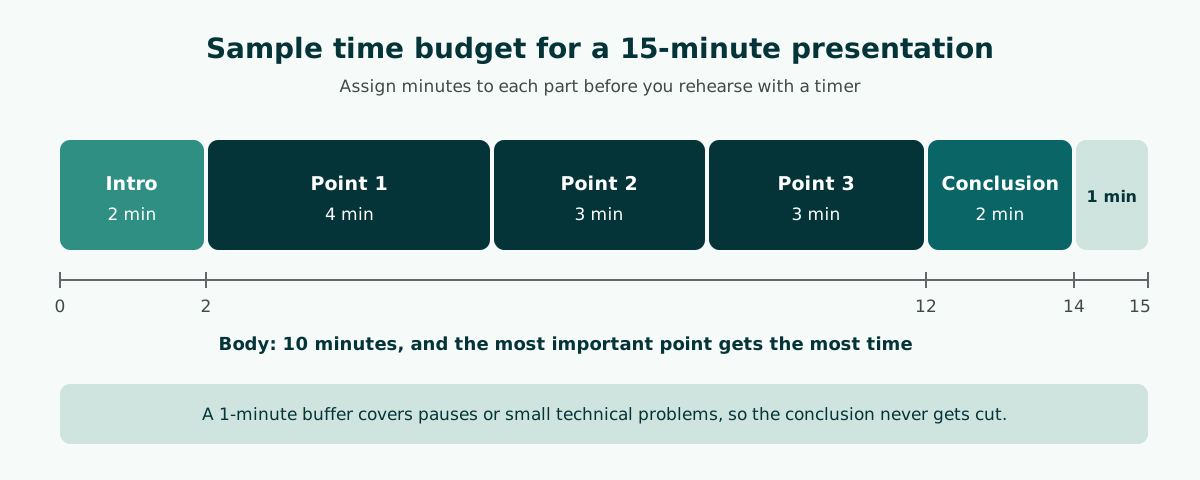
- Set aside a buffer. Keep one or two minutes for technical hiccups or pauses.
- Fix the introduction and conclusion. Both are short, but never zero. A cut conclusion loses the part people remember most.
- Split the rest across your key points. The most important point can take the largest share.
- Write the minutes on every slide. When you rehearse with a stopwatch, you will see which slide runs long.
Rehearsing with a timer is the most honest test of a structure. PowerPoint's Presenter View shows your speaker notes and a slide timer you can pause or reset, so you can track your pace without checking a watch. The guide to speaker notes in PowerPoint covers how to write notes that help.
Short talks and long presentations
Short talks (about 3 to 5 minutes), such as a quick update in a team meeting or a lightning pitch, have no room for many points. Use one key message, a one-sentence opening that names the problem, one strong piece of evidence, and a close that states the ask. Keep the slide count low, because every slide change costs attention.
Long presentations (30 minutes or more), such as a training session or an annual review, risk losing people along the way. Add section divider slides that show where you are in the roadmap, and close each major part with a one-sentence recap so anyone who drifted can catch up. UNC makes the same point: in longer speeches, keep reminding the audience of the main points you have made.
Map your structure with sections in PowerPoint
Structure does not have to live only in your head. PowerPoint has a Section feature that, according to Microsoft Support, works much like folders: you use sections to organize your slides into meaningful groups. It is a natural way to map the introduction, body, and conclusion directly in the file.
- In the thumbnail pane, right-click between two slides and select Add Section.
- Type a name such as "Introduction", "Body: Pilot data", or "Conclusion", then select Rename.
- Click the triangle next to a section name to collapse it. The numeral by the name shows how many slides that section holds.
- To move or delete a section, go to View and then Slide Sorter.
Sections pay off when several people build one deck. Each person can work on a section without scrambling the order, and the slide count beside each section shows at once when the body is too heavy for its time. When you polish the look of each section, the slide design principles help keep the parts consistent.
Common presentation structure mistakes
These mistakes make a presentation feel jumpy even when the content is correct.
- No roadmap. The audience does not know which part they are in or how much is left.
- A body without a pattern. Data, stories, and recommendations are mixed in random order.
- The conclusion only appears at the end. In meetings and pitches, people need to know your request from the start.
- A conclusion that adds new material. It should wrap up, not open another topic.
- Two messages on one slide. Split it into two slides with titles that state each message.
- No time budget. The early parts run long and the conclusion gets cut.
The quickest check is the title test from the outline section: read only the slide titles in order. If they tell a coherent story, the structure is healthy. If not, fix the order before you touch the design. Crowded slides also break the flow; the guide to readable presentation contrast covers how to keep slides legible.
Drafting a structured outline with Soluslide
Soluslide drafts a presentation outline from your topic, event type, and duration. The result is a set of slide titles, slide text, speaker notes, and minutes per slide, all editable before you sign in. The screenshot below comes from an outline for a 10-minute agency meeting about a four-day work week pilot, which is the basis of the outline example above.
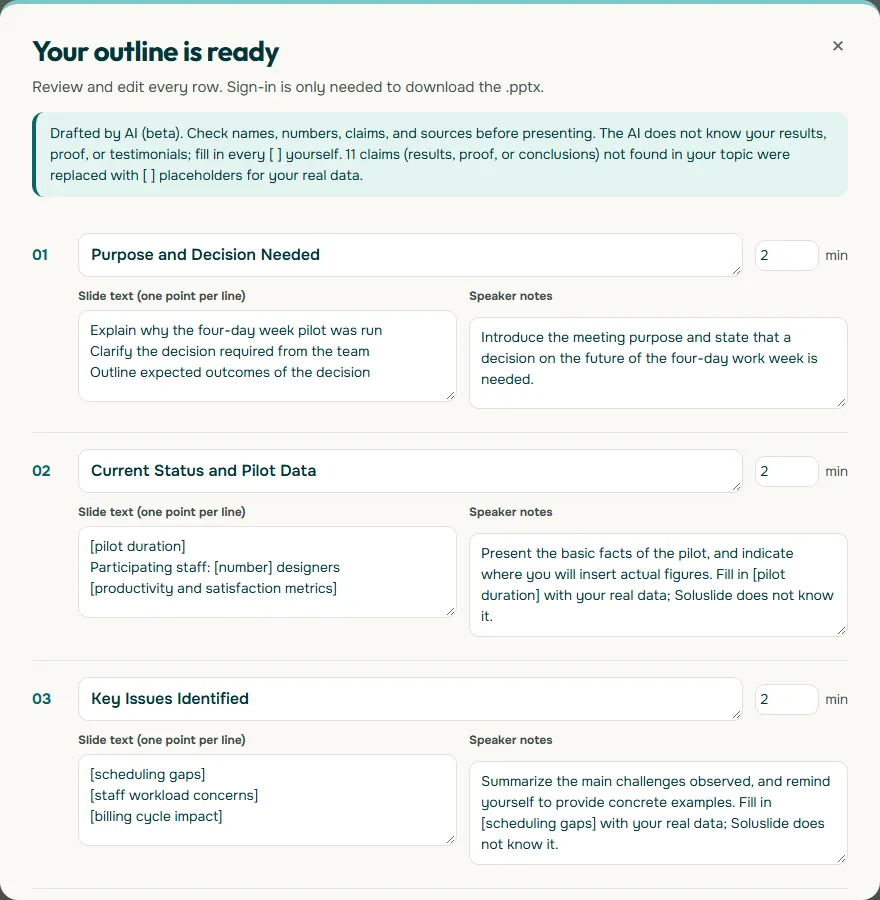
Notice that the outline marks unknown data with square brackets instead of inventing numbers. Fill those in with your real data, check the order with the title test, then download an editable .pptx file. Start from the outline builder, or see the features and the sample beta pricing.
Frequently asked questions
What is the basic structure of a presentation?
A presentation has three parts: an introduction, a body, and a conclusion. The introduction gives the topic, goal, and roadmap; the body covers two to four key points with evidence; the conclusion summarizes, states the request, and opens questions.
What is a presentation outline?
A presentation outline is an ordered list of slide titles grouped into introduction, body, and conclusion, with a few points and minutes for each slide. It lets you fix the flow before you design anything.
How do you structure a presentation?
Write your key message, choose one organizing pattern for the body, list two to four key points, then add an introduction with a roadmap and a conclusion with a summary and request. Finish by assigning minutes to every slide.
What should be in the introduction of a presentation?
A brief greeting and who you are, the topic and why it matters to this audience, the goal of the talk, and a roadmap of the two to four points you will cover.
What are the five ways to organize a presentation?
Common patterns are chronological, problem-solution, cause and effect, comparison, and topical. Proposals and pitches usually suit problem-solution, while lessons often suit the topical pattern.
How long should the introduction and conclusion be?
There is no fixed number, but both should be short compared with the body and planned in advance. For example, a 10-minute talk might use 2 minutes for the introduction, 6 for the body, and 2 for the conclusion.
What is the structure of a thesis defense presentation?
A common sequence is title, background, research questions, objectives, method, results, discussion, conclusions, recommendations, and thanks. Always follow your department's guidelines if they set a specific format.
When should questions be taken in a presentation?
Microsoft Support suggests asking the audience to hold questions until the end so you finish your material uninterrupted. For defenses and formal events, follow the rules set by the examiners or organizers.
How can I quickly check if my presentation structure works?
Read only the slide titles from first to last. If they tell the story in order and each slide clearly belongs to the introduction, body, or conclusion, the structure is sound.
Sources
Factual claims in this article refer to the sources below. Sample outlines and prompts are illustrations to adapt.
Related reading
Try shaping your own outline. You can review and edit it before signing in.
Build a free outline