
How Many Slides for a 10-Minute Presentation (and 5 or 20)
The honest answer is "it depends on how long each slide stays up", but that can be turned into numbers. This guide gives you slide counts for 5, 10, and 20 minute talks, the formula behind them, and a quick way to check the plan with a stopwatch.

How many slides for a 10-minute presentation: the short answer
For a 10-minute presentation, plan roughly 5 to 10 slides. That range comes from giving each slide between one and two minutes of speaking time, which is the pace most university presentation guides recommend. Use the low end when your slides carry charts, data, or a concept you have to explain; use the high end when most slides are a single photo, a short statement, or a quick example.
The same logic scales to other lengths. A 5-minute talk usually fits 3 to 5 slides, and a 20-minute talk fits about 10 to 20. If your slot includes questions, subtract that time first, because nobody presents new slides during Q&A.
Scroll the table sideways to see every column.
| Talk length | Light visual slides (about 1 min each) | Standard slides (about 1.5 min each) | Dense data or teaching (2 to 3 min each) |
|---|---|---|---|
| 5 minutes | 4 to 5 | 3 to 4 | 2 to 3 |
| 10 minutes | 8 to 10 | 6 to 7 | 4 to 5 |
| 20 minutes | 15 to 20 | 12 to 13 | 7 to 10 |
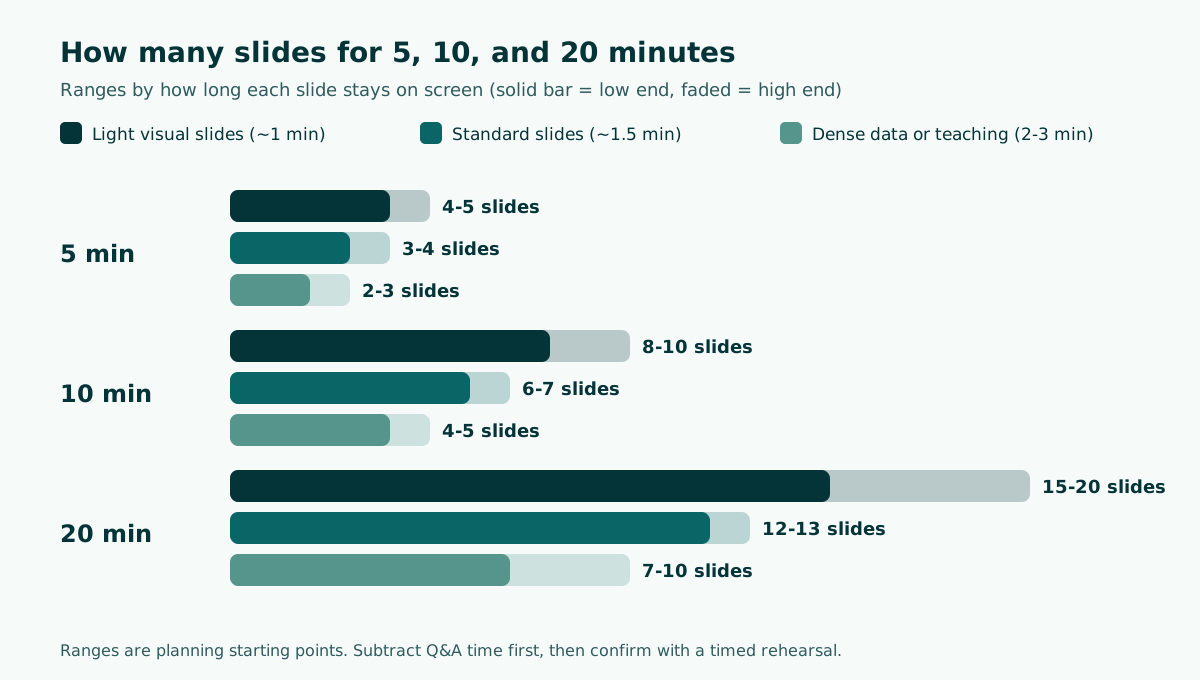
Treat these numbers as a first draft, not a rule. The rest of this guide explains where they come from, how to adjust them for your event, and how to confirm them in one rehearsal.
Why there is no single slides-per-minute rule
Search for "slides per minute" and you will see confident answers ranging from one slide every 30 seconds to one slide every three minutes. They are not contradicting each other as much as it seems; they describe different kinds of talks.
- One slide every two minutes on average. A presentation guide from the University of Central Florida lists this as a guideline, alongside the advice that most slides should carry a table or figure.
- One to two minutes per slide. The DePaul University oral presentation guidelines say the pace should average one or two minutes per slide. If a slide needs more than two minutes, it is probably better split across several; if several slides each take less than a minute, they can be condensed.
- It depends on the setting. A University of Washington presentation on giving talks suggests at most one slide per minute for science talks and one slide per two to three minutes for teaching, fewer when the session is interactive.
- Ten slides in twenty minutes. Guy Kawasaki's well-known 10/20/30 rule for pitches says a deck should have ten slides, last no more than twenty minutes, and use no font smaller than thirty points. That works out to two minutes per slide.
Put together, the useful middle ground is one to two minutes per slide, with the exact figure set by how much each slide asks the audience to absorb. A results chart in a thesis defense presentation needs time; a photo that sets the scene does not.
The formula: work backwards from your time slot
Instead of guessing a number of slides and hoping it fits, start from the clock and divide. The calculation has three steps.
- Find your speaking time. Take the slot you were given and subtract Q&A and any setup or handover time. A "10-minute slot" with 2 minutes of questions leaves 8 minutes of talking.
- Choose minutes per slide. Use about 1 minute for light visual slides, about 1.5 minutes for standard slides with a heading and a few points, and 2 to 3 minutes for dense charts, worked problems, or teaching material.
- Divide and round down. Speaking time divided by minutes per slide gives your content slides. Rounding down leaves a small buffer for the moment you inevitably talk longer than planned.
slides = (slot minutes - Q&A minutes - buffer) / minutes per slide

5-minute lightning talk, no Q&A:   (5 - 0 - 0.5) / 1.5  = 3 slides
10-minute update, 2 min Q&A:      (10 - 2 - 0.5) / 1.5 = 5 slides
20-minute talk, 5 min Q&A:        (20 - 5 - 1) / 1.5   = 9 slides
A title slide and a closing slide usually stay on screen while you say a sentence or two, so many presenters do not count them against the budget. Count them if your title slide doubles as the opening, where you introduce the problem; that opening often takes a full minute. Our guide on presentation structure explains how to divide time between the introduction, body, and conclusion before you even open PowerPoint.
How many slides for a 5-minute presentation
Five minutes feels short until you stand up, and then it disappears. Plan 3 to 5 slides, and fewer if any of them carries a chart. A practical layout is one opening slide that states the point, two or three slides that each support it with one piece of evidence, and one closing slide with the takeaway or request.
Short talks punish detours. If you are tempted to add a sixth slide "just in case", put that material in your speaker notes or a backup slide after the closing slide instead, so you can show it only if someone asks. The article on speaker notes in PowerPoint shows how to keep those reminders out of the audience's view.
Two habits make five minutes work. First, write the opening sentence word for word and rehearse it until it is automatic, because the first thirty seconds set your pace; see how to start a presentation for opening lines that get to the point fast. Second, decide in advance which slide you will skip if you run long. Knowing your sacrifice slide is far calmer than speeding up in the last minute.
How many slides for a 10-minute presentation, minute by minute
Ten minutes is the most common slot for class presentations, team updates, conference lightning sessions, and proposal pitches. It gives you room for a real structure: an opening, three main points, and a close. With 2 minutes reserved for questions, that comes to about 5 to 8 slides.
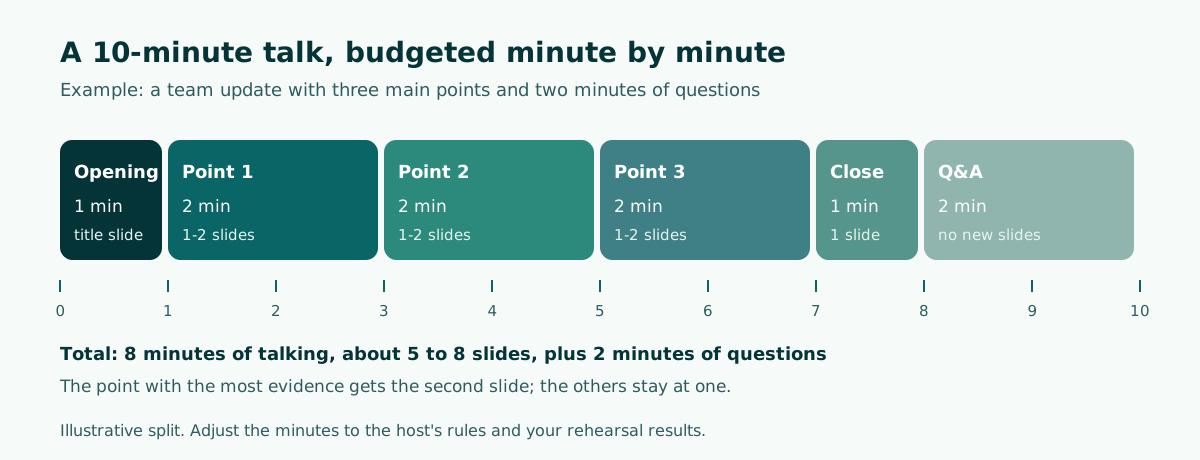
In this budget, each main point gets two minutes, which is enough for one slide with a claim and one with the evidence behind it. Only the point with the most data needs that second slide; the others can stay at one. That keeps the deck between 5 and 8 slides rather than drifting toward 12.
If you present as a team, divide the minutes before you divide the slides. Three speakers sharing ten minutes means roughly two and a half minutes each, so each person owns two or three slides at most. Our group presentation guide covers handovers so the switches do not eat into the clock. For internal meetings where the goal is a decision, the structure in meeting presentations that lead to decisions puts the request on slide two, not slide eight.
How many slides for a 20-minute presentation
Twenty minutes is long enough that the audience needs signposts. Plan 10 to 20 slides depending on density, and treat the talk as three or four sections of five to six minutes rather than one long run.
The 10/20/30 rule is a useful sanity check here: Kawasaki argues ten slides are enough for a twenty-minute pitch, because an audience cannot follow more than about ten concepts in one meeting. If you are presenting to investors or partners, start from ten and add slides only when a section truly needs a chart of its own. Our pitch deck guide lists the parts most small-business decks need.
For lectures and training sessions, the University of Washington guidance points the other way: one slide per two to three minutes, fewer if the session is interactive. A 20-minute lesson with an exercise might need only seven or eight slides, because the exercise itself takes time and needs no new visuals. The teaching presentation template shows how to plan those activity breaks.
In longer talks, add a simple agenda slide after the opening and a one-line recap at the end of each section. They cost very little time and help listeners who drift for a moment find their way back.
What should change your slide count
The formula gives you a starting number. These factors push it up or down:
- Density. A slide with one chart and its takeaway needs time for the audience to read it before you talk over it. Dense slides lower the count; simple visuals raise it.
- Animations and builds. If you reveal points one at a time, one slide can do the work of three. Count the reveals, not just the slides. See PowerPoint animation for when step-by-step reveals help.
- Video. A 45-second clip takes 45 seconds of your budget, plus a moment to introduce it. Add it to the timeline as its own block.
- Audience and purpose. Examiners at a defense expect method and results slides they can question. A pitch audience wants fewer slides and more conversation. A class benefits from pauses.
- Readability. If you are tempted to squeeze two slides into one to stay under a number, check whether the text is still legible from the back row. The guide to readable presentation contrast explains why a crowded slide costs more time than it saves.
The goal is never the number itself. A 10-minute talk with 7 clear slides beats one with 10 slides you rush through, and both beat 15 slides where the presenter apologises for skipping half of them.
Check the plan with Rehearse Timings in PowerPoint
The only way to know whether your count fits is to time a full run. PowerPoint has a built-in tool for this. According to Microsoft Support, you select Slide Show > Rehearse Timings, then advance with Next, a mouse click, or the Right Arrow key while the time for the current slide is shown. At the end you can keep or discard the timings, and View > Slide Sorter shows the time recorded for each slide.
One caution from the same page: recorded timings can advance your slides automatically. Before the real presentation, open Set Up Slide Show and choose to advance slides Manually, unless you actually want an automatic show.
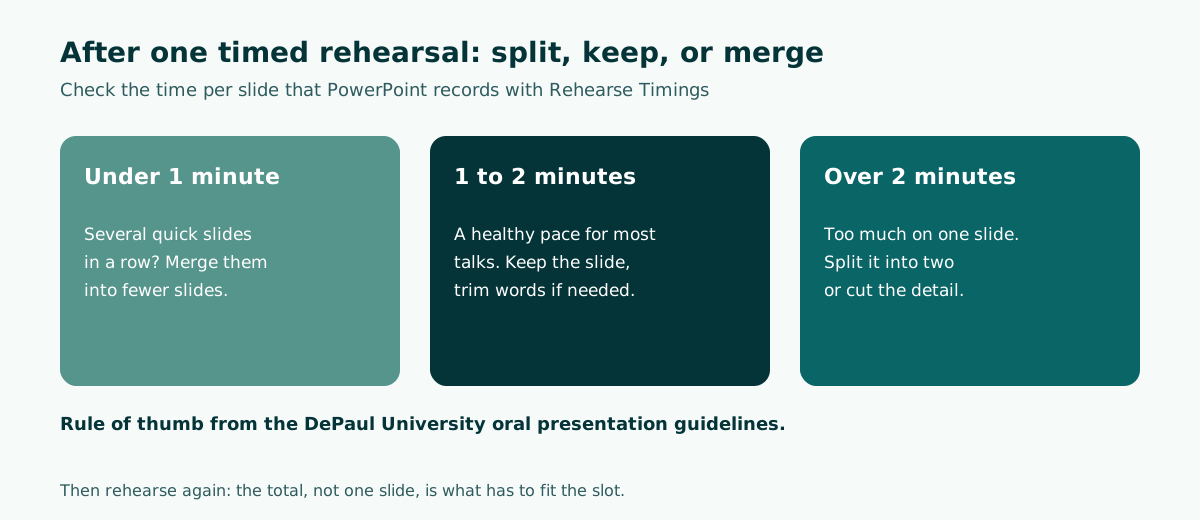
Read the Slide Sorter times with the DePaul rule in mind. A slide that took more than two minutes probably holds two ideas and should be split, or trimmed. A run of slides that each took under a minute can often be merged. Then rehearse again, because the total is what has to fit.
If you want feedback beyond the stopwatch, Microsoft's Speaker Coach gives feedback on pace, filler words, and monotone while you rehearse in the desktop apps. It is a useful second check on whether you are rushing to fit too many slides.
Worked example: a 10-minute team update
Here is a complete plan for a 10-minute slot with 2 minutes reserved for questions, using about 1.5 minutes per standard slide. Notice that the title slide also carries the opening, and the evidence slide exists only for the point that needs a chart.
Slot: 10 minutes  |  Q&A: 2 minutes  |  Speaking time: 8 minutes

1. Title + purpose: what this update is for and the decision needed   (1 min)
2. Point 1: where response times stand this quarter                    (1.5 min)
3. Evidence: chart of weekly response times                            (1.5 min)
4. Point 2: the two causes behind the slowest weeks                    (1.5 min)
5. Point 3: proposed fix and what it costs                             (1.5 min)
6. Close: the decision we need today                                   (1 min)
   Q&A, with a backup slide of raw numbers if asked                   (2 min)

Total: 6 slides, 8 minutes of talking
Six slides look thin on paper, but in the room they feel complete, because every slide earns its time. If the rehearsal shows slide 5 running to three minutes, split the fix and the cost into separate slides and shorten slide 2. If you finish in six minutes, you have room for one example on slide 4, not five more slides.
The closing slide matters more than its one minute suggests. The guide on how to end a presentation shows how to finish on the request rather than a generic "thank you".
Plan the minutes before you design the slides
Most timing problems start when people design slides first and count minutes later. Reversing that order is the simplest fix: write the outline with a minute value next to every slide, add them up, and only then open a template.
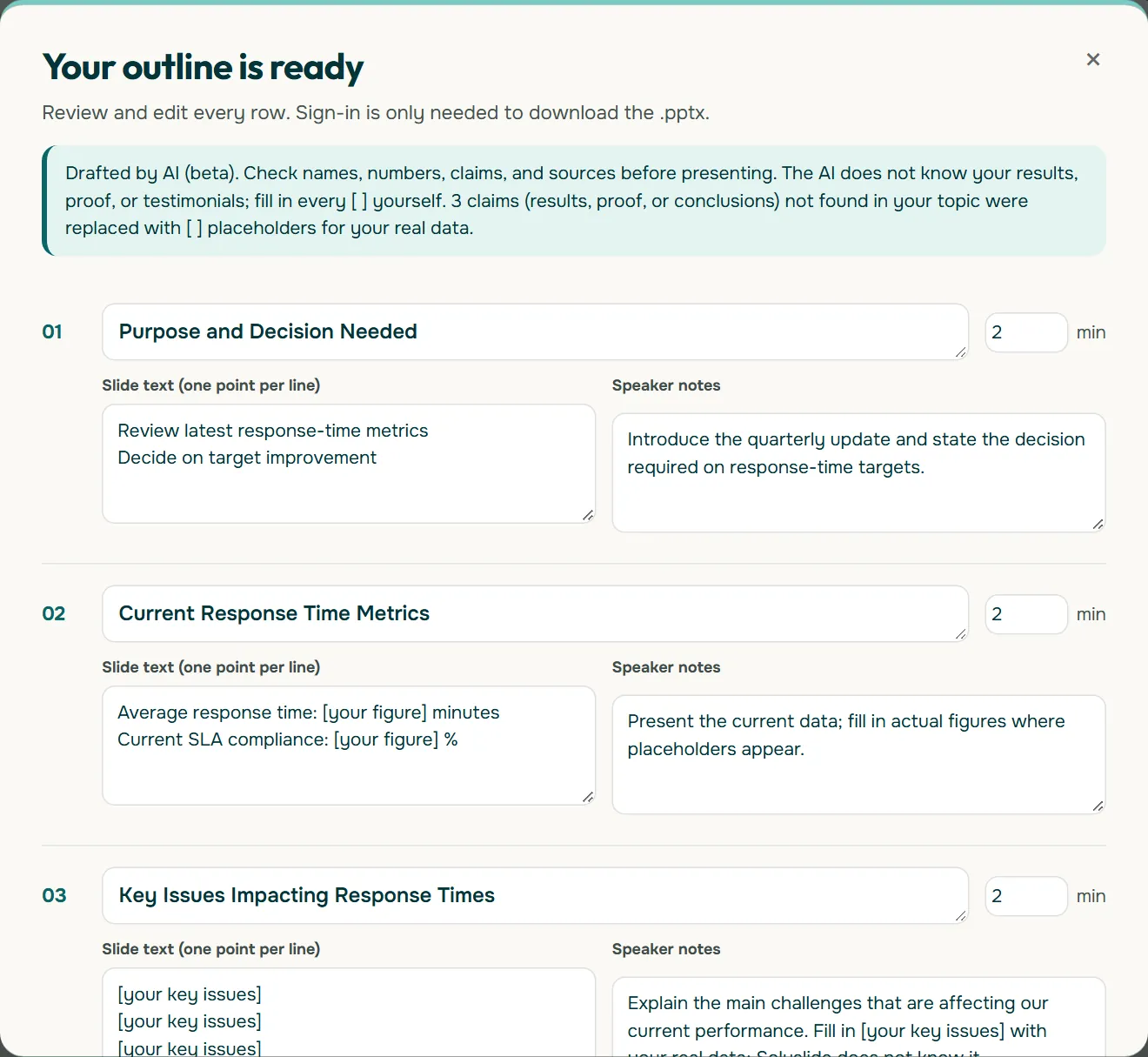
Soluslide works this way. You enter a topic, pick the event type, and set the duration, and it drafts an outline where every slide has a title, speaker notes, and its own minutes. You can edit the rows and the minutes before signing in, then export an editable .pptx when the timing adds up. You can try the outline builder with your own topic, or read about the features and how the AI prompt brief affects the result. Whatever tool you use, rehearse once with a timer before the real thing.
Frequently asked questions
How many slides for a 10 minute presentation?
Plan about 5 to 10 slides, giving each one to two minutes. Use fewer if your slides carry charts or data, and subtract Q&A time before you count.
How many slides for a 5 minute presentation?
Usually 3 to 5 slides: an opening, two or three supporting slides, and a close. Keep extra material in backup slides after the closing slide.
How many slides for a 20 minute presentation?
About 10 to 20 slides depending on density. For a pitch, ten slides in twenty minutes (the 10/20/30 rule) is a good starting point.
Is one slide per minute a good rule?
It is a reasonable upper limit for simple visual slides, but many university guides recommend one to two minutes per slide. Dense or teaching slides need two to three minutes.
Do I count the title slide and closing slide?
Count them if you speak over them for a minute or more, for example when the title slide carries your opening. A title slide shown for ten seconds can be left out of the budget.
How do I know how long each slide takes?
Use Slide Show, Rehearse Timings in PowerPoint and run the whole talk. Slide Sorter view then shows the time recorded for each slide.
What if I have more content than slides?
Move detail into speaker notes or backup slides after the close, and keep only what supports your main points. A slide that needs more than two minutes can be split into two.
Should Q&A time be part of the slide count?
No. Subtract Q&A from your slot first, because you do not present new slides while answering questions. Count only your speaking time.
Sources
Factual claims in this article refer to the sources below. Sample outlines and prompts are illustrations to adapt.
- DePaul University: Oral Presentation Guidelines (Undergraduate Research Showcase)
- University of Central Florida: Presentation guidelines (PresentationWriting.pdf)
- University of Washington (Moritz 2018): giving talks
- Guy Kawasaki: The 10/20/30 Rule of PowerPoint
- Microsoft Support: Rehearse and time the delivery of a presentation
- Microsoft Support: Rehearse your slide show with Speaker Coach
Related reading
Try shaping your own outline. You can review and edit it before signing in.
Build a free outline