
Group Presentation Guide: Split the Content, Time, and Roles
Most group presentations sound like four short talks stapled together. This guide shows how to turn them into one: agree on a single message and outline, give every speaker a fixed number of minutes, keep one deck in one style, script the handoffs, and rehearse until anyone can cover for anyone.

How to do a group presentation, in short
A strong group presentation has one storyline, one slide style, and a clear time budget for every speaker. In practice: agree on the core message and a shared outline, split the sections and minutes per person, name one person to own the final deck, write a handoff line between speakers, and rehearse the whole thing together with a timer until it fits.
Many teams work in the opposite order. Everyone builds their own slides, the files are merged the night before, and the first full run happens in front of the class or the client. The symptoms are familiar: three different fonts, the same point explained twice, and a last speaker who has to sprint because the clock ran out.
University study guides agree on the fix. London Metropolitan University tells groups to decide who will deliver which parts, rehearse together, learn each other's parts, and be ready to stand in if someone drops out. Southern Cross University breaks the work into four stages, from early contact to a final rehearsal. The sections below turn that advice into steps you can use for a class project, a team meeting, or a pitch with colleagues.
The four stages of preparing a group presentation
The Presenting in Groups quick guide from Southern Cross University organizes preparation into four stages. Each stage ends with something concrete, so the group always knows what "done" looks like before moving on.
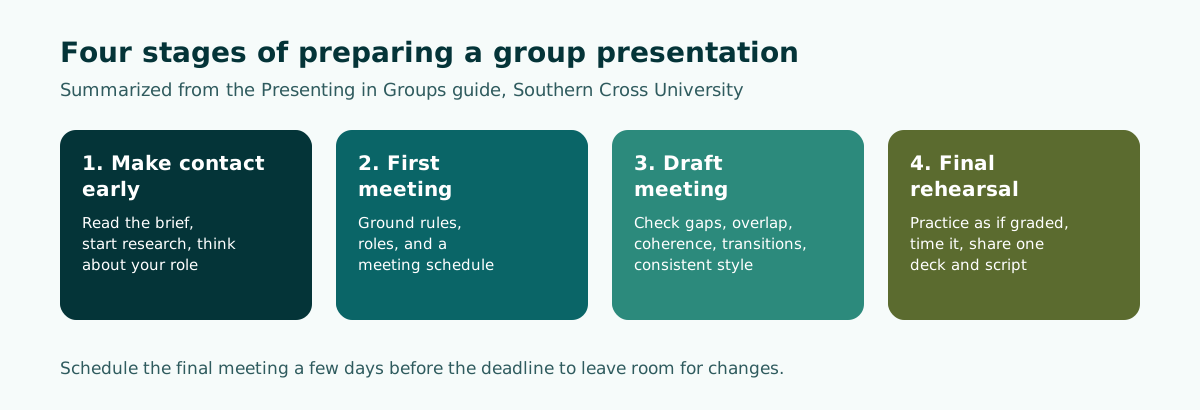
- Make contact early. Reach your teammates as soon as possible and set up a first meeting. Before it, everyone reads the assignment brief and rubric, starts preliminary research, and thinks about the role that suits them.
- First meeting. Set ground rules (how you will communicate, how decisions are made, what happens if someone goes quiet), assign roles, and book at least two more meetings.
- Draft meeting. Each member brings draft slides and a first script. The group checks for gaps, overlap, a coherent order, source quality, smooth transitions, and a consistent style.
- Final rehearsal. Practice as if you were being assessed, time the full run, give feedback, and leave with one shared deck and one script that every member has.
The same guide recommends holding the final meeting at least a few days before the deadline. That buffer is what lets you fix a weak section calmly instead of rewriting it at midnight.
Splitting the content: from one message to individual sections
Good splits start from the outline, not from the head count. If the group opens with "you take chapter one, I take chapter two", every speaker writes their own intro and conclusion and the talk loses its thread.
A safer sequence:
- Write the core message in one sentence, for example "A cold brew stand on campus is worth piloting because demand exists and start-up costs are low."
- Build a shared outline with an opening, a body, and a close. Common patterns are covered in our guide to presentation structure.
- Break the body into blocks that each answer one question.
- Only then put a name next to each block.
Southern Cross University suggests playing to each member's strengths, and notes that it can be especially effective to open and close with your most confident speakers. The teammate who loves research can own the data section, while the one with an eye for layout can own the final deck.
Avoid splits where someone only presents the title slide. Beyond being unfair, many instructors assess individual contribution. The University of Roehampton's study skills hub stresses a fair division of tasks and making sure each member contributes equally.
Splitting the time per speaker, including Q&A
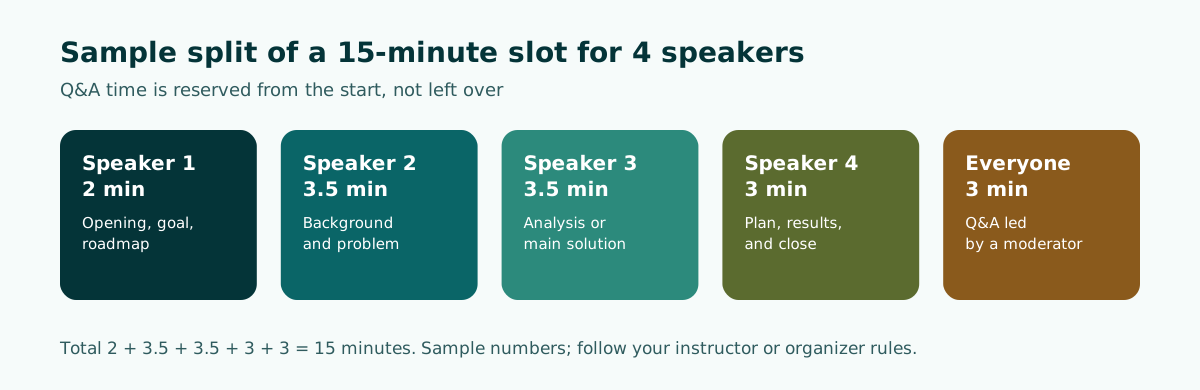
Time is the most common source of friction in a group talk. The first speaker gets excited, the last one gets squeezed. The fix is to write the minutes for each section into the outline from day one, and to reserve Q&A time up front instead of treating it as whatever is left.
Scroll the table sideways to see every column.
| Total slot | Opening | Body (shared) | Close | Q&A |
|---|---|---|---|---|
| 10 minutes, 3 speakers | 1.5 min | 4.5 min | 1.5 min | 2.5 min |
| 15 minutes, 4 speakers | 2 min | 7 min | 3 min | 3 min |
| 20 minutes, 5 speakers | 2 min | 11 min | 3 min | 4 min |
These budgets are a starting point we put together, not a rule. Some instructors run Q&A separately from the presentation slot, so check the brief.
Put your minutes in your speaker notes and appoint one timekeeper who gives a quiet signal when someone runs over. To write notes that keep you on track without turning into a script you read aloud, see our guide to speaker notes in PowerPoint.
Support roles every group needs
Besides splitting the content, a well-run group assigns a few support roles. One person can hold more than one role, but each role needs a clear owner.
Scroll the table sideways to see every column.
| Role | Main job | When it matters most |
|---|---|---|
| Coordinator | Books meetings, tracks deadlines, records decisions | From the first meeting |
| Deck owner | Merges slides and aligns fonts, colors, and layouts | After the draft meeting |
| Timekeeper | Times rehearsals and signals during the real run | Rehearsal and presentation day |
| Q&A moderator | Takes questions and routes each one to the right teammate | Q&A |
| Slide operator | Advances slides on the speaker's cue | Presentation day, if speakers do not hold the clicker |
Southern Cross University asks groups to decide how they will coordinate and finalize the joint slideshow, for example by agreeing on themes and fonts, or by electing one person to take charge of the final draft so the formatting stays consistent. The deck owner is the role teams forget most often, yet it is the one the audience notices first.
Roehampton's guidance adds that roles can follow strengths and interests, such as leader, researcher, writer, or presenter, as long as everyone contributes equally.
One deck, one style
Your audience does not care who built which slide. They see one presentation. Work from a single file, or at least from one shared template.
- Agree on the template at the first meeting: heading and body fonts, main colors, logo position, and chart style.
- Edit together when you can. London Metropolitan University notes that a PowerPoint file saved to OneDrive lets group members edit the same presentation at the same time.
- Use the slide master for repeated elements such as the logo and slide numbers, so nobody nudges them out of place by accident.
- Check readability on the room's projector, especially color contrast and font size. Our guides to readable contrast and slide design go deeper.
A single file also protects you when someone cannot show up. Southern Cross University recommends ending the final meeting with one group slideshow and script distributed to all members, so another member can stand in if someone is absent on the day.
Settle the slide size early, based on the screen you will present on. The difference between 16:9 and 4:3 is explained in our PowerPoint slide size guide.
Smooth handoffs between speakers
The most awkward moments in a group talk are rarely in the content. They happen between speakers: long pauses, pointing at each other, or "wait, who's next?" Southern Cross University lists transitions among the things to check at the draft meeting, with a simple tip: speakers can briefly introduce the next speaker and their topic.
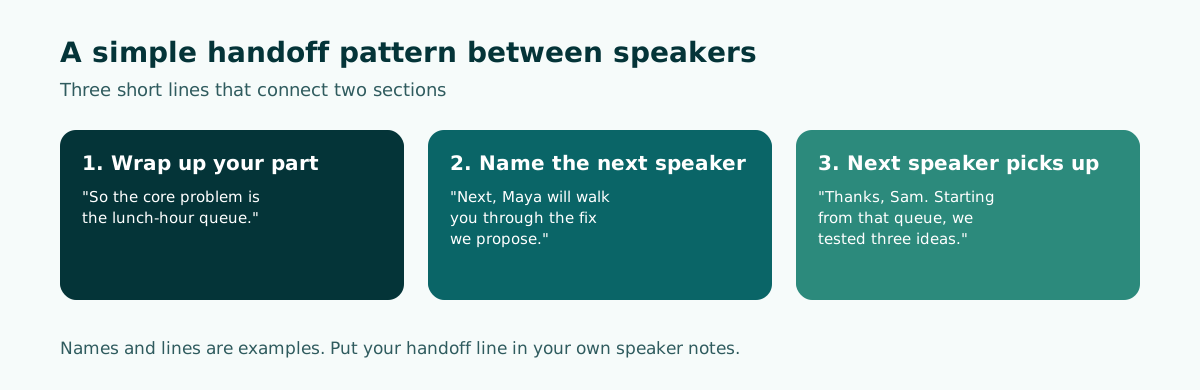
The pattern has three short lines:
- The outgoing speaker sums up their section in one sentence.
- They name the next speaker and what that person will cover.
- The new speaker picks up from that last line instead of greeting the room again.
Write your handoff into your own speaker notes and rehearse it as a team. Practice the physical switch too, especially in a tight room, so the next speaker is already near the screen when their name is called. For the very first and last minutes of the talk, use our guides on how to start a presentation and how to end a presentation.
Rehearsing together and handling Q&A
Solo practice is not enough for a group talk. The total time, the handoffs, and who answers which question can only be tested when everyone rehearses together.
- Run one: go through the whole talk with a stopwatch and note each section's minutes.
- Fix: trim sections that run long and simplify crowded slides.
- Run two: focus on handoffs and where each person stands.
- Mock Q&A: ask a friend outside the group to fire questions at you.
London Metropolitan University suggests practising in front of friends, inviting their questions, and asking for constructive feedback. It also points to Speaker Coach in PowerPoint, which gives feedback on pacing and speaking habits after a rehearsal. The University of Southern Queensland's guide warns that nerves often make people rush, which makes it hard for the audience to follow.
For Q&A, agree on one simple rule: the moderator takes each question and hands it to the teammate who owns that section. Others can add to the answer once the first answer is finished, not halfway through. If a question falls outside your material, say so honestly and offer a written follow-up.
If your group is presenting over a video call, add one rehearsal in the actual meeting app. Decide who shares the screen for the whole session, since switching sharers mid-talk wastes time and can expose windows nobody meant to show. Speakers who are not talking stay muted, and the next speaker unmutes when their name is called in the handoff. For general delivery tips, see how to give a good presentation.
Common group presentation mistakes
These mistakes cost groups marks even when the research is solid.
- Merging slides on the last night. Styles clash and nobody has time to catch overlap.
- Every section has its own intro. The audience hears "hi, I'm..." four times.
- No written time budget. The last speaker always pays for it.
- Knowing only your own part. One absence and the group is lost.
- Q&A without a moderator. Two people answer at once, or everyone stares at each other.
- Reading the slides. Text-heavy slides pull speakers into reading instead of explaining.
Almost all of these can be caught at the draft meeting, as long as people bring real slides and scripts rather than plans. If your slides tend to be dense, our guide on how to make a PowerPoint presentation helps you cut each slide back to one idea.
Sample outline for a 15-minute group presentation
Here is a sample outline for an entrepreneurship class project with four members. The topic is invented, but the structure transfers to most group assignments and team updates.
Topic: Business plan for a campus cold brew stand (15 minutes, 4 speakers)
Slide 1    (Speaker 1, 2 min)    Title, team, goal, roadmap
Slides 2-3 (Speaker 2, 3.5 min)  Background and problem: [your demand data]
Slides 4-5 (Speaker 3, 3.5 min)  Solution: product, price, location
Slides 6-7 (Speaker 4, 3 min)    Start-up costs, risks, conclusion, ask
Q&A        (Moderator: Speaker 1, 3 min)
Handoffs: each speaker ends with a one-line summary + the next speaker's name
Square brackets mark data the group must supply from its own research. Never fill in demand figures or revenue forecasts without a source.
You can draft an outline like this quickly in Soluslide: enter the topic, pick the event type, and set the duration, and you get a slide list with titles, bullet text, speaker notes, and estimated minutes per slide that you can edit before signing in. Those per-slide minutes make it easy to divide the time between speakers.
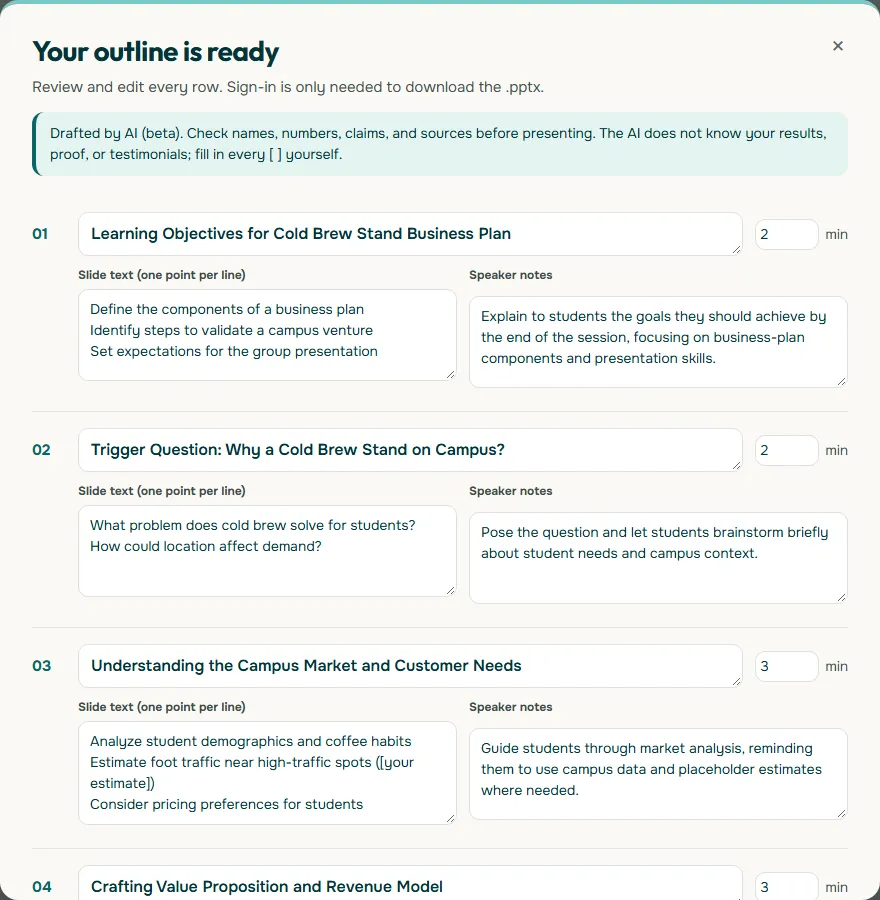
Once the group agrees on the outline, you can sign in to the beta and download an editable .pptx, then polish it together in PowerPoint. Start from the Soluslide outline builder, see the features, or read our guide for students using AI presentation makers.
Frequently asked questions
How do you divide a group presentation?
Agree on the core message and a shared outline first, break the body into blocks that each answer one question, and then assign each block to a member. Take each person's strengths into account.
How many minutes should each person speak in a group presentation?
There is no fixed rule. Subtract Q&A time from the total slot, give short slots to the opening and close, and divide the rest among the body speakers. Follow your instructor's or organizer's rules if they set one.
Who should open a group presentation?
Southern Cross University suggests opening and closing with your most confident speakers. The opener should also give a short roadmap so the audience can follow the speaker changes.
How do you transition between speakers?
The outgoing speaker sums up in one sentence and names the next speaker and their topic, then the new speaker picks up from that line without greeting the room again. Write the line into your speaker notes and rehearse it.
Should a group use one PowerPoint file?
Yes, or at least one shared template. A single file keeps the style consistent and lets someone else present a section if a member is absent.
How many times should a group rehearse together?
At least one full timed run and one more focused on handoffs and Q&A. Practising in front of a friend who asks questions helps you prepare for the real Q&A.
What if a group member is absent on presentation day?
Plan for it during rehearsal: every member learns the other sections and keeps a copy of the shared deck and script, so someone can step in.
Can Soluslide split the outline between group members?
Soluslide drafts an outline with editable minutes per slide, which a group can use to divide the time. Assigning names and editing the file together still happens in PowerPoint or another tool.
Sources
Factual claims in this article refer to the sources below. Sample outlines and prompts are illustrations to adapt.
Related reading
Try shaping your own outline. You can review and edit it before signing in.
Build a free outline