
Short Presentation Examples: 3, 5, and 7 Minute Outlines
Short presentations that work follow a simple formula: a one-sentence opening, three points with evidence, and a close that asks for something.
Short presentation examples and the basic formula
A short presentation is a talk of roughly three to ten minutes that has to deliver one clear purpose. The most common examples are a five-minute class presentation, a seven-minute progress update in a meeting, a three-minute pitch, and a quick self-introduction to a new team.
Almost every short presentation that works follows the same formula: a one-sentence opening, three main points, and a close that asks for something. The opening names the topic and why the audience should care. The three points carry the content, each with one piece of evidence or an example. The close sums up and makes a request, such as a decision you need or one action the audience should try.
In this guide you will find real outline examples for five-minute and seven-minute presentations built in Soluslide, a sample three-minute pitch script, a time split down to the second, and the mistakes that most often push short talks over time. You can copy every example and adapt it to your own topic.
Why short presentations are actually harder
Many people assume a short talk is easier because there are fewer slides. In practice, a short presentation forces you to choose. In a 30-minute talk, one weak point barely shows. In five minutes, one extra point can take a fifth of your time and squeeze out the close.
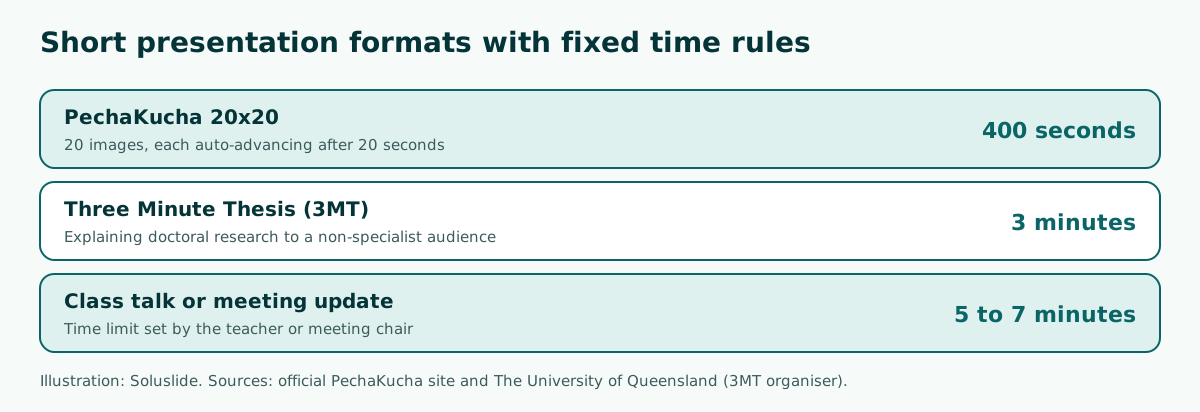
An extreme example is the Three Minute Thesis (3MT) competition developed by The University of Queensland. Doctoral students explain their research in three minutes, in language a non-specialist audience can follow. The official site puts the challenge plainly: an 80,000-word thesis would take nine hours to present, and the time limit is three minutes.
The lesson carries over to class talks and meetings. Know your single main message before you build the first slide, cut detail that only interests you, and rehearse with a timer. The presentation structure guide covers a general framework you can compress for shorter slots.
Scroll the table sideways to see every column.
| Length | Main points | Approximate slides | Typical situation |
|---|---|---|---|
| 3 minutes | 1 message + 1 piece of evidence | 2 to 4 | Quick pitch, self-introduction, 3MT |
| 5 minutes | 3 points | 5 to 6 | Class presentation, individual assignment |
| 7 minutes | 3 points + a decision | 6 to 7 | Progress update in a meeting |
| 10 minutes | 3 to 4 points | 8 to 10 | Seminar, project briefing |
The figures in the table are a practical rule of thumb, not a fixed standard. For a closer look at pacing, see how many slides per minute.
Example: a five-minute class presentation
The first example is a five-minute class presentation on saving electricity at school. We typed this topic into the Soluslide outline builder with the teaching event type:
Topic: 5-minute class presentation on how to save electricity at schoolEvent: TeachingDuration: 5 minutesIt returned five slides of one minute each: learning objectives, a trigger question, key actions (turn off and unplug), a student energy audit activity, and a quick check with a recap.
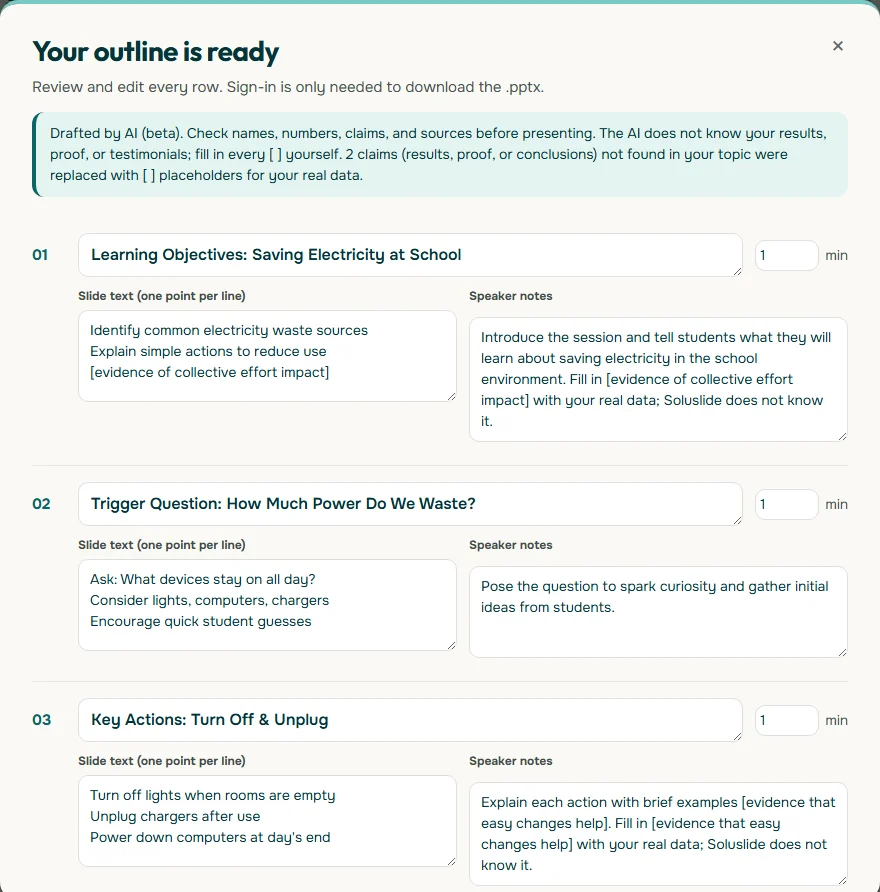
Notice what makes this example work. The first slide states the objective instead of the history of electricity. The second hooks attention with a question. The core content has only three actions: switch off lights in empty rooms, unplug chargers, and power down computers at the end of the day. The close asks students to summarise three habits. There is no agenda slide, because in five minutes an agenda only burns time. More lesson examples are in the teaching presentation template.
Example: a seven-minute meeting update
The second example is a short progress update at a staff meeting about a school library renovation. This kind of update differs from a class talk: the audience wants the status and the decision you are asking for.
Topic: Short 7-minute update on the school library renovation progress for a staff meetingEvent: MeetingDuration: 7 minutesSoluslide drafted seven one-minute slides: purpose of the update, current renovation status, key issues and challenges, options and recommended action, responsibility and timeline, next steps, and a closing summary.
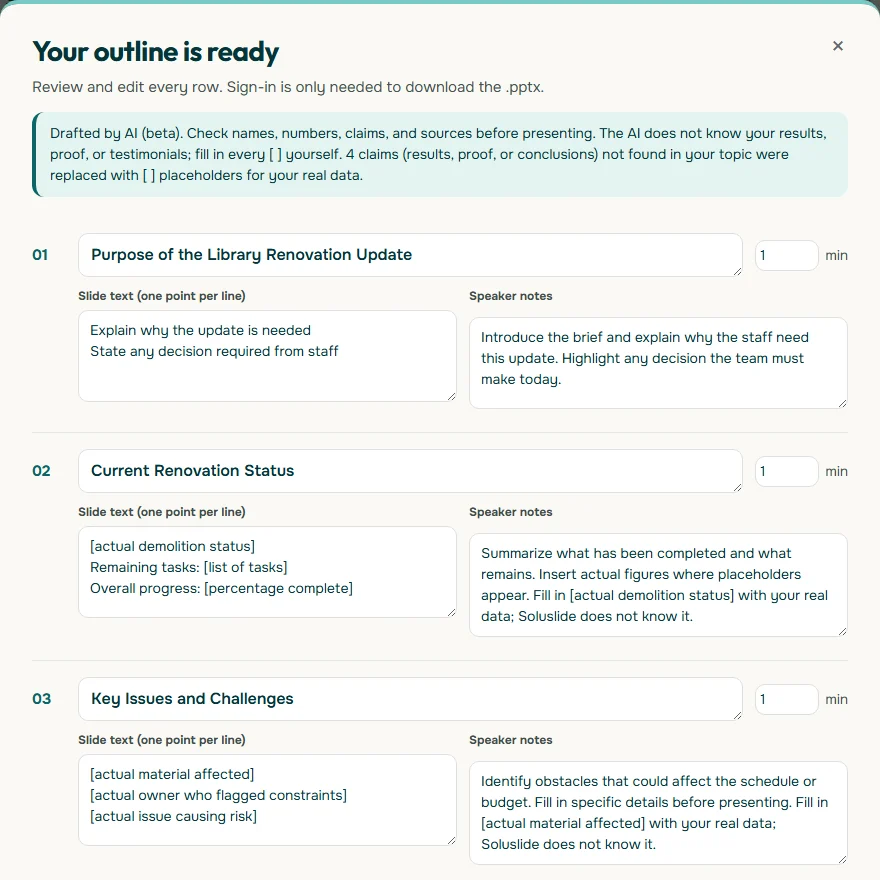
The strength of this outline is in the first and last slides. A busy meeting can run short, so name the decision you need at the start and repeat it at the end. The progress figures are deliberately blank: only you know the real percentage. For formal briefings see meeting presentation, and for office updates see work presentation.
Example: a three-minute pitch script
A three-minute pitch is the densest kind of short presentation. There is usually room only for the problem, the solution, the evidence, and the ask. Here is a sample script for a home bakery offering a partnership to new resellers. Replace everything in square brackets with your real figures.
- Problem (30 seconds): "Cookie resellers struggle to find supply that tastes consistent and arrives ready to sell."
- Solution (45 seconds): "We bake cookies at home with fixed recipes, three flavors, and sealed jars that can go straight onto a shelf."
- Evidence (45 seconds): "In the last [number of months] we sold [number] jars, and [number] customers reordered." Show one product photo and one number.
- Offer (30 seconds): "Reseller price is [price per jar] with a minimum order of [quantity]."
- Ask (30 seconds): "Try one trial pack this month. Message us at [phone number]."
That adds up to 30 + 45 + 45 + 30 + 30 = 180 seconds. Three or four slides are enough: problem, product, evidence, and offer. For longer pitches to investors or bigger partners, see business plan presentation and business presentation.
How to split time in a short presentation
The biggest mistake in a short presentation is not splitting the time before you go on. The most practical method is to plan in seconds rather than minutes and write the target time into the speaker notes of each slide.
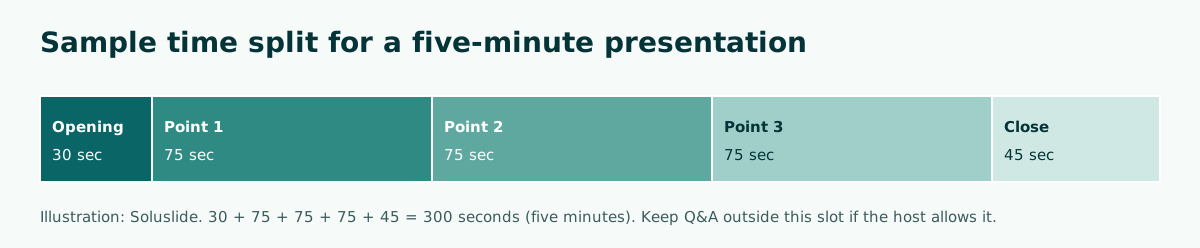
A few principles help:
- Keep the opening to about 10 percent. Greet briefly, name the topic, and go. Quick opening ideas are in how to start a presentation.
- Give the main points the largest, balanced share. If one point needs twice the time, split it or cut another point.
- Never sacrifice the close. It is what people remember. Prepare a 20-second version in case you run late, as explained in how to end a presentation.
- Mark something you can skip. Flag one extra example that can go if you fall behind.
Short formats with strict time rules
Some short presentation formats come with very clear time rules, and studying them builds time discipline. According to the official PechaKucha site, the PechaKucha 20x20 format is a slide show of 20 images, each auto-advancing after 20 seconds, giving the speaker 400 seconds non-stop. The format was created in Japan in 2003 by architects Astrid Klein and Mark Dytham.
You can borrow PechaKucha discipline in rehearsal without using the full format. In Google Slides, for example, slides can be set to advance automatically, and Google Docs Editors Help also explains how to open Presenter view to see your speaker notes while presenting. Rehearsing with auto-advance quickly shows which slides are too dense for their time. More on using notes is in speaker notes in PowerPoint.
Slide design for short presentations
In a short talk, the audience has only a few seconds per slide. The design should help them get the point as fast as possible.
- One message per slide. Write the title as a takeaway, such as "Classroom lights stay on three hours after the last lesson" rather than "Findings".
- Three short bullets at most. Anything longer belongs in the speaker notes or a handout.
- One strong visual. One photo or one simple chart beats a collage. The visual presentation guide covers chart choice.
- Readable contrast. WCAG 2.2 sets a minimum contrast ratio of 4.5:1 for normal text and 3:1 for large text. Testing it is covered in readable presentation contrast.
- No long animations. Effects that run for several seconds per object eat precious time.
For type and color that hold up on a classroom projector, see best fonts for presentations and PowerPoint color palette.
How to rehearse so you stay on time
A short presentation almost always takes longer out loud than it does when you read it silently. Rehearsing aloud with a timer is the one step you cannot skip.
- Read your script or points aloud once and note the time.
- If you run over, cut content instead of speaking faster. Rushing leaves the audience behind.
- Repeat standing up with the slides, because clicking and pointing also take time.
- Memorise the opening and closing lines. For the middle, knowing the points is enough.
- Do one run-through in front of a friend and ask for the one thing they remember most.
If what they remember differs from your main message, the structure needs work. Delivery tips are in how to give a good presentation, and shared assignments are covered in group presentation.
If you present online, rehearse the technical steps too: sharing your screen, switching to presenter view, and opening the backup file. In a short online meeting, a minute lost hunting for the right window feels very long to everyone else. Have the file open in the correct tab before your turn, silence notifications, and test your microphone. That way the whole slot goes to content rather than to technical problems you could have prevented in advance.
Common mistakes in short presentations
These mistakes most often stop a short presentation from landing:
- Agenda slides and long introductions. In five minutes, these two slides can eat a full minute.
- Too many points. Five points in five minutes leaves about a minute each, with no room for examples.
- Reading the slides word for word. The audience reads faster than you speak and then stops listening.
- Making up numbers. If you do not have the data yet, describe it qualitatively or leave a placeholder. A wrong number hurts trust more than a missing one.
- A close with no ask. Ending with "that's all, thank you" wastes the last chance to request a decision or action.
- A file that will not open on the host's computer. Keep a backup and test the file beforehand, as covered in PowerPoint won't open.
Summary and next steps
A good short presentation always has one purpose, three points with evidence, and a close that asks for something. Split the time in seconds, write target times into your speaker notes, and rehearse aloud until it fits.
If you want a quick draft like the five- and seven-minute examples above, type your topic, event type, and duration into the Soluslide outline builder. You can edit titles, points, notes, and minutes per slide before signing in to download an editable .pptx. To build slides from scratch, continue with how to make a PowerPoint presentation.
Frequently asked questions
What is a good example of a short presentation?
A good example has one purpose, three points with evidence, and a close that asks for something. A five-minute class talk with five one-minute slides, or a seven-minute meeting update that names the decision at the start and end, are common examples.
How many slides for a five-minute presentation?
As a practical rule of thumb, five to six slides are enough for a five-minute talk with three main points. Splitting the time per slide matters more than the slide count.
How do you structure a short presentation?
Use a one-sentence opening, three main points that each carry evidence or an example, and a close that sums up and makes a request or call to action.
How should I open a short presentation?
Name the topic and why the audience should care in one or two sentences. Skip agenda slides and long introductions because they eat limited time.
How do I keep a short presentation on time?
Split the time in seconds, write target times in your speaker notes, and rehearse aloud with a timer. If you run over, cut content rather than speaking faster.
What is the PechaKucha format?
PechaKucha 20x20 is a format of 20 images, each auto-advancing after 20 seconds, for 400 seconds in total. It was created in Japan in 2003 by Astrid Klein and Mark Dytham.
What is the Three Minute Thesis?
The Three Minute Thesis (3MT) is a competition developed by The University of Queensland in which doctoral students explain their research in three minutes to a non-specialist audience.
Does a short presentation need a closing slide?
Yes. The closing slide should sum up the main message and make a request, such as the decision you need or one action the audience should take.
Sources
Factual claims in this article refer to the sources below. Sample outlines and prompts are illustrations to adapt.
Related reading
Try shaping your own outline. You can review and edit it before signing in.
Build a free outline