
Work Presentation: How to Report to Your Manager and Ace Interview Talks
A good work presentation gets straight to your status and your request. Managers and hiring panels do not need a long introduction.

What a work presentation is and how to make one
A work presentation is any presentation you give as part of your job: reporting progress to your manager, updating your team in a weekly meeting, presenting results at the end of probation, or answering a presentation task in a job interview. Making one always starts the same way. Decide who is listening, write one sentence about what you want them to know or decide, then build the slides that support that sentence and cut the rest.
The difference from a classroom or conference talk is the audience. People at work are few, busy, and already know the context. They do not need a long introduction. They need a clear status, numbers they can trust, and a direct request. Microsoft Support also reminds presenters that slide text should be a cue for the speaker rather than the full message for the audience, and that you should not go over the time you planned.
This guide covers the types of work presentation, a report flow for your manager, a sample time split, how to prepare an interview presentation, how to present numbers, and how to rehearse. If your talk is mostly a pitch to clients or investors, the business presentation guide is a better fit.
Types of work presentation and their goals
"Work presentation" covers several situations that look alike but have different audiences and goals. Knowing which one you face helps you decide how many slides to make, how detailed the numbers should be, and what tone to use.
Scroll the table sideways to see every column.
| Type | Audience | Goal | Must include |
|---|---|---|---|
| Progress or monthly report | Your manager | Give status and get a decision | Progress vs target, blockers, options |
| Weekly team update | Your team | Align priorities | Done, in progress, blocked |
| Job interview presentation | Hiring panel | Prove you can do the role | Answer to the task, your reasoning, real examples |
| End of probation or internship review | Manager and HR | Show the results of that period | Measured results, lessons, next plan |
| Process improvement proposal | Manager or other teams | Get a change approved | Problem, impact, proposal, cost, timeline |
Progress reports and weekly team updates are the most common. Both repeat, so a consistent format pays off. A manager who sees the same slide order every month knows exactly where to look for numbers and where to look for problems.
Interview presentations and probation reviews happen less often, but the stakes are higher. You are not only reporting; you are being assessed. A clear structure, real examples, and keeping to time all count as evidence of your skills. Meetings in government offices follow a slightly different format; see the meeting presentation guide.
A work report flow for your manager
A good work report still makes sense if your manager only looks at the first and the last slide. Put the conclusion up front, not at the end. The five-part flow below works for weekly, monthly, and project reports.
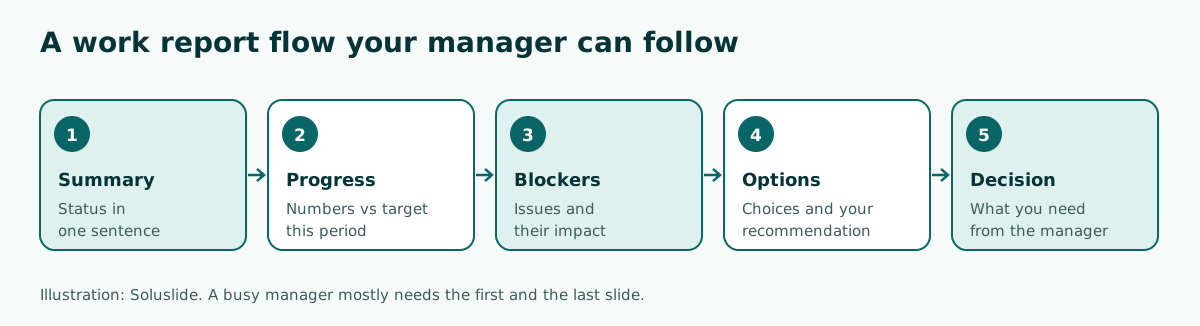
- Summary. One sentence of status, for example "The October campaign reached 85 percent of target, and one blocker needs a decision today."
- Progress. Two or three key numbers compared with the target for the same period.
- Blockers. The biggest issue and what happens if nobody deals with it.
- Options. Two possible fixes and your recommendation, with the reason.
- Decision. State exactly what you are asking for: approval, extra budget, or a change in priorities.
This order also trains you to think as a problem solver rather than someone who only reports. For a wider view of how talks are organized, read presentation structure.
Sample time split for a 10-minute report
Many meetings give each person only ten to fifteen minutes. Splitting your time in advance stops you from spending it all on progress and running out before you make your request. The split below follows the five-part flow above.
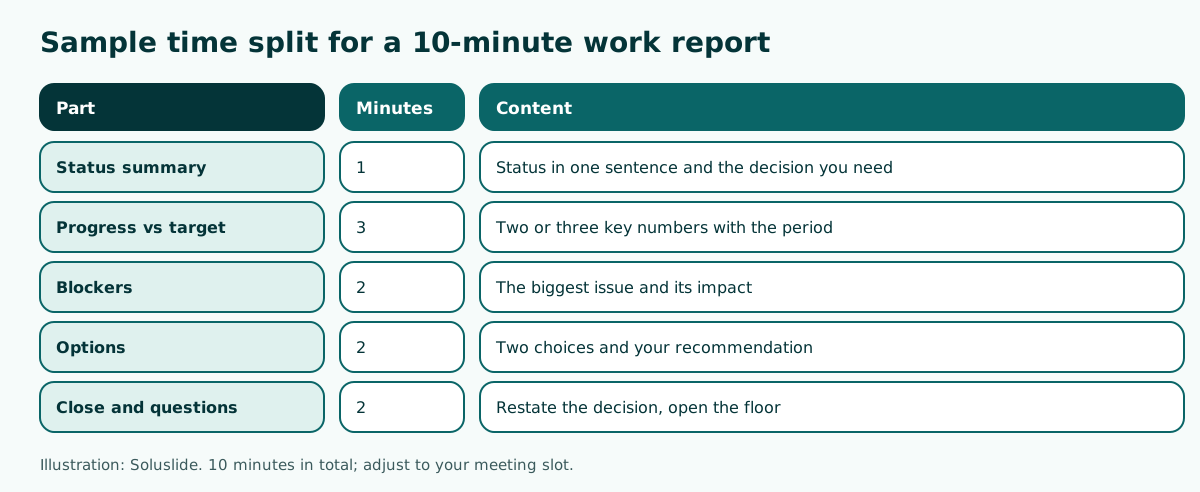
Progress gets the most time because that is where your manager judges whether work is on plan. Still, do not let it eat the time meant for your options. If you have many numbers, move the detail to an appendix or a separate file you share after the meeting.
To estimate slide count, the common rule of roughly one to two minutes per slide is a useful starting point; the math is in how many slides for a 10-minute presentation. Most importantly, keep the question time, because that is where decisions usually happen.
Drafting a work report outline faster
The outline takes the longest when you start from a blank page. One way to speed it up is to let a tool draft an outline from your topic, then fill in and edit it yourself. We typed the topic "Monthly work progress report for my manager, marketing team" with the meeting event type and a 10-minute duration into the Soluslide builder.
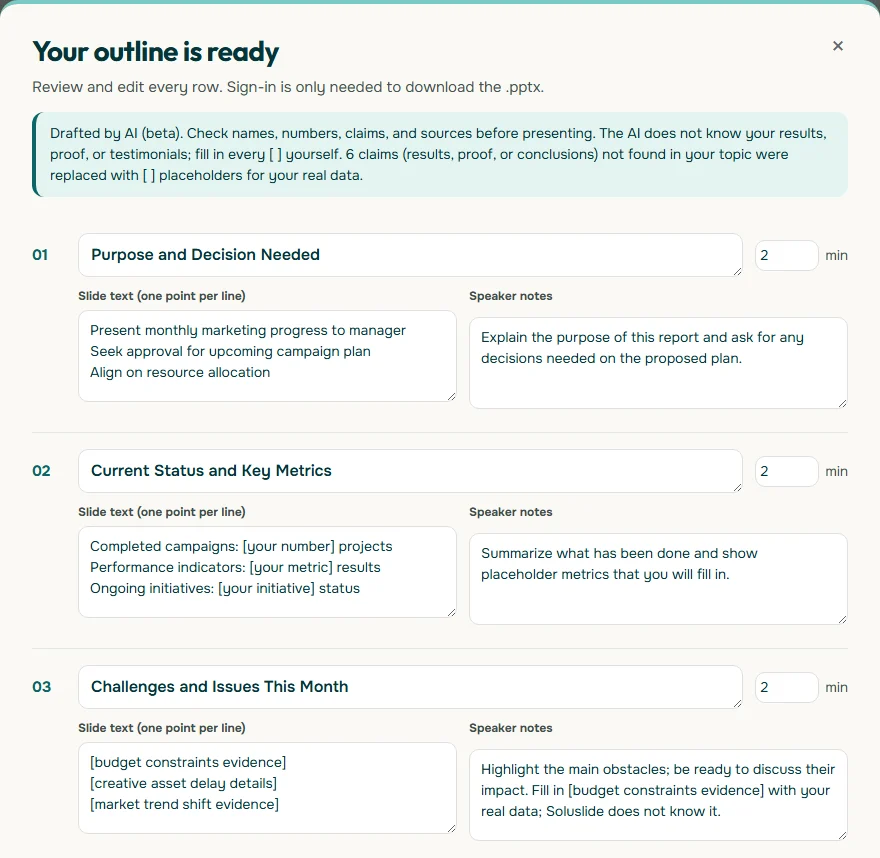
Notice two things in the screenshot. First, the opening slide goes straight to the purpose of the report and the decision needed, which matches the flow above. Second, the metrics and issues are not invented; they are left in square brackets so you can fill in real data. A draft like this still needs your review and edits.
If your material already sits in a document, turning it into slides is covered in presentation from document, and examples of effective prompts are in AI PPT prompt.
Giving a presentation in a job interview
Some employers ask candidates to prepare a presentation as part of hiring. The invitation usually states the topic and the length. Hays, the recruitment firm, advises finding out how long the presentation needs to be, not running over, timing yourself when you practise, and leaving room for questions at the end. Hays also suggests matching the fonts and colours on the company website.
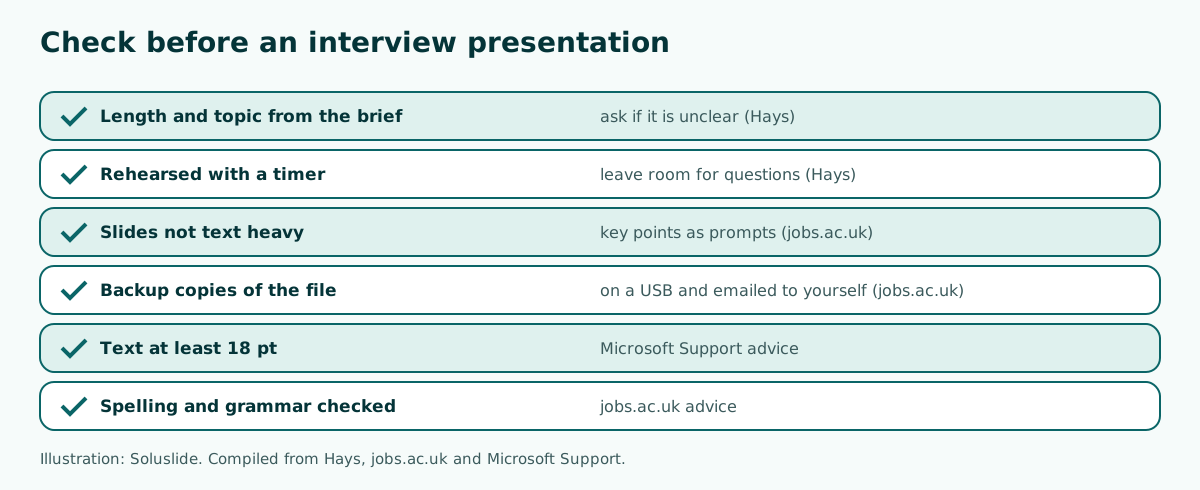
The careers site jobs.ac.uk points out that the audience can read everything on the slides very quickly, so slides should hold key points that prompt you as you speak. The same site recommends saving several versions of the file on a USB and emailing it to yourself in case technology fails, and checking spelling, punctuation and grammar.
Your content should answer the task you were given directly, show how you think, and use real examples from your experience. A strong opening and close help the panel remember you; ideas are in how to start a presentation and how to end a presentation.
Presenting numbers in a work presentation
Almost every work presentation contains numbers: sales, tickets closed, budget spent, or people trained. Badly presented numbers make a manager hesitate, while clear ones speed up the decision.
- Always compare. A single number is hard to judge. Compare it with the target, the previous period, or the original plan.
- State the period and source. Write "sales from 1 to 31 October, from the till system", not just "sales this month".
- Pick two or three headline numbers. Put the rest in an appendix.
- Use the right chart. Bars to compare, lines for trends. The how-to is in how to make a graph in PowerPoint.
- Tables for detail. If your manager really needs the breakdown, build a clean table; see how to make a table in PowerPoint.
Microsoft Support recommends chart and graph labels that are easy to understand and avoiding font sizes smaller than 18 pt. If you have to shrink the text to fit the numbers, the slide is too busy and should be split.
Clean and consistent slide design
A work presentation does not need a fancy design. It needs to look tidy and consistent, especially for reports you repeat every week or month. Your manager should focus on the content, not on animations or changing colours.
- Use the company template if there is one. If not, pick one simple template and keep using it.
- Choose simple fonts such as Arial or Calibri, as Microsoft Support suggests, and keep strong contrast between text and background.
- One slide, one message. Make the slide title a conclusion, such as "Ad costs fell 12 percent", rather than just "Ad costs".
- Limit animations and transitions. Routine reports almost never need them.
More on appearance is in slide design, font choices in best fonts for presentations, and colour contrast in presentation contrast. For recurring reports, keep one master file and update the numbers each period so the format stays the same.
An example of turning report slide titles into conclusions:
Before: October Sales DataAfter: October sales at 85 percent of target, 30 units shortBefore: Team IssuesAfter: Material stock 5 days late, campaign pushed back one weekBefore: November PlanAfter: Proposal to move ad budget to our two best sellersThe rewritten titles can be read in two seconds and tell your manager what happened. The rest of the slide only needs to back that sentence up with a number, a chart, or one example. The numbers above are illustrations; replace them with your own data.
Rehearsal and tools before you present
Rehearsal is not only for big talks. A ten-minute report to your manager sounds more convincing if you have said it out loud once. Rehearsing also shows you which part runs too long.
In PowerPoint, Speaker Coach helps you practise in private. According to Microsoft Support, it evaluates your pacing, pitch, filler words and informal speech, detects when you are simply reading the text on a slide, and gives you a report after each rehearsal. To keep the points you want to say without putting them on the slide, use speaker notes; the steps are in speaker notes in PowerPoint.
If you present in an online meeting, test screen sharing before the meeting starts and make sure the right version of the file is open. For an in-person talk, arrive early and check the projector. General delivery tips are in how to give a good presentation.
Common mistakes in work presentations
A few mistakes show up again and again in work presentations, in routine reports and interview talks alike. The good news is that all of them are easy to avoid once you know them.
- Saving the conclusion for the end. Managers get pulled out of meetings or run short of time. If your request only appears on the last slide, it may never be heard.
- Reading the slides. Microsoft Support advises against reading the presentation and suggests practising so you can speak from bullet points. Slides read word for word make people stop listening.
- Numbers without a comparison. "Sales of 120 units" means little without the target or last month's figure.
- Hiding problems. A blocker your manager discovers after the meeting damages trust. Raise it together with a proposed fix.
- Running over time. In an interview, overrunning can look like poor preparation. In a routine meeting, it eats into the next colleague's slot.
- A file that will not open. Different PowerPoint versions or an oversized file often cause last-minute trouble; fixes are in PowerPoint won't open and how to reduce PowerPoint file size.
The easiest way to avoid all of these is a short run-through with a colleague who will give honest feedback. Ask them to name the one thing they remember from your talk. If it is not your main message, the slide order needs work.
Summary and next steps
An effective work presentation starts with a simple question: who is listening, and what do you need from them? For a report to your manager, put the summary and the decision you need first, compare numbers with the target, and keep time for questions. For an interview presentation, confirm the length and topic, rehearse with a timer, keep slides light on text, and carry backup copies of your file.
If you want to start from a draft outline, the Soluslide builder can draft one from your topic and duration, which you can edit before downloading an editable .pptx file. The full list is on the features page. Whatever tool you use, the final content is your responsibility: check every number, name, and claim before you present.
Frequently asked questions
What is a work presentation?
A work presentation is any presentation given as part of your job, such as a progress report to your manager, a weekly team update, an end of probation review, or a presentation task in a job interview.
How do I make a good work presentation?
Decide on your audience and the one thing they should know or decide, put the summary first, support it with two or three key numbers, and close with a clear request.
What should a work report to my manager include?
A status summary, progress against target, blockers and their impact, options with your recommendation, and the decision you need from your manager.
How many slides do I need for a 10-minute work presentation?
Usually around five to eight slides, depending on how dense the content is. Splitting your time by section and keeping time for questions matters more than the exact count.
How do I prepare a job interview presentation?
Confirm the topic and length from the invitation, rehearse with a timer, leave room for questions, keep slides light on text, and save backup copies on a USB and in your own email.
What is the minimum font size for work presentation slides?
Microsoft Support recommends avoiding font sizes smaller than 18 pt, and going larger for a big room where the audience sits far away.
How should I present numbers to my manager?
Compare each number with the target or the previous period, state the period and source, choose two or three headline numbers, and move the detail to an appendix.
Can I use AI to make a work presentation?
Yes for drafting an outline, but you still need to check every number, name, and claim and fill in your real data before you present.
Sources
Factual claims in this article refer to the sources below. Sample outlines and prompts are illustrations to adapt.
Related reading
Try shaping your own outline. You can review and edit it before signing in.
Build a free outline