
Product Presentation: Structure, Timing, and Two Real Examples
A convincing product presentation answers one question for the room: why should I buy, stock, or use this? Two real outlines show the order that works.
What a product presentation is and how to structure it
A product presentation is a short talk that introduces a product or service to people who could buy it, resell it, or use it. The order that works most often has six parts: the audience's problem, the product as the answer, how it works, proof, the offer and pricing, and a clear ask at the end.
This article walks through two real outlines built with the Soluslide outline builder on 19 November 2026, using the small-business pitch event type. The first presents a new reusable water bottle to retail store buyers in 7 minutes. The second demos an online booking app to small dental clinics in 10 minutes. Both are shown as unedited screenshots and then taken apart slide by slide.
One pattern stands out in both screenshots: most claims are left as square-bracket placeholders, such as [market demand data] or [a real customer quote]. That is deliberate. Claims about your product have to come from your own evidence, not from a template. The section on claims below explains why this matters beyond credibility. If you are preparing for investors rather than buyers, you will get more from pitch deck generator and business plan presentation.
Example 1: a 7-minute product presentation to retail buyers
The first example used this input:
Topic: Product presentation of a new reusable water bottle for retail store buyers
Event: Small-business pitch
Length: 7 minutes
It produced six slides: Retail Buyers' Need for Sustainable Packaging (1 min), Introducing the Reusable Water Bottle (1 min), How the Bottle Works in Store (1 min), Proof of Concept: Add Your Evidence (1 min), Offer, Pricing and Retail Margins (2 min), and Next Steps and Partnership Ask (1 min). That adds up to 7 minutes.
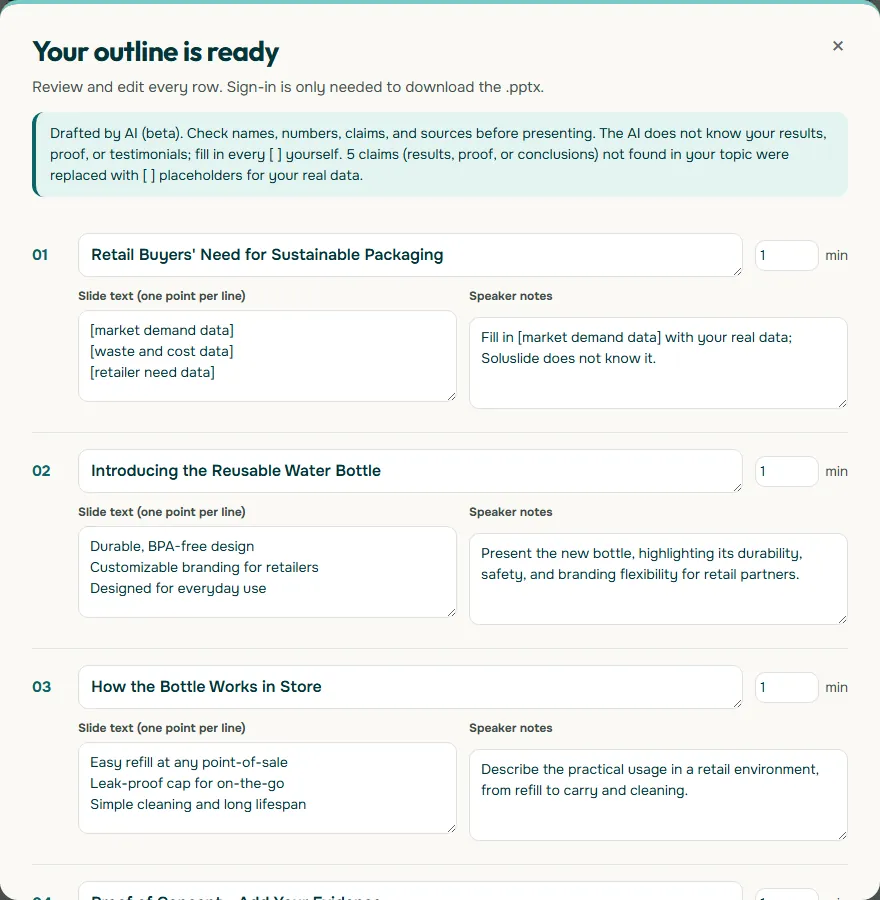
The time budget is the part to copy. The offer, pricing, and margins slide gets 2 minutes, twice as long as any other. A store buyer is not only asking whether the bottle is good; they want the wholesale price, the suggested retail price, and the margin they keep. The outline spells those out as three lines: Wholesale price: [your price] per unit, Suggested retail price: [your price], and Margin opportunity: [your margin]. If that slide is rushed, the meeting ends without an order.
What to put on each slide of the retail example
The table below turns the six slides into a preparation checklist: what each slide needs and where the information usually comes from in a small business.
Scroll the table sideways to see every column.
| Slide | Minutes | What it needs | Where the data comes from |
|---|---|---|---|
| Buyer need | 1 | What shoppers ask for that the shelf lacks | Customer questions, store feedback, sales notes |
| Product intro | 1 | Material, size, design, what makes it different | Product specification and packaging |
| How it works in store | 1 | Display, refill, care, lifespan | Your own testing and instructions |
| Proof | 1 | Pilot results, a customer quote, sales data | Pilot store reports, messages, your sales ledger |
| Offer, pricing, margins | 2 | Wholesale price, retail price, margin, minimum order | Your official price list |
| Next steps and ask | 1 | First order size, co-branding, launch timeline | Your production and delivery schedule |
The proof slide is where most product decks are weakest. The outline suggests three kinds of evidence: pilot results with a named retailer, a real customer quote, and sales data. One genuine quote, used with permission, beats a line like "customers love it". If you have no sales yet, say what you do have, such as the number of samples handed out and the feedback you received.
The ask has to be concrete too. The example closes with Initial order of [quantity] units and Timeline to launch: [your timeline]. A buyer offered a clear next step finds it easier to say yes than one who is simply invited to "partner with us".
Example 2: a 10-minute product demo for an app
The second example is a digital service: an online booking app pitched to small dental clinics in 10 minutes. The outline has six slides: Dental Clinics' Booking Pain Points (2 min), Online Booking App Overview (2 min), How the App Works for Clinics (2 min), Proof of Concept: Add Your Evidence (2 min), Offer and Pricing (1 min), and Ask and Next Steps (1 min).
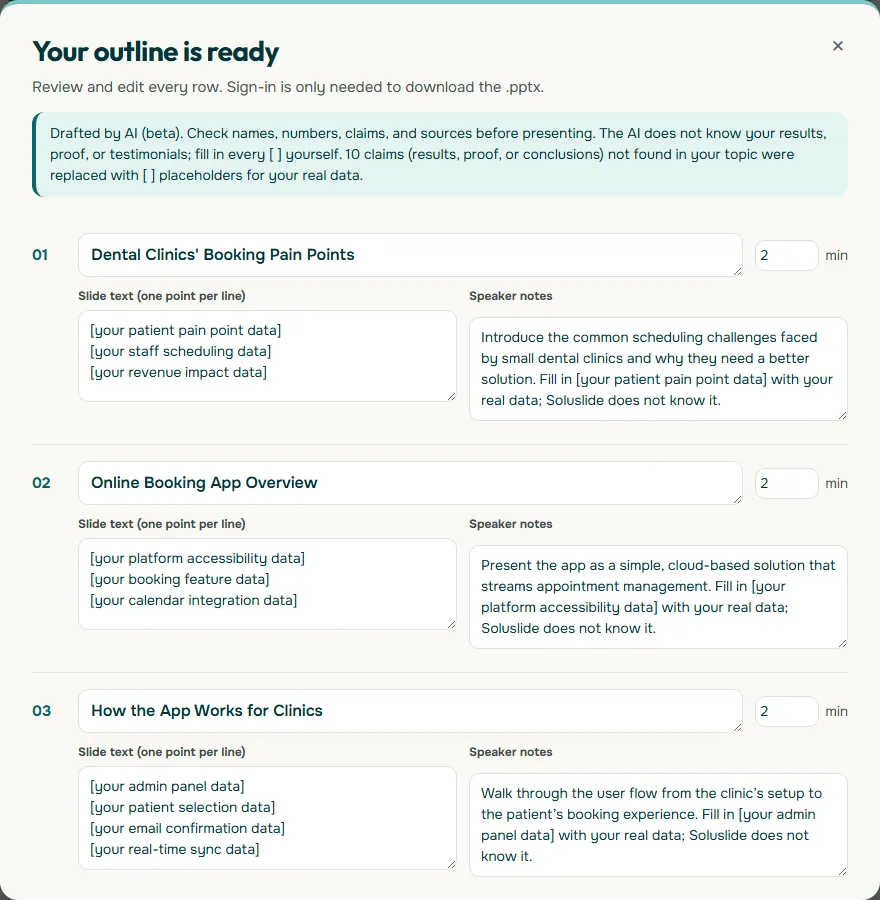
Compared with the bottle, the time shifts toward explanation. A clinic owner who has never used online booking needs to see the problem quantified and the workflow walked through, so the first four slides get 2 minutes each, while pricing and the ask get 1 minute each. Every claim on the first three slides is a placeholder, from [your patient pain point data] to [your real-time sync data], because only you know how your app behaves and what clinics told you.
Show the real thing on the how-it-works slide whenever you can: actual screenshots or a short screen recording of the app, not mock-ups of features that do not exist yet. Steps for adding a clip are in how to embed a video in PowerPoint.
How to split the time in a product presentation
Both examples share a timing pattern: the part the audience cares about most gets the biggest share, and the ask is short but specific. The diagram below shows the 7-minute split.
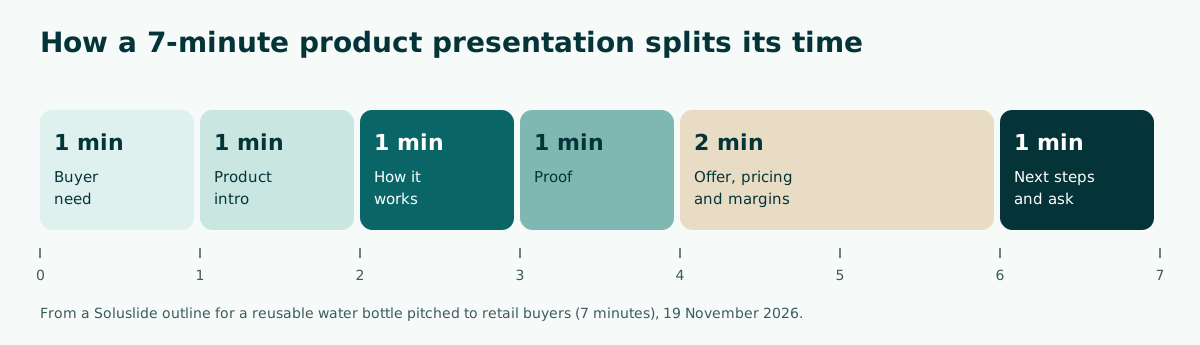
A practical rule follows from this. When the audience already understands the category, such as a store buyer who knows the drinkware shelf, one minute each for the problem and the product is enough and the extra time goes to pricing. When the category is new to them, such as a clinic owner meeting online booking for the first time, spend more time on the problem and the workflow, as the 10-minute example does.
Do not add slides just because the slot is longer. Add time to the part your audience questions most. For retail buyers that is usually price and margin; for a new service it is usually how it works and the proof. For general pacing, see how many slides per minute, and for more short formats, short presentation.
Product presentation vs product demo vs investor pitch
People often mix up a product presentation, a product demo, and an investor pitch. All three talk about a product, but the audience and the ask differ. Picking the wrong one means your content answers a question nobody in the room is asking.
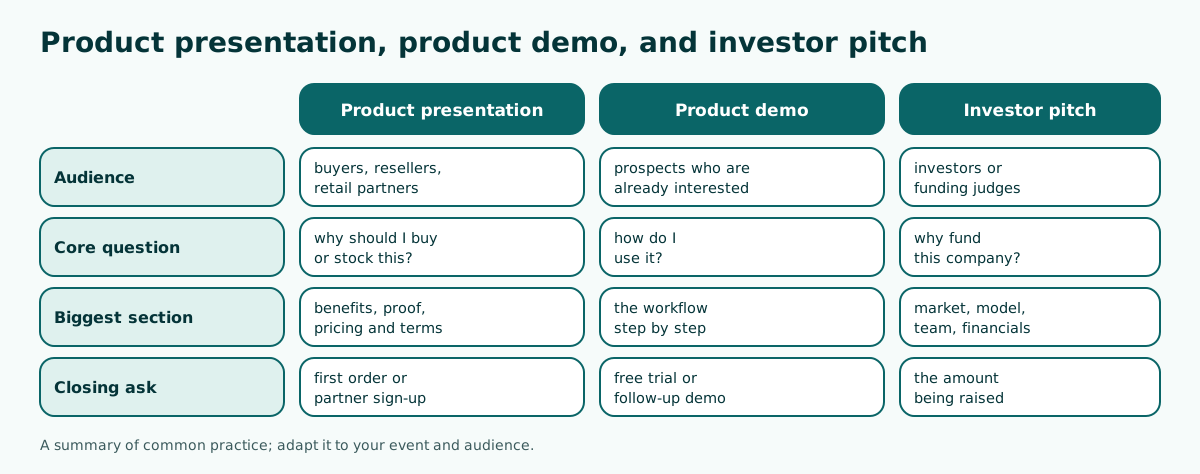
- Product presentation: for buyers, resellers, or retail partners. The biggest section covers benefits, proof, and pricing, and it closes with a first order or a partner sign-up.
- Product demo: for prospects who are already interested. It walks through the workflow step by step and closes with a free trial or a follow-up demo.
- Investor pitch: for investors or funding judges. It covers the market, business model, team, and financials, and closes with the amount being raised.
The 10-minute example actually blends two of these: its last slide says Seeking [your investment amount] for scaling. If your audience is clinic owners rather than investors, replace that line with an offer to run a pilot at their clinic. Editing one line like this is exactly why every outline needs a careful read. For wider business contexts, see business presentation.
Claims you can safely make
A product presentation is a form of promotion, so the claims in it carry the same obligations as advertising. The US Federal Trade Commission's advertising guide for small business states that under the FTC Act, advertising must be truthful and non-deceptive, advertisers must have evidence to back up their claims, and advertisements cannot be unfair. Consumer protection rules in other countries follow similar principles, so treat this as a baseline wherever you sell.
In a slide deck, that translates into a few simple habits:
- Every number has a source. "Sold 1,200 units in three months" must be traceable to your sales records.
- Health, safety, or environmental claims need a basis. Words like "BPA-free", "leak-proof", or "eco-friendly" should be backed by a test result, a certificate, or a supplier specification you hold.
- Prices and terms are complete. State minimum orders, shipping costs, or contract length on the pricing slide.
- Testimonials are real and used with permission. Never assemble a quote a customer did not say.
This is why both outlines leave claims empty in square brackets. One real piece of evidence on a slide is worth more than five claims you cannot defend when a buyer asks follow-up questions.
Visuals that make the product feel real
An audience at a product presentation wants to see the product, not just read about it. Good visuals make it tangible and easy to imagine in use.
- Real product photos. For physical goods, use photos of the packaging you actually sell, on a plain background in bright light. Bring a physical sample if you are presenting in person.
- Real screenshots. For an app or digital service, show screens that exist today, not designs you have not built yet.
- One number per slide. Wholesale price, margin, or delivery time sticks better when it is shown large and on its own.
- Enough contrast. WCAG 2.2 success criterion 1.4.3 sets a minimum contrast ratio of 4.5:1 for normal text. A pale yellow price on white tends to vanish on a projector.
A comparison table also works well on the offer slide, for example a starter pack and a full pack side by side with their contents and prices. Building clean tables is covered in how to make a table in PowerPoint, choosing pictures in images for PowerPoint, and visual principles in general in visual presentation.
Opening and closing a product presentation
The first sentence of a product presentation should touch the audience's problem, not your company history. Compare these two openings:
Weak: "We were founded in 2019 in a small workshop."
Stronger: "Your customers keep asking for a refillable bottle that does not leak in a bag. We built one, and it fits your existing drinkware shelf."
The second opening gives the buyer a reason to keep listening. If you use a claim like "does not leak", make sure you can back it with your own testing. More ways to open are in how to start a presentation.
The close should ask for one specific action the audience can take that day. For example, "confirm a starter order of 48 units and we will deliver next week" or "book a 30-minute demo at your clinic". Avoid ending on "thank you, any questions?" alone, because people leave without knowing the next step. Endings that ask for action are covered in how to end a presentation.
Common product presentation mistakes
- Too much company story. The audience came for the product and the offer. One sentence about who you are is enough.
- Features without benefits. "Double-wall steel" only matters once you say what it means for the buyer, such as drinks staying cold through a commute.
- Hiding the price until the end. Buyers want numbers. Put the price clearly on the offer slide.
- Invented proof. Made-up testimonials or figures are a legal risk and destroy trust when discovered.
- A vague ask. "Feel free to reach out" without contact details and a clear step is rarely followed up.
- Running over time. A 7-minute slot that runs to 12 eats into questions, which is often where the decision gets made.
Before you present, rehearse with a timer and ask one person who resembles your audience to listen. The questions they raise are usually the ones the real audience will ask. More delivery tips are in how to give a good presentation.
Build your own product presentation outline
To make your own version, type the product, the audience, and the goal into the Soluslide outline builder, choose the small-business pitch event type, and set the length. You can edit every title, slide text, speaker note, and minute count before signing in, including replacing an investment ask with a reseller or pilot ask as described above. Signing in is only needed to download an editable .pptx file.
Whatever tool you use, keep the order from these two examples: problem, product, how it works, proof, offer, ask. Fill every placeholder with evidence you own, give more time to the part your audience questions most, and close with one step they can take that day. For building the file from scratch, see how to make a PowerPoint presentation, and for more examples by event, PowerPoint presentation examples.
Frequently asked questions
What should a product presentation include?
Usually six parts: the audience's problem, the product as the answer, how it works, proof, the offer and pricing, and a clear ask. Both examples in this article follow that order.
How long should a product presentation be?
It depends on the event. The examples here use 7 minutes for retail buyers and 10 minutes for an app whose workflow needs explaining.
Which part of a product presentation takes the most time?
In the retail example, offer, pricing, and margins take 2 of the 7 minutes. For a new service, the problem and how it works also need extra time.
What is the difference between a product presentation and an investor pitch?
A product presentation answers why the audience should buy or stock the product and asks for an order or sign-up. An investor pitch answers why the company deserves funding and asks for an amount of money.
Can I say my product is the safest or the best?
Only if you can prove it. The FTC's guidance for small business says advertising must be truthful and non-deceptive and advertisers must have evidence to back up their claims.
How do I open a product presentation?
Start with the audience's problem or need in one or two sentences, then introduce the product as the answer. Avoid opening with a long company history.
How do I end a product presentation?
Ask for one specific action, such as a starter order or a demo booking, with contact details and the next step stated clearly.
What visuals work best in a product presentation?
Real product photos or real screenshots of the app as it exists today, not mock-ups. If you present in person, bring a physical sample.
Sources
Factual claims in this article refer to the sources below. Sample outlines and prompts are illustrations to adapt.
Related reading
Try shaping your own outline. You can review and edit it before signing in.
Build a free outline