
What Is PPT? Meaning, PPT vs PPTX, and What PowerPoint Does
People say PPT to mean a file format, any slide deck, or even the talk itself. This guide explains what PPT stands for, what PowerPoint is used for, how .ppt differs from .pptx, what a presentation file contains, and which apps can open it.

What is PPT?
PPT is short for a PowerPoint presentation, a slide deck made with Microsoft PowerPoint. Strictly speaking, .ppt is also the file extension PowerPoint used in its 97-2003 versions, before the newer .pptx format became the default in PowerPoint 2007.
PowerPoint itself is a presentation program developed by Microsoft and offered as part of Microsoft 365 and Microsoft Office. You use it to build slides that combine text, images, tables, charts, and video, then show them on a screen or projector while you speak.
In everyday use, people say "PPT" in three slightly different ways:
- A file format: the .ppt extension used by older versions of PowerPoint.
- Any presentation file: including the modern .pptx files that PowerPoint saves by default today.
- The slides or the talk itself: as in "send me your PPT" or "I am presenting my PPT on Friday".
When a teacher, manager, or client asks you to "send the PPT", they almost always mean an editable presentation file, not a PDF or a set of images. If you are not sure, ask whether they need to edit it or only read it, because that decides which format you should send.
What does PPT stand for?
PPT stands for PowerPoint Presentation. The abbreviation comes from the three-letter .ppt file extension that PowerPoint used for years. When Microsoft moved to .pptx, the short name had already stuck, so people kept calling presentations "PPTs" whatever their actual extension.
The name PowerPoint has its own story. According to Wikipedia, the product was called "Presenter" throughout development. Just before release, that name was unexpectedly rejected when Forethought tried to register it as a trademark, because it had already been used by someone else. Robert Gaskins, one of its creators, thought of "PowerPoint", based on the product's goal of empowering individual presenters.
A few related terms are easy to mix up:
- PPT: a PowerPoint presentation, or specifically the older .ppt file type.
- PPTX: the current default PowerPoint file format.
- Slide: a single page inside a presentation. One PPT contains many slides.
- Deck: a full set of slides, a word common in business, as in "pitch deck" or "sales deck".
So "slides", "PPT", and "deck" usually point to the same thing: one presentation file that can be shown and edited. If you are preparing one for investors, our guide to an AI pitch deck generator covers what a pitch deck needs.
What is PowerPoint used for?
PowerPoint is used to present information visually and in a clear sequence. The slides support the speaker: the key points sit on screen while the explanation is spoken aloud. That is why PowerPoint files turn up in classrooms, offices, conference rooms, and online meetings alike.
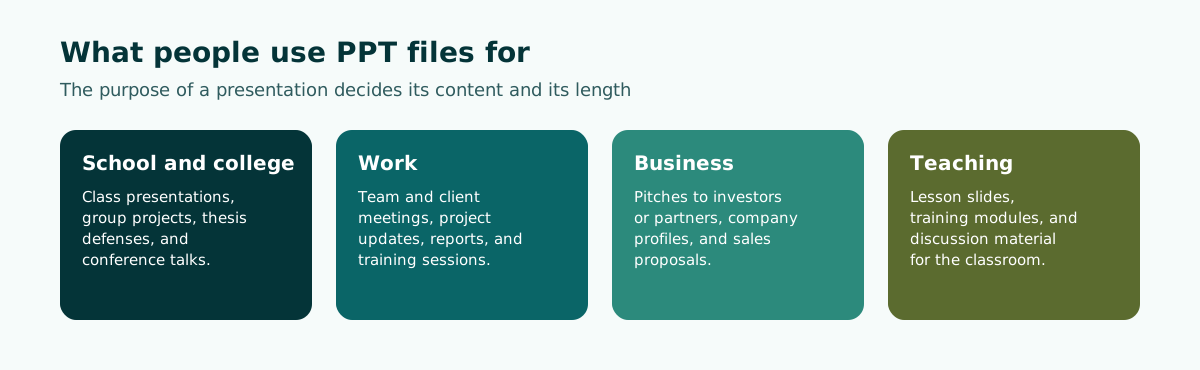
In more detail, PowerPoint helps you:
- Organize a talk. Breaking material into slides forces you to put ideas in order, from the opening to the close.
- Show data visually. Tables and charts make numbers easier to grasp than reading them out.
- Keep speaker notes. The notes pane holds what you want to say without showing it to the audience.
- Keep the look consistent. Themes and the Slide Master keep colors and fonts the same on every slide.
- Share material. The file can be sent, edited by colleagues, or saved as a PDF to hand out after the event.
These benefits only show up when the slides follow a clear order. How to split a talk into an opening, a body, and a close is covered in our guide to presentation structure.
What is a PPT file, and what is inside it?
A PPT file is a single document that stores a whole presentation: every slide plus the settings that control how those slides look and behave. Many people assume it only holds what appears on screen, but it contains several connected layers. Knowing them makes it much easier to edit someone else's deck or repair a layout that has gone wrong.
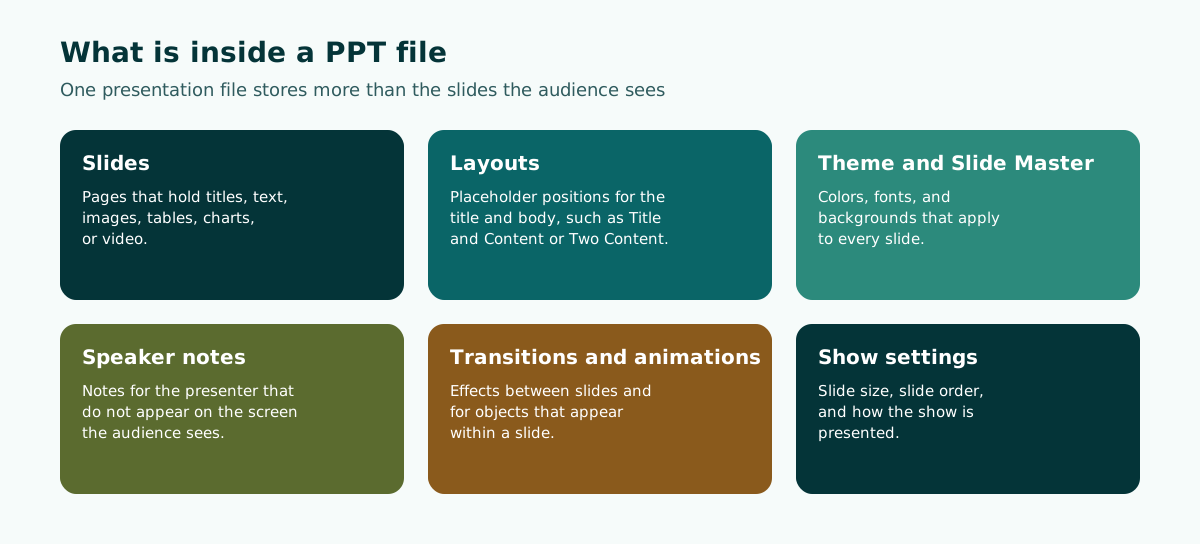
Slides and layouts
Every slide uses a layout, such as Title and Content or Two Content. The layout decides where the title and body placeholders sit. Typing into those placeholders, rather than scattering loose text boxes, keeps the deck tidy and consistent from one slide to the next.
Theme and Slide Master
The theme sets colors, fonts, and effects. The Slide Master sits above every layout, so a change made there applies across the whole presentation. Choosing readable colors and type is covered in our slide design principles.
Speaker notes
The notes pane under each slide is where the presenter writes what they plan to say. Microsoft Support explains that in Presenter View you can see your notes as you present, while the audience sees only your slides. Our guide to speaker notes in PowerPoint shows how to write notes you can actually use.
PPTX vs PPT: what is the difference?
The short answer: .ppt is the older binary format used by PowerPoint 97-2003, while .pptx is the zipped, XML-based format that replaced it as the default in PowerPoint 2007. Microsoft lists many more formats PowerPoint can save; the ones you will meet most often are below.
Scroll the table sideways to see every column.
| Extension | Format name | What it is for |
|---|---|---|
| .pptx | PowerPoint Presentation | The default format; opens on a PC or a Mac, and on any mobile device that has PowerPoint installed |
| .ppt | PowerPoint 97-2003 presentation | Older binary format, kept for compatibility with legacy versions |
| .ppsx | PowerPoint Show | Always opens in Slide Show view rather than Normal view |
| .potx | PowerPoint Design Template | A template used to format future presentations |
| PDF Document Format | Preserves formatting for sharing; not meant for editing in PowerPoint | |
| .odp | OpenDocument Presentation | For presentation apps that use the OpenDocument format |
According to Wikipedia, PowerPoint 2007 replaced the 97-2003 binary format as the default with the Office Open XML format. Microsoft Support adds that Open XML files use zip compression and can be up to 75 percent smaller in some cases. Files with the plain "x" suffix, such as .pptx, cannot contain VBA macros; only extensions ending in "m", such as .pptm, can.
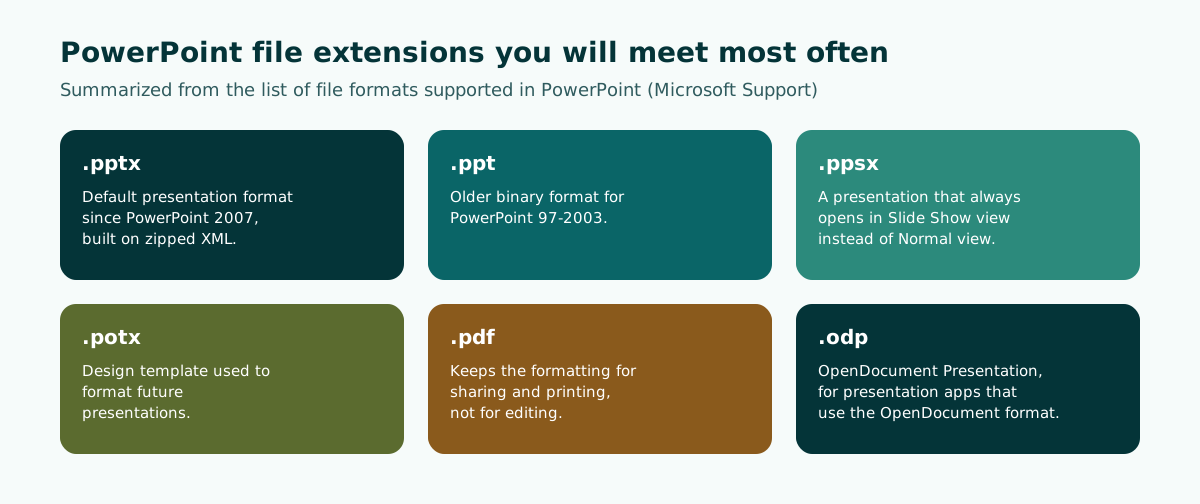
The practical rule: send .pptx when someone still needs to edit the file, and send a PDF when people only need to read or print it. If you receive an old .ppt, PowerPoint for the web opens it read-only; Microsoft's advice is to open it and use File, then Save a Copy, to get a .pptx you can edit. An editable PPTX is also what you should expect from any tool that drafts slides for you.
A short history of PowerPoint
PowerPoint was not born at Microsoft. According to Wikipedia, it was created by Robert Gaskins, Tom Rudkin, and Dennis Austin at a Silicon Valley software company called Forethought, Inc. It was released on April 20, 1987, initially for Macintosh computers only.
Microsoft acquired PowerPoint for about $14 million three months after it appeared, which Wikipedia describes as Microsoft's first significant acquisition. PowerPoint went on to become part of Microsoft Office, and versions for iOS, Android, and web access were later added alongside Windows and Mac.
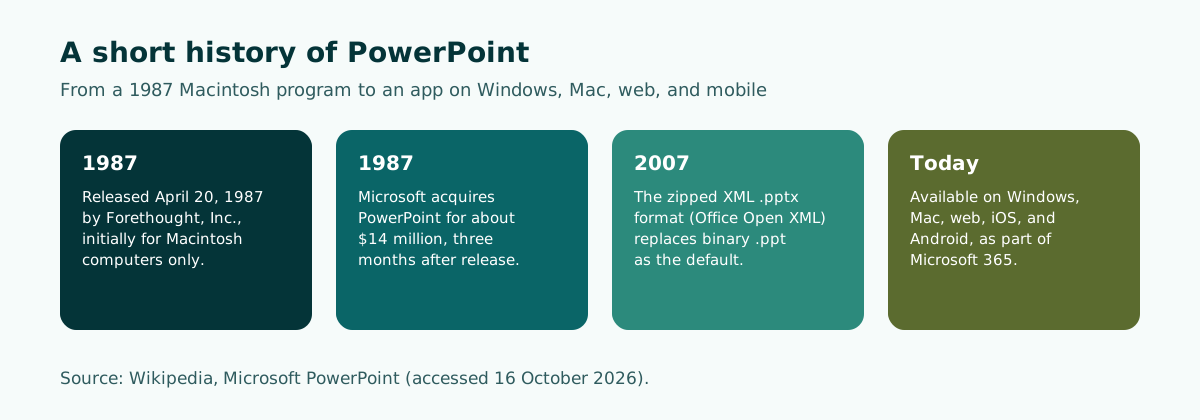
This history explains why "PPT" became a generic word. For decades PowerPoint was the standard presentation tool in schools, universities, and offices, so its file extension turned into a name for presentations in general, including decks built in other apps.
It also has one practical consequence: plenty of old .ppt files are still in circulation, such as department templates or training decks from years ago. They still open in desktop PowerPoint, but it is worth saving them as .pptx before you edit and share them, so colleagues on PowerPoint for the web can edit them as well.
How to open, create, and convert a PPT file
You do not need desktop PowerPoint to work with a presentation file. These are the common options and what each is good for.
Scroll the table sideways to see every column.
| App | Devices | Notes |
|---|---|---|
| Microsoft PowerPoint | Windows, Mac, web, iOS, Android | Native .pptx format; the web version opens old .ppt files read-only |
| Google Slides app | Android phones and tablets | Opens and edits PPT, PPTX, and ODP files; exports as PPTX, PDF, TXT, and ODP |
| AI outline tools | Browser | Draft the content and order of slides before you polish the deck in PowerPoint |
To turn an old .ppt into a .pptx in PowerPoint:
- Open the .ppt file.
- Choose File, then Save As (desktop) or Save a Copy (PowerPoint for the web).
- Pick PowerPoint Presentation (.pptx) as the file type.
- Save, then open the new copy and check each slide.
Whenever you move a deck between apps, watch for compatibility. Fonts, animations, and layouts can shift when a file opens somewhere else, so always open it in the app you will present from and go through it slide by slide. If you need to build or fix slides away from a laptop, see how to make a PowerPoint on your phone.
PowerPoint terms worth knowing
Once you start using PowerPoint, a handful of terms come up again and again in menus and help pages. Learning them early makes it much faster to find the feature you need.
- Normal view. The main editing view, with slide thumbnails on the left and the notes pane below the slide.
- Slide Show. The full-screen view the audience sees. A .ppsx file opens straight into this view.
- Presenter View. The presenter's screen, showing the current slide, the next slide, and your speaker notes, while the audience sees only the slide.
- Placeholder. A dotted box from the layout, ready for a title, text, a picture, or a table.
- Section. A named group of slides, handy in long decks such as a training day or a thesis defense.
- Template. A starting file with a design, layouts, and sometimes sample content, saved as .potx.
Google Slides uses similar names for most of these ideas, so the skills carry over when you switch apps. If text on your slides is hard to read from the back of the room, the fix is usually contrast and size rather than a new template; our guide to readable presentation contrast shows how to test it.
Common PPT mistakes to avoid
Many presentations fail not because the content is weak but because of how it is delivered on the slide. These are the mistakes that show up most often in classrooms, offices, and meeting rooms:
- Slides full of text. Long paragraphs make the audience read instead of listen. Move the explanation into the speaker notes.
- Low color contrast. Grey text on a light background, or dark text over a busy photo, is hard to read from the back row.
- Type that is too small. A size that looks fine on a laptop is often too small on a projector.
- No clear flow. Slides follow the order you wrote them in, not the order your audience needs to think in.
- Too much animation. An effect on every object distracts people and slows the talk down.
- Sending the wrong format. A PDF to someone who needs to edit, or an old .ppt that PowerPoint for the web can only read.
Almost all of these are avoided by settling the content first and applying the design second. For the delivery side, from rehearsal to handling questions, read how to give a good presentation.
How to start making a good PPT
Now that you know what a PPT is, the next step is making one well. The most common mistake is picking a design before the content is clear. A more reliable order of work:
- Define the goal and the audience. What should people understand or decide when you finish?
- Draft an outline. Write each slide title as a short message, then order the slides into an opening, a body, and a close.
- Fill in short points. One main idea per slide, with the detail in your speaker notes.
- Set the size and design. Choose a slide size that matches the screen, then apply one consistent theme.
- Rehearse and check. Run the deck on the device you will use and watch for readability and timing.
Here is a worked example: a five-slide outline for a team meeting about an office recycling pilot.
Slide 1  Title: Office recycling pilot (opening, 1 minute)
Slide 2  Problem: [share] of our waste could be recycled (insert your real audit figure)
Slide 3  Proposal: a 4-week pilot on two floors
Slide 4  Cost and schedule (table)
Slide 5  Decision we need today
Notice that every title says something, and the placeholder in slide 2 waits for a real number instead of an invented one. The full process is in how to make a PowerPoint presentation. For choosing dimensions, see PowerPoint slide size, and for your first sentence in front of the room, read how to start a presentation.
PPTs for a thesis defense, meeting, pitch, or lesson
Each kind of event has its own habits for structuring slides. A thesis defense follows background, method, results, and conclusions. A team or client meeting needs a clear decision. A small-business pitch needs the problem, the solution, and the ask. A lesson needs learning objectives and practice.
Guides that match each situation:
- Students: our thesis defense presentation guide and the viva presentation page.
- Teams and organizations: meeting presentations that lead to a decision.
- Teachers and trainers: the teaching presentation template.
Soluslide helps with the step that usually takes longest: turning a topic or document into a timed outline, with slide titles, content, and speaker notes you can edit. After you sign in with a beta account, that outline downloads as a .pptx file you can keep editing in PowerPoint. You can compare it with other options in our review of AI presentation makers, or try it in the outline builder.
Frequently asked questions
What does PPT stand for?
PPT stands for PowerPoint Presentation, a presentation made with Microsoft PowerPoint. The abbreviation comes from the .ppt file extension that PowerPoint used by default before 2007.
What is a PPT file?
A PPT file is a presentation file that stores slides along with their layouts, theme, speaker notes, transitions, and show settings. Strictly, .ppt is the older binary format from PowerPoint 97-2003, while most files today are .pptx.
What is the difference between PPT and PPTX?
.ppt is the older binary format used by PowerPoint 97-2003, while .pptx is the zipped XML format that became the default in PowerPoint 2007. Use .pptx for any file that still needs editing.
Is PPT the same as PowerPoint?
Not quite. PowerPoint is the program made by Microsoft, and a PPT is a presentation or file made with it, although people often use the two words interchangeably.
What is PowerPoint used for?
PowerPoint is used to build and show slide presentations containing text, images, tables, charts, and video. It helps you present information in order, show data visually, and keep speaker notes that the audience does not see.
How can I open a PPT file without PowerPoint?
The Google Slides app for Android can open and edit PPT, PPTX, and ODP files. Fonts, animations, and layouts may shift in another app, so check every slide before you present.
Who invented PowerPoint?
PowerPoint was created by Robert Gaskins, Tom Rudkin, and Dennis Austin at Forethought, Inc. It was released on April 20, 1987 for Macintosh, and Microsoft acquired it about three months later.
Should I send a presentation as PPTX or PDF?
Send a PDF when people only need to read or print the slides. Send .pptx when someone still needs to edit them, such as a teammate or an event organizer.
Sources
Factual claims in this article refer to the sources below. Sample outlines and prompts are illustrations to adapt.
Related reading
Try shaping your own outline. You can review and edit it before signing in.
Build a free outline